
 Translate



DXA 2.4 for .NET 8: Architecture Changes, Migration Tips, and Breaking Changes
The release of DXA 2.4 marks a major milestone for the Digital Experience Accelerator ecosystem. With this release, DXA officially moves from the traditional .NET Framework 4.8 stack to modern .NET 8 and ASP.NET Core.
The new release consolidates the previous DXA repositories into a single monorepo and modernizes the framework architecture to align with current .NET development practices.
For teams currently running DXA 2.3 on .NET Framework 4.8, this is not a simple package upgrade — it is a full platform migration.
In this article, we’ll look at:
- What changed in DXA 2.4
- The new architecture
- Migration considerations
- Breaking changes developers should prepare for
- Key benefits of moving to .NET 8
Why DXA 2.4 Matters
DXA 2.4 modernizes the entire DXA runtime stack by adopting:
- .NET 8
- ASP.NET Core MVC
- Modern DI and middleware
- Modern caching and logging patterns
- Linux hosting
- Redis cloud support
- cloud readiness
- monorepo
The release also consolidates the DXA ecosystem into a single repository:
- Framework
- Modules
- API client
- Example application
This simplifies dependency management and future releases significantly.
Another important point is that no Content Manager changes are required. Existing DXA 2.3 TBBs and DXA R2 JSON publishing continue to work unchanged.
Architecture Evolution
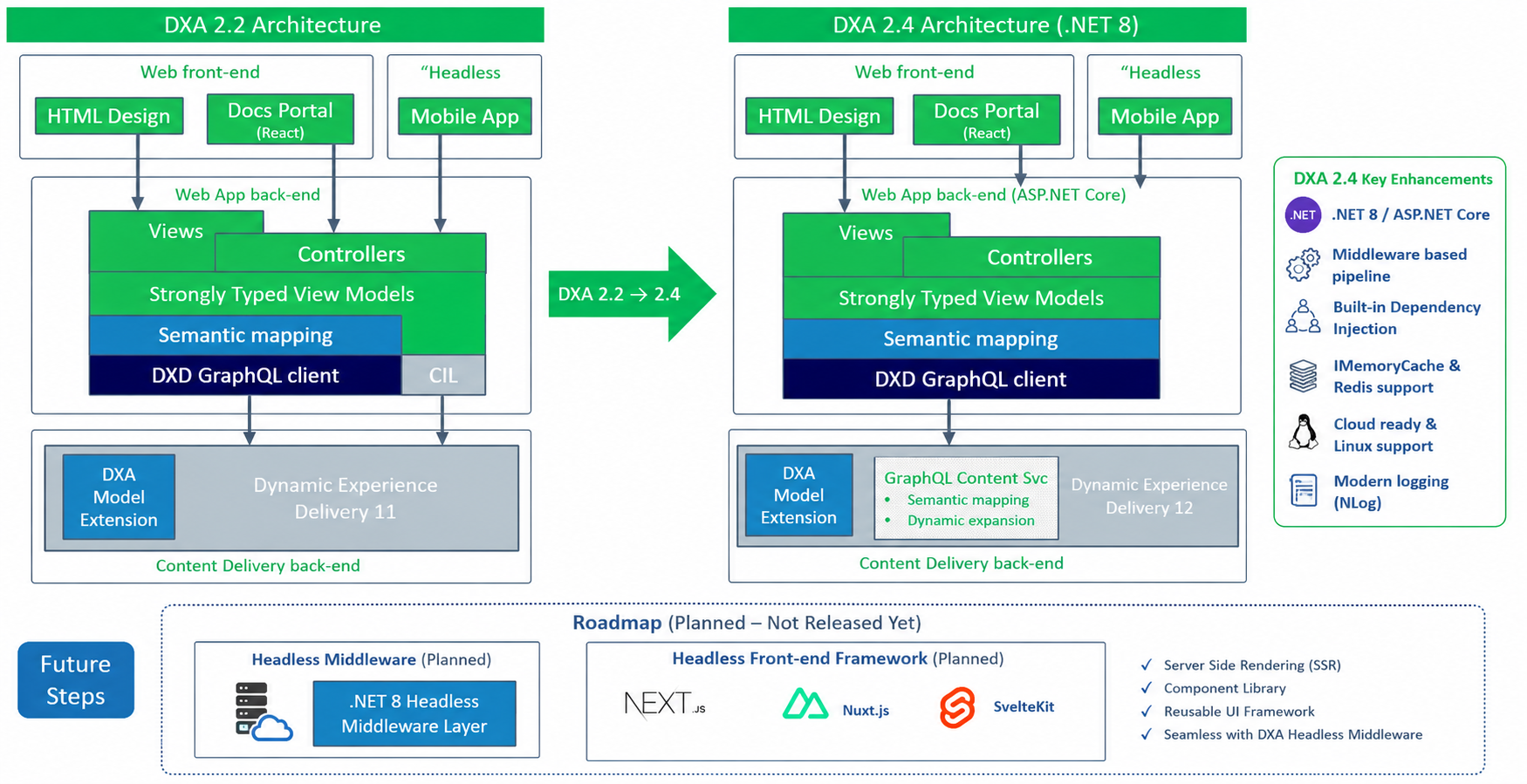
DXA 2.4 Architecture Evolution
Although DXA 2.4 modernizes the runtime stack with .NET 8 and ASP.NET Core, the overall DXA architecture and development model remain largely unchanged from DXA 2.2/2.3.
Existing concepts such as:
- Views
- Controllers
- Strongly typed View Models
- Semantic Mapping
- DXA Model Extension
continue to work in the same way.
The primary architectural changes are:
- migration to ASP.NET Core middleware
- removal of legacy CIL integration
- GraphQL Content Service enhancements
- cloud-native hosting support
The following diagram illustrates the transition from DXA 2.2 to DXA 2.4 and also highlights potential future roadmap directions for headless middleware and modern front-end frameworks.
Key Highlights
.NET 8 Support
DXA now targets net8.0 exclusively.
Support for:
- .NET Framework 4.8
- ASP.NET MVC 5
- System.Web
has been removed.
This allows DXA applications to benefit from:
- improved performance
- cross-platform hosting
- modern dependency injection
- async-first architecture
- containerization support
- cloud-native deployment models
Monorepo Consolidation
Previously, DXA components were spread across multiple repositories such as:
- dxa-web-application-dotnet
- dxa-modules
DXA 2.4 consolidates everything into a single repository:
This new structure simplifies:
- release management
- dependency alignment
- module versioning
- package publishing
New NuGet Packages
DXA 2.4 introduces updated package names under the Tridion.Dxa.* namespace.
Main packages include:
Tridion.Dxa.FrameworkTridion.Dxa.Framework.DataModelTridion.Dxa.Api.ClientTridion.Dxa.Module.CoreTridion.Dxa.Module.SearchTridion.Dxa.Module.DynamicDocumentation
This replaces the older Sdl.Web.* package model used in DXA 2.3.
ASP.NET Core Middleware Pipeline
One of the biggest architectural changes is the move from:
- HTTP Modules
- Global.asax
- System.Web pipeline
to the ASP.NET Core middleware model.
DXA is now initialized using middleware registration:
app.UseRouting();

app.UseMiddleware<ADFContextMiddleware>(
    Configuration.GetSection("AmbientConfig").Get<AmbientDataConfig>());

app.UseDxa();

app.UseEndpoints(endpoints =>
{
    endpoints.ConfigureDxaEndpoints(serviceProvider);
});
This aligns DXA with standard ASP.NET Core application design.
Dependency Injection Changes
DXA 2.3 applications typically relied on Unity configuration.
DXA 2.4 now uses the built-in ASP.NET Core dependency injection container through IServiceCollection.
Most registrations are automatically handled using:
services.AddDxa(Configuration);
Custom providers such as:
- content providers
- binary providers
- localization resolvers
- cache providers
must now be registered through DI in Startup.cs or Program.cs.
Configuration Migration
Configuration handling changes significantly in DXA 2.4.
The old:
web.configConfigurationManager.AppSettings
approach is replaced by:
appsettings.jsonIConfiguration
Example:
{
  "Dxa": {
    "Services": {
      "Discovery": "http://your-discovery-service"
    }
  }
}
This is one of the larger migration areas for existing implementations.
View Migration Changes
Several Razor view patterns require updates.
Partial Views
@await Html.PartialAsync("Partials/Teaser")
replaces:
@Html.Partial("Partials/Teaser")
Localization
FormatResource now requires an injected IStringLocalizer.
View Imports
Views\web.config is replaced by _ViewImports.cshtml.
Caching and Logging Modernization
Caching now uses:
IMemoryCacheIDistributedCache
with optional Redis support via:
services.AddStackExchangeRedisCache(...)
Logging integrates with:
Microsoft.Extensions.Logging- NLog.Extensions.Logging
- NLog.Web.AspNetCore
This makes DXA more aligned with current enterprise .NET application standards.
Breaking Changes to Consider
DXA 2.4 introduces several important breaking changes.
System.Web Removal
The following are no longer available:
HttpContext.CurrentHttpRequestHttpResponseRouteDataUrlHelper
Applications must migrate to ASP.NET Core equivalents.
Controller Changes
Controllers now inherit from:
Microsoft.AspNetCore.Mvc.Controller
instead of classic MVC controller classes.
Action return types must also migrate to:
IActionResultActionResult
WebRequestContext Updates
Static accessors such as:
WebRequestContext.IsDeveloperMode
must become:
WebRequestContext.Current.IsDeveloperMode
XO Module Not Supported
The Experience Optimization (XO) module is currently not supported in DXA 2.4.
Applications depending on XO should remain on DXA 2.3 until support becomes available.
This is a critical consideration for upgrade planning.
Migration Recommendations
Before starting the upgrade:
- inventory all custom DXA extensions
- identify
System.Webdependencies - review custom providers and Unity registrations
- validate Razor view compatibility
- assess XO module usage
Recommended migration strategy:
- Upgrade the solution to .NET 8
- Replace DXA package references
- Migrate configuration to
appsettings.json - Replace Unity with built-in DI
- Update views and controllers
- Validate middleware and routing
- Test caching, search, and localization carefully
Final Thoughts
DXA 2.4 is a significant modernization release for the Tridion ecosystem.
The move to .NET 8 provides:
- long-term platform support
- better performance
- cloud-native readiness
- container support
- simplified dependency management
- modern ASP.NET Core architecture
At the same time, teams should approach the migration as a full framework modernization effort rather than a minor upgrade.
For organizations already planning .NET modernization initiatives, DXA 2.4 provides a strong path forward.