


In Progress

Show translation version history in online editor

This is another feature we have lost transitioning from WorldServer to Trados Enterprise.

In the browser workbench of WorldServer we are able to see the version history of a translated segment and easily roll back the translation if needed. This also assist us in seeing when a quality issue may have been introduced. The TE online editor does not enable us to pinpoint where quality issues were introduced.

This also enables individuals further along the workflow to see what changes were made by editors or reviewers.
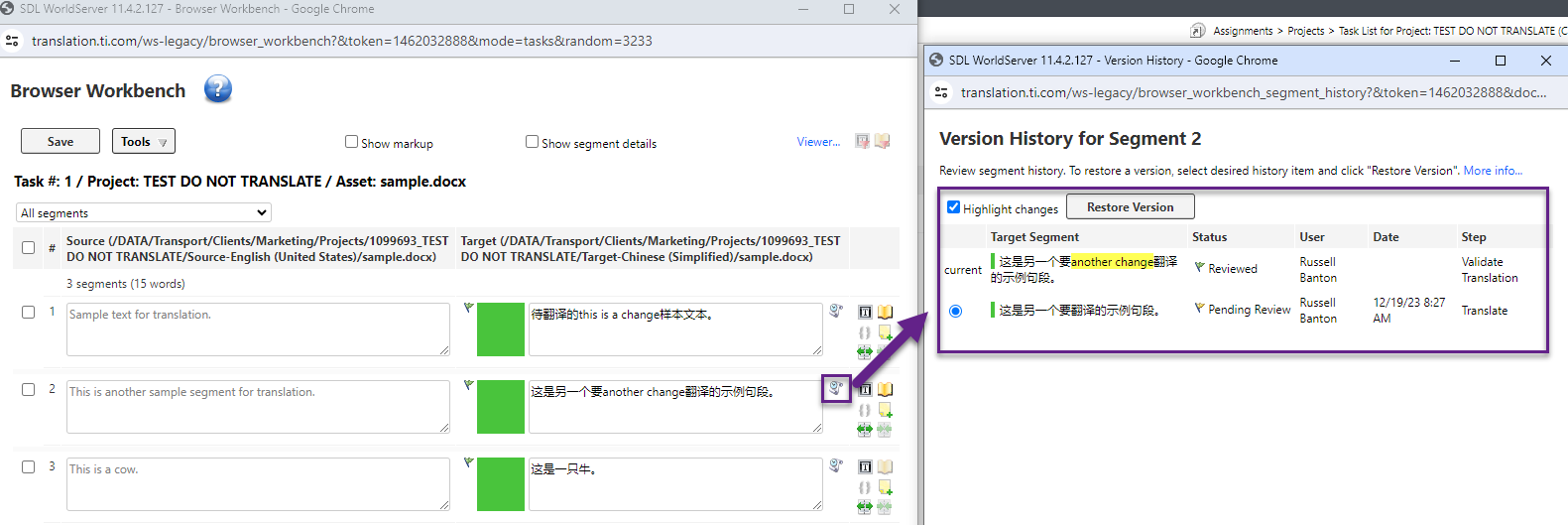
Screenshot of SDL WorldServer Browser Workbench showing a translation task with three segments. Segment 2 has Chinese characters with a change highlighted.

  • Hi Russell,

    If you enabled Tracked Changes, you would see the changes that were made by editors and reviewers, you can even force Tracked changes for certain tasks, so it can't be disabled. Have you had a chance to explore this?

    While we don't have a full history of each version displayed, we have Word-like Tracked Changes functionality currently. In future we are looking at also exposing this kind of information, but in the meantime Tracked Changes may do the trick.

    Thanks,
    Luis