Translate



Hi everyone,
Apologies if this has been asked before.
I'm having some trouble with installing the LanguageTool plugin. I followed the installation steps as shown in this video, but when I get to the part where I need to press the "Start Local LT Server" button, no window pops up, unlike in the video.
I have consulted my company's IT department, but they haven't been able to identify the issue.
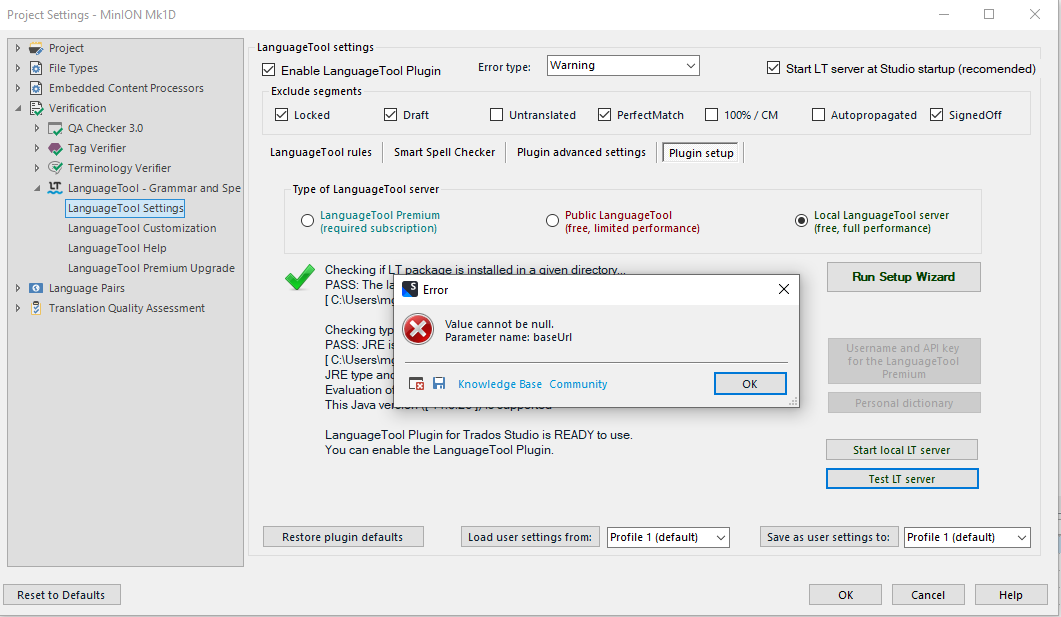
Additionally, when I press the "Test LT Server" button below, I get the error below.
Does anyone have any troubleshooting tips or suggestions for resolving this issue? Any help would be greatly appreciated.
Thanks in advance.
PS- Trados Studio 2022 SR2 - 17.2.11.19134
Language Tool - 4.0.5.2022
Marta
<SDLErrorDetails time="04/03/2025 15:38:48">
  <ErrorMessage>Value cannot be null.
Parameter name: baseUrl</ErrorMessage>
  <Exception>
    <Type>System.ArgumentNullException, mscorlib, Version=4.0.0.0, Culture=neutral, PublicKeyToken=b77a5c561934e089</Type>
    <ParamName>baseUrl</ParamName>
    <HelpLink />
    <Source>RestSharp</Source>
    <HResult>-2147467261</HResult>
    <StackTrace><![CDATA[   at RestSharp.RestClient..ctor(String baseUrl)
   at LanguageToolStudioPlugin.LanguageToolRestApiActions.LanguageToolRestApi.Languages()
   at LanguageToolStudioPlugin.LanguageToolStudioPluginUI.btnTestLTServer_Click(Object sender, EventArgs e)
   at System.Windows.Forms.Control.OnClick(EventArgs e)
   at System.Windows.Forms.Button.OnClick(EventArgs e)
   at System.Windows.Forms.Button.OnMouseUp(MouseEventArgs mevent)
   at System.Windows.Forms.Control.WmMouseUp(Message& m, MouseButtons button, Int32 clicks)
   at System.Windows.Forms.Control.WndProc(Message& m)
   at System.Windows.Forms.ButtonBase.WndProc(Message& m)
   at System.Windows.Forms.Button.WndProc(Message& m)
   at System.Windows.Forms.Control.ControlNativeWindow.OnMessage(Message& m)
   at System.Windows.Forms.Control.ControlNativeWindow.WndProc(Message& m)
   at System.Windows.Forms.NativeWindow.Callback(IntPtr hWnd, Int32 msg, IntPtr wparam, IntPtr lparam)]]></StackTrace>
  </Exception>
  <Environment>
    <ProductName>Trados Studio</ProductName>
    <ProductVersion>Studio17</ProductVersion>
    <EntryAssemblyFileVersion>17.2.11.19134</EntryAssemblyFileVersion>
    <OperatingSystem>Microsoft Windows 10 Pro</OperatingSystem>
    <ServicePack>NULL</ServicePack>
    <OperatingSystemLanguage>2057</OperatingSystemLanguage>
    <CodePage>1252</CodePage>
    <LoggedOnUser>OXFORDNANOLABS\mguerrero</LoggedOnUser>
    <DotNetFrameWork>4.0.30319.42000</DotNetFrameWork>
    <ComputerName>ONT-7FT5KR3</ComputerName>
    <ConnectedToNetwork>True</ConnectedToNetwork>
    <PhysicalMemory>16191128 MB</PhysicalMemory>
  </Environment>
</SDLErrorDetails>
Generated Image Alt-Text
[edited by: RWS Community AI at 3:52 PM (GMT 0) on 4 Mar 2025]

 \
\