
 Translate



Hello Team,
I'm trying to use the Trados Data Protection Suite app, and it is causing various errors.
Trados Studio 2024 SR1 + latest app version
When I'm using it during project creation, custom batch task sequence, Protect data in the end, no encryption just protection, I hit FInish and Studio crashes without a note or anything. When I reopen, the project is available but the source file is not prepared, not copied under the target, and all Batch tasks are unavailable - the project is unusable.
If I'm trying to use the Protect Data on a freshly created project, after selecting what to protect, when hitting Finish I get the following error, and nothing happens: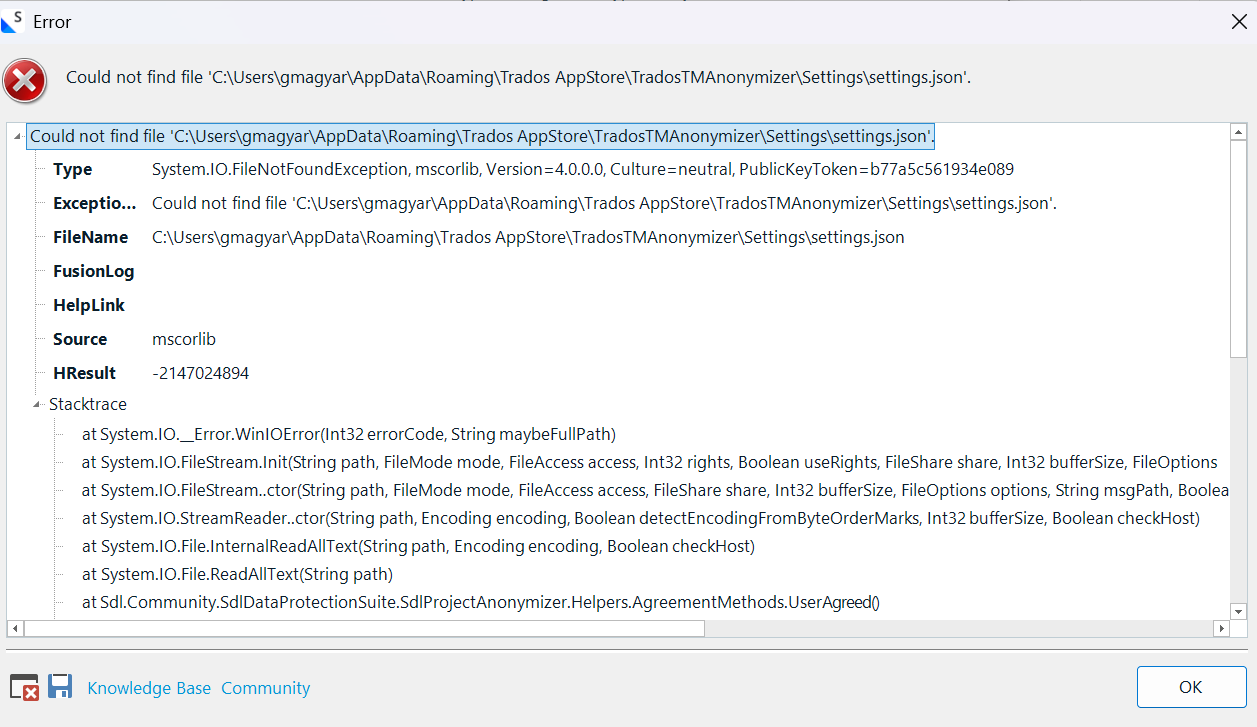
Attached is the error file (XML).
<SDLErrorDetails time="4/14/2026 4:55:59 PM">
  <ErrorMessage>Could not find file 'C:\Users\gmagyar\AppData\Roaming\Trados AppStore\TradosTMAnonymizer\Settings\settings.json'.</ErrorMessage>
  <Exception>
    <Type>System.IO.FileNotFoundException, mscorlib, Version=4.0.0.0, Culture=neutral, PublicKeyToken=b77a5c561934e089</Type>
    <ExceptionMessage>Could not find file 'C:\Users\gmagyar\AppData\Roaming\Trados AppStore\TradosTMAnonymizer\Settings\settings.json'.</ExceptionMessage>
    <FileName>C:\Users\gmagyar\AppData\Roaming\Trados AppStore\TradosTMAnonymizer\Settings\settings.json</FileName>
    <FusionLog />
    <HelpLink />
    <Source>mscorlib</Source>
    <HResult>-2147024894</HResult>
    <StackTrace><![CDATA[   at System.IO.__Error.WinIOError(Int32 errorCode, String maybeFullPath)
   at System.IO.FileStream.Init(String path, FileMode mode, FileAccess access, Int32 rights, Boolean useRights, FileShare share, Int32 bufferSize, FileOptions options, SECURITY_ATTRIBUTES secAttrs, String msgPath, Boolean bFromProxy, Boolean useLongPath, Boolean checkHost)
   at System.IO.FileStream..ctor(String path, FileMode mode, FileAccess access, FileShare share, Int32 bufferSize, FileOptions options, String msgPath, Boolean bFromProxy, Boolean useLongPath, Boolean checkHost)
   at System.IO.StreamReader..ctor(String path, Encoding encoding, Boolean detectEncodingFromByteOrderMarks, Int32 bufferSize, Boolean checkHost)
   at System.IO.File.InternalReadAllText(String path, Encoding encoding, Boolean checkHost)
   at System.IO.File.ReadAllText(String path)
   at Sdl.Community.SdlDataProtectionSuite.SdlProjectAnonymizer.Helpers.AgreementMethods.UserAgreed()
   at Sdl.Community.SdlDataProtectionSuite.SdlProjectAnonymizer.Batch_Task.AnonymizerSettingsPage.ValidateInput()
   at Sdl.TranslationStudio.ProjectManagement.Settings.AutomaticTaskSettingsPageAdapter.ValidateInput()
   at Sdl.Desktop.Platform.Implementation.Settings.AbstractSettingsHost.OnActiveSettingsPageChanging(ISettingsPageReference settingsPageReference, Boolean& cancel)
   at Sdl.Platform.UI.SettingsUIControl.OnActiveSettingsPageChanging()
   at Sdl.Platform.UI.SettingsUIControl._tree_BeforeActivate(Object sender, CancelableNodeEventArgs e)
   at Infragistics.Win.UltraWinTree.UltraTree.OnBeforeActivate(CancelableNodeEventArgs e)
   at Infragistics.Win.UltraWinTree.UltraTree.FireEvent(TreeEventIds id, EventArgs e)
   at Infragistics.Win.UltraWinTree.UltraTree.SetActiveNode(UltraTreeNode node, Boolean bringIntoView, Boolean adjustHorizontalPosition, NodeActivationReason reason)
   at Infragistics.Win.UltraWinTree.UltraTree.set_ActiveNode(UltraTreeNode value)
   at Sdl.Platform.UI.SettingsUIControl.SelectNode(UltraTreeNode node)
   at Sdl.Platform.UI.SettingsUIControl.UpdateActiveSettingsPage()
   at Sdl.Desktop.Platform.Implementation.Settings.AbstractSettingsHost.ActivateSettingsPage(String[] path)
   at Sdl.TranslationStudio.Common.BatchProcessing.New.SettingsPageWizardViewModel.EnsureInitialized()
   at Sdl.TranslationStudio.Common.BatchProcessing.New.SettingsPageWizardViewModel.Submit()
   at Sdl.Platform.UI.Wizard.Framework.Extensions.IWizardPageVmExtensions.<SubmitFullAsync>d__0.MoveNext()
--- End of stack trace from previous location where exception was thrown ---
   at System.Runtime.CompilerServices.TaskAwaiter.ThrowForNonSuccess(Task task)
   at System.Runtime.CompilerServices.TaskAwaiter.HandleNonSuccessAndDebuggerNotification(Task task)
   at Sdl.Platform.UI.Wizard.Framework.WizardWindowViewModel.<ExecuteFinishAsync>d__89.MoveNext()]]></StackTrace>
  </Exception>
  <Environment>
    <ProductName>Trados Studio</ProductName>
    <ProductVersion>Studio18</ProductVersion>
    <EntryAssemblyFileVersion>18.1.3.6657</EntryAssemblyFileVersion>
    <OperatingSystem>Microsoft Windows 11 Enterprise</OperatingSystem>
    <ServicePack>NULL</ServicePack>
    <OperatingSystemLanguage>1033</OperatingSystemLanguage>
    <CodePage>1252</CodePage>
    <LoggedOnUser>GLOBAL\gmagyar</LoggedOnUser>
    <DotNetFrameWork>4.0.30319.42000</DotNetFrameWork>
    <ComputerName>MHDBAPSPERKS01</ComputerName>
    <ConnectedToNetwork>True</ConnectedToNetwork>
    <PhysicalMemory>16191128 MB</PhysicalMemory>
  </Environment>
</SDLErrorDetails>
Indeed, the JSON file is not in the specified location, but should it be there?
Could you please advise?
Thank you!
Greta
Can you please advise?
Generated Image Alt-Text
[edited by: RWS Community AI at 3:59 PM (GMT 1) on 14 Apr 2026]


