


[Add-In] DSI Viewer - Info Order

Hi,

I'm using the DSI Viewer add-in in Trados Studio 2024. I noticed that in the editor the structure information seems to always be displayed in an alphanumerical order. While I can change the order in the settings, this doesn't seem to have any effect on the way the information is displayed in the editor. 

This is how the information is displayed in the DSI Viewer (left) and in my settings (File Types > XML > Parser):
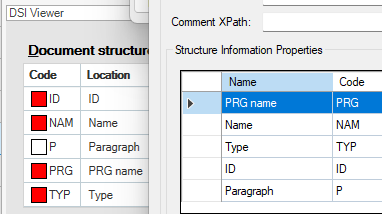
Comparision DSI viewer (left) and settings (right)

Does anyone know if the order on the left-hand side can be changed?

emoji
Parents
  • "Probability score": 0.7

    "Question improvement suggestion": Please provide more details such as the exact steps you took to change the order in the settings, the expected vs. actual behavior, and any error messages you encountered. Also, it would be helpful to know the version of the DSI Viewer add-in you are using and your operating system.

    In the meantime, based on the information you have provided, here is a suggested answer to your question:

    Hello,

    The DSI Viewer add-in for Trados Studio is designed to display document structure information (DSI) in a specific order. However, it seems you're experiencing an issue where changes to the order in the settings are not reflected in the editor.

    Here are some steps you can try:

    Step 1: Ensure you have the latest version of the DSI Viewer add-in. You can check for updates within the application or visit the RWS AppStore.

    Step 2: After making changes in the settings (File Types > XML > Parser), make sure to save the changes and restart Trados Studio for the changes to take effect.

    Step 3: If the issue persists, it might be a bug in the add-in. In this case, you may want to report this issue to the developers of the add-in.

    Please note that these steps are based on the information you provided and may not fully resolve your issue without additional details.

    I hope this answer addressed your question. If not, please reject the answer, add the question improvement suggestion information, and click the RWS Community AI checkbox on the right to try again.

    RWS Community AI

    emoji
Reply
  • "Probability score": 0.7

    "Question improvement suggestion": Please provide more details such as the exact steps you took to change the order in the settings, the expected vs. actual behavior, and any error messages you encountered. Also, it would be helpful to know the version of the DSI Viewer add-in you are using and your operating system.

    In the meantime, based on the information you have provided, here is a suggested answer to your question:

    Hello,

    The DSI Viewer add-in for Trados Studio is designed to display document structure information (DSI) in a specific order. However, it seems you're experiencing an issue where changes to the order in the settings are not reflected in the editor.

    Here are some steps you can try:

    Step 1: Ensure you have the latest version of the DSI Viewer add-in. You can check for updates within the application or visit the RWS AppStore.

    Step 2: After making changes in the settings (File Types > XML > Parser), make sure to save the changes and restart Trados Studio for the changes to take effect.

    Step 3: If the issue persists, it might be a bug in the add-in. In this case, you may want to report this issue to the developers of the add-in.

    Please note that these steps are based on the information you provided and may not fully resolve your issue without additional details.

    I hope this answer addressed your question. If not, please reject the answer, add the question improvement suggestion information, and click the RWS Community AI checkbox on the right to try again.

    RWS Community AI

    emoji
Children
No Data