Translate


Dear Trados Developers,
I wish you all the best and thanks for always catering to our needs and ideas. Trados is always my preferred CAT tool.
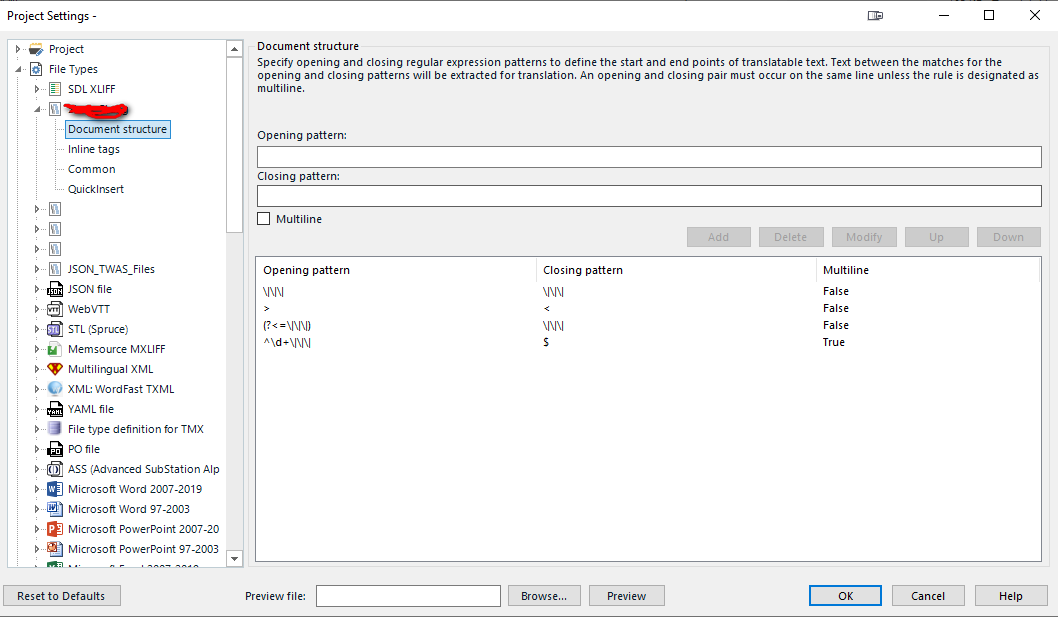
Currently, the Document Structure and Inline Tags interfaces for custom file types require users to manually input "Opening" and "Closing" patterns one by one. For complex projects—such as localized software strings or legacy proprietary formats—this process is highly manual, error-prone, and inefficient.
Proposed Solutions
1. Batch Import/Export of Structure Rules
Developers should implement an Import/Export mechanism for Regex rules.
-
Supported Formats:
.csv,.tsv, or.xlsx. -
Functionality: A simple mapping system where columns represent:
-
Opening Pattern -
Closing Pattern -
Multiline (Boolean)
-
-
Benefit: Allows power users to maintain libraries of preset rules and deploy them to new file types in seconds rather than hours.
2. Integrated Regex Validator & Tester
To reduce "Project Settings" errors that only appear after attempting to open a file, an integrated validation tool is needed within the UI.
-
Regex Engine Parity: The validator should use the same engine Trados uses at runtime (e.g., .NET Regex).
-
Real-time Feedback: A "Test" field where users can paste a sample string of code to see if their patterns correctly identify and highlight the intended translatable text or tags.
3. Syntax Highlighting & Error Catching
The input fields for Opening/Closing patterns should include basic syntax highlighting to identify unclosed parentheses, escaped characters, or invalid quantifiers before the user clicks "Add."
Technical Use Case Example
In the provided screenshot, rules such as (?<=\|\|\|) and ^\d+\|\|\| are being used. When managing dozens of such delimiters, a single typo in a manual entry can break the entire file parsing logic. Batch importing ensures consistency across different workstations and projects.