Translate


Subject: Usability Issue: Customize Ribbon Panel Display and Scroll Behavior
To: RWS Development Team (Trados Studio)
Dear RWS Team,
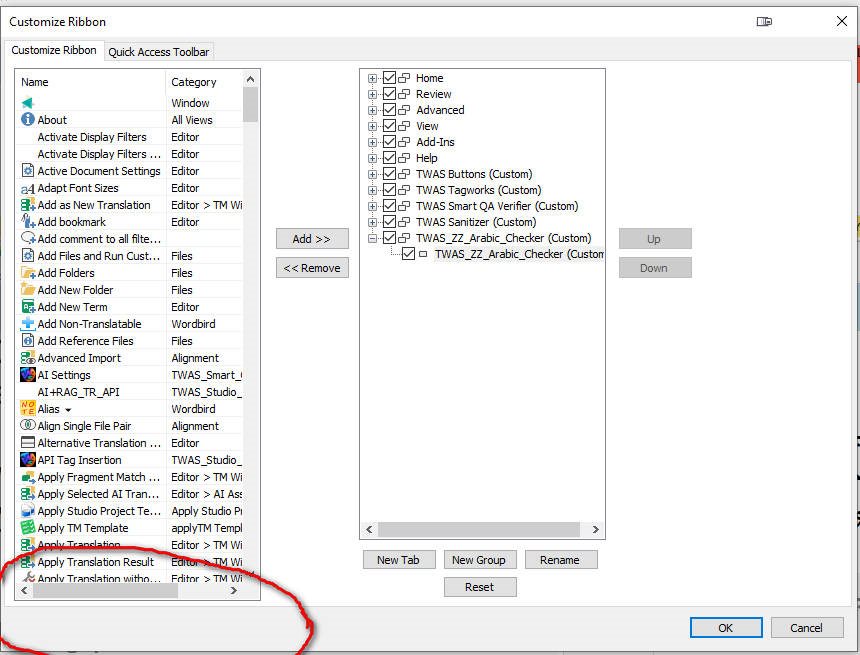
I would like to report a usability and UI issue in the Customize Ribbon dialog in Trados Studio (observed in version 2024).
Issue Description
The Customize Ribbon panel is currently too narrow and cramped, making it difficult to read item names without excessive scrolling. Even when the dialog is manually resized, the vertical scroll bar remains present inside the panel, and the resizing does not improve visibility or reduce the need for scrolling. This behavior significantly hinders usability, especially for users managing long lists of commands or multiple custom tabs.
Expected Behavior
-
The panel should have a larger default size to allow users to view more items without scrolling.
-
When the dialog is resized, the internal scroll bar should adapt or disappear if the expanded window provides enough space to display the full list.
-
The overall layout should prioritize readability and efficient navigation.
Impact
This is not a bug in terms of functionality, but a serious usability issue that affects user experience, particularly for power users who frequently customize the ribbon. Improving this interface element would align with professional usability standards and enhance productivity.
I kindly request that this be reviewed and addressed in a future update or service release.
Thank you for your continued efforts to improve Trados Studio.
Best regards,
Sameh Ragab