


Under Community Review

Search for TUs with empty custom fields

Dear RWS team

Some years ago, we introduced custom fields to our serverbased TMs. But many of our TM entries reach further back, of course, which means they lack this information.

For us, it would be useful to have the possibility to search for all these TUs to decide whether to keep or delete them.

((Nota bene: Working with complex filter is not possible because there are thousends of different values in these custom fields.))
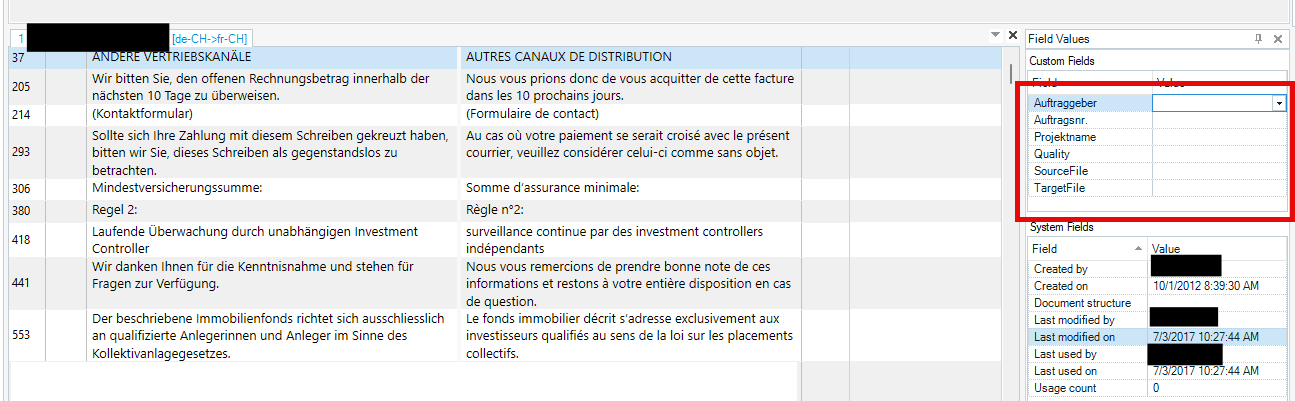
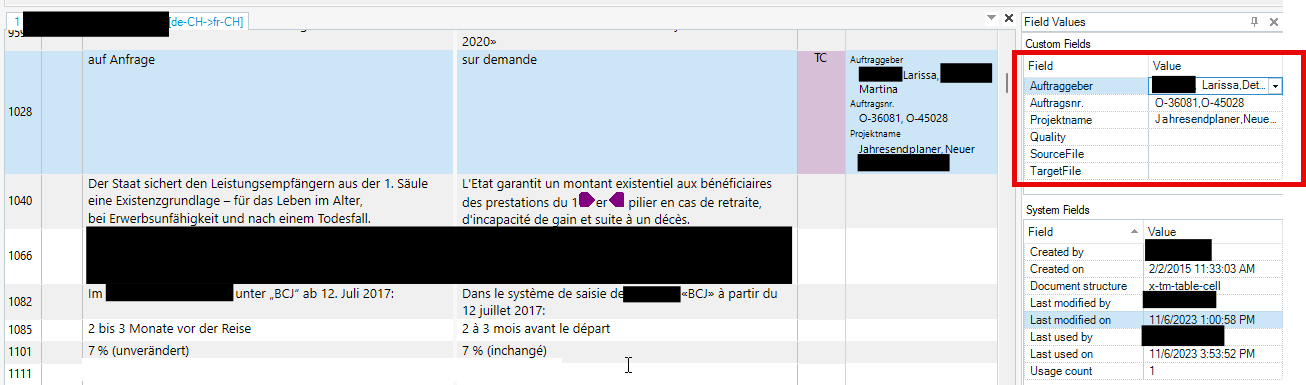
A screenshot showing a bilingual table with German and French text, alongside a 'Field Values' panel displaying custom fields such as Auftraggeber, Auftragsnr., Projektname, Quality, SourceFile, and TargetFile.A screenshot of a bilingual table with German and French text, and a 'Field Values' panel on the right showing custom fields like Auftraggeber, Auftragsnr., Projektname, Quality, SourceFile, and TargetFile.

Thank you for taking this enhancement into consideration.

Best regards

Seraina

Parents
  •  

    I think you can make it. For example:

    • Add a new client to the picklist Clients that doesn't exist. Let's say _foo.
      • The leading underscore will show it first in the list later.
      • You can delete that _foo client later.
    • Add a filter like this (my field is called Clients, yours maybe Auftraggeber):
      Example of filter
      • i.e., a filter with anything but _foo.
      • Tick the NOT checkbox.
    • Perform Search. Now only TUs with empty Clients field are shown.

    Does it work? Is this what you needed?

    I haven't played with more fields, just with one…

Comment
  •  

    I think you can make it. For example:

    • Add a new client to the picklist Clients that doesn't exist. Let's say _foo.
      • The leading underscore will show it first in the list later.
      • You can delete that _foo client later.
    • Add a filter like this (my field is called Clients, yours maybe Auftraggeber):
      Example of filter
      • i.e., a filter with anything but _foo.
      • Tick the NOT checkbox.
    • Perform Search. Now only TUs with empty Clients field are shown.

    Does it work? Is this what you needed?

    I haven't played with more fields, just with one…

Children
  • Hi  
    Thanks a lot for your reply, appreciated.

    I'm not quite sure if I followed your instructions the way I was supposed to.

    I did the following:

    1. Added the virtual client _foo to the picklist (which in reality doesn't exist)
    2. I created a filter in the TM view that says display all TUs that do not match "_foo" (screenshot 2) or do not contain "_foo" (screenshot 3)


    In my case, still plenty of TUs can be found, but not the ones with empty fields.
    Is this the way I was supposed to filter for the TUs?

    We work with a very long list of clients (Auftraggeber) and have numerous jobs (Auftragsnummer) as well as project names (Projektname) in our TM, which makes it impossible to create a complex filter for all TUs that do not contain any of this information.

    Thank you very much for your help.

    Best regards
    Seraina

  •   

    I see a diference: your filters use = or CONTAINS operators, while my filter uses the operator != (which means Not equal to). I thought your field was a picklist, so in myTM I added a simple list named Client, and as you can see I can only select Equal to or Not equal to operators:

    Add Condition dialog box showing 'Field' set to 'Client', 'Operator' dropdown with 'Equal to' and 'Not equal to' options, and an empty 'Value' field.

    Add Condition dialog box showing 'Field' set to 'Client', 'Operator' set to 'Not equal to', and 'Value' dropdown with options '_foo', 'foo', 'Client A', 'Client ABCD', and 'Client B'.

    Maybe your field is a list with multiple values…

    Anyway, can you try setting your filter as mine, with the operator != 

    If it doesn't exist, try setting a DOES NOT CONTAIN operator instead of CONTAINS.

  • I would also like to be able to search for TUs whose custom field is empty.

    As you suggested, using "NOT" may work in some cases. However, it can become quite complicated, especially when multiple conditions are combined with "AND" and "OR." I think it would be much simpler if operators such as "Empty" and "Not empty" were available, in addition to the current "Equal to" and "Not equal to." I hope these operators can be added.

    Thank you.