
 Translate



Version 4.10 introduced a number of fundamental changes to the the CCMS which are designed to support a better user experience throughout the system. Specifically, we've introduced "Partial Publishing" the first step in a more flexible publishing paradigm. We have completed essential work our Change Proposals functionality which supports authors in the full Change Proposal lifecycle. Finally, we've enable users to easily reference supplementary files within components with our new "Copy File Link" feature. For all this and more read on!
Support Folder structure changes in partial publications
In TimeArc, users can publish or publish preview of the content organized within a folder hierarchy. This flexible system allows users to publish either the entire hierarchy or select specific documents within the structure. Once published, the folder structure is replicated on the TimeArc Portal and displayed as the Table of Contents (TOC) for the relevant collection, making it easy for viewers to navigate the content.
One of the limitations of this was the need to publish the entire content set each time. With this update, the user can publish an already published document without having to publish the entire hierarchy or content set. This is TimeArc's first version of Partial Publishing. which we hope you will enjoy, there is much more to come in this area!
Please Note the following restrictions:
- The user is required to publish the full hierarchy when there are changes to the Table of Contents structure due to the actions mentioned below:
- Adding a new document/folder/supplementary file
- Replacing a File
- Moving document/folder/supplementary file
- Deleting document/folder/supplementary file
- Rename of folder/supplementary file
- Additionally, a full hierarchy publish is required for the first publish of a new release.
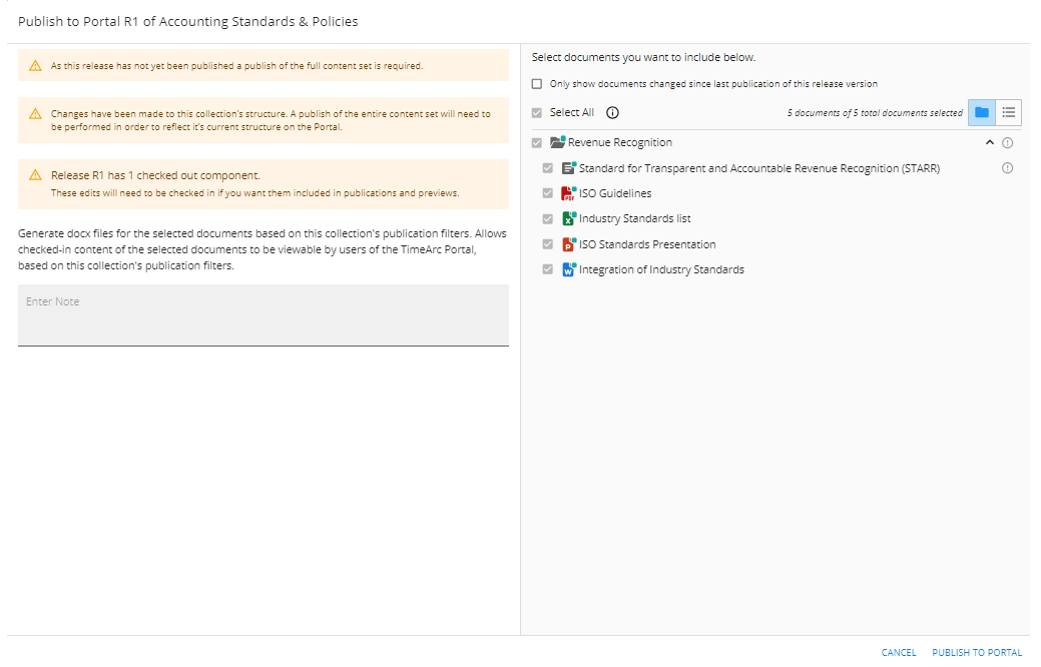
- When there are changes made to the collection’s structure, the user is displayed a notification on the Publish modal and badges are displayed on the document/folder/supplementary file which requires a full hierarchy publish (see Figure 3).
To initiate Part Publishing, select the relevant documents and folders you wish to publish as shown in the image below. Warning will appear if you are publishing content which requires a full publication or contravene the partial publication business rules.
Change Proposals: Life Cycle Completion.
Merge Change Proposals
The Merge Change Proposals feature streamlines collaboration between Portal users and CMS users, enabling efficient review and integration of user feedback into the content editorial process. In TimeArc, end users interact with drafted content in the Portal, where they can suggest edits or improvements via Change Proposals. These proposals represent potential updates to the draft version of a content set. Proposed changes are submitted to the CCMS, where content creators and managers can:
- Review the suggestions via the Change Proposals Dashboard
- Accept (merge) them using the Merge Change Proposals feature.
Once the Change Proposal is submitted on Portal, it is made available in the CCMS via the Change Proposal Dashboard. When the proposal number is selected from the dashboard, the user is displayed the Merge modal where the user can review the proposed changes component by component. The merge dialog presents the Change Proposal status on the right side.
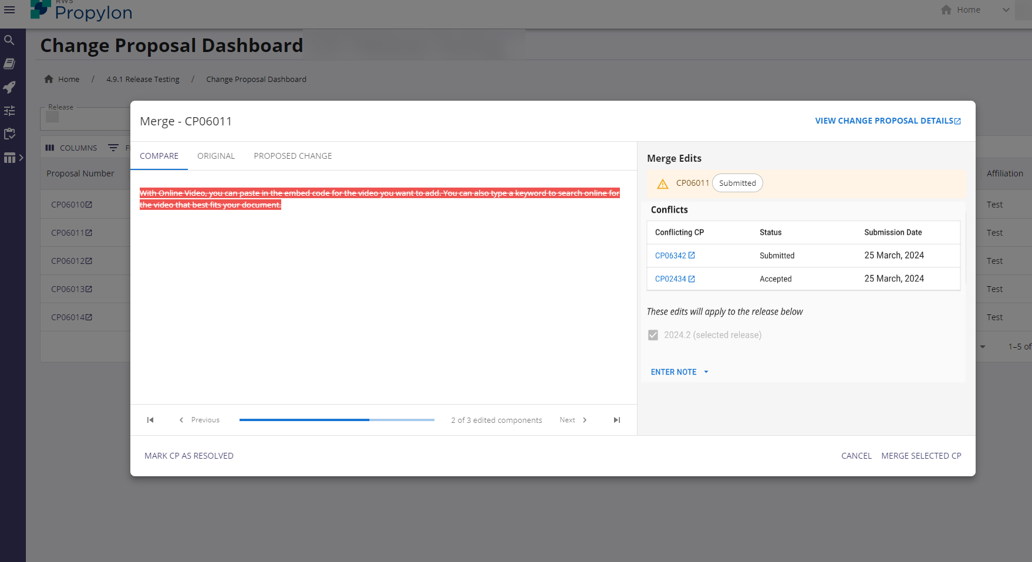
Once the proposed changes are reviewed, the user can merge the changes into the content in CCMS using the Merge Selected CP option. When a proposed change is merged, the components with changes are checked-in and a version history is recorded for this change.
Please note the following:
- Components that have no change are not updated and no version history is recorded. O
- Once a change proposal is merged, it cannot be merged again
Managing Conflicts
When a component has multiple change proposals submitted, a table is displayed to notify the user of the numbers of conflicting change proposals available on the component user is reviewing. When a change proposal with a conflict is merged, the conflicting change proposals become stale since the component with multiple change proposals has a new checked-in version in CCMS compared to draft version on which the change is propose. The stale CP cannot be merged due to this reason and user will need to manually make the changes to each component.
Similarly, when a component that is part of a change proposal and the component is in-edit and is locked by another user, the change proposal cannot be merged. When a component is an external component and is proposed with a change as part of the change proposal, the change proposal cannot be merged as external components cannot be edited in a collection.
Modified Change Proposals
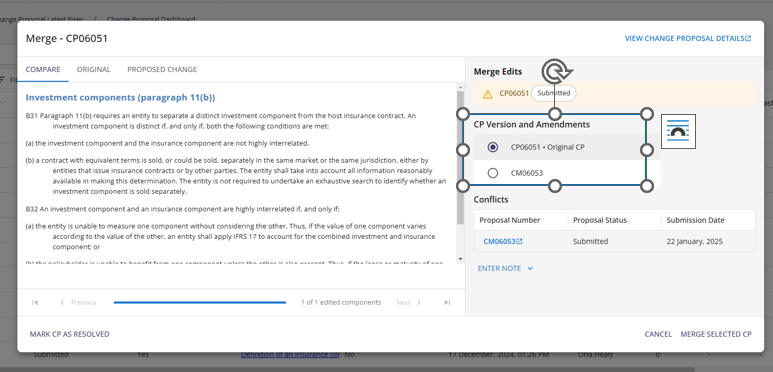
When you navigate to change proposal that includes modifications you now can toggle between the original change proposal and the modification(s) as highlighted in the screen below.
Other Update(s)
|
ISQM1 Report - Publish details |
In this update, the ISQM1 report generation functionality has been enhanced to include Publish details fields, providing users with details on when a version of the component was published, publisher name and date. This expanded functionality maintains the same easy-to-use report generation process, now with richer data for an improved user experience. |
|
Copy File Link |
The new Copy File Link functionality enables users to easily reference files within CCMS content. With this feature, users can generate a direct link to a file stored in the CCMS and insert it as a reference within component content or related content metadata. This is particularly useful for creating quick, accessible references to files without re-uploading or duplicating them. How to Use the Copy File Link Function:
Figure 1. Copy File Link option
|
|
Support for Macro enabled Office Files |
This update introduces expanded file type support in the CCMS, allowing users to upload additional office file types that include macros. With this enhancement, users can now import and add .docm (Word files with macros), .xlsm (Excel files with macros), .dotm (Word templates with macros) and .pptm (PowerPoint with macros) as supplementary files. Previously, CCMS restricted uploads to only certain file types, including .doc, .docx, .ppt, .pptx, .xls, .xlsx, and .pdf. Now, the user can also add a .txt file. This added support for macro-enabled files and .txt file enhances the system’s flexibility, enabling users to include files with advanced functionality within their content. |
|
Download File |
This update introduces a new option to download a file in its original format while viewing the supplementary file in |
Issue Log
|
Publish and Generate Preview are failing and produce "Publish Error" in the outputs table |
|
|
When numbering has been removed, the numbering is still displayed on the component |
|
|
User cannot edit a publication filter |
|
|
Intermittently, Check-In or Edit Content for multi-component editing does not work via the options button or checkboxes. |
Performance and stability improvements for multi-component editing. |
|
Content Dashboard filters and buttons are not well aligned |
|
|
Section headings being treated as additions in Merge CP modal |
|
|
Publications Filter that are not defined in publication filters page are being displayed on publish in CCMS and Portal |
|
|
‘View Metadata’ toggle was not displaying metadata values in content view |
|
|
Cannot publish a parent release where a child release has a published draft preview |
|
|
Disable component editing while reorder in progress |
|
|
User who initiated job name now available on Jobs page |
|
|
Formatting only edits saved to components |
|
Version 4.10 Patch Releases
|
4.10.1 |
System Update |
System update for staging workflow |
|
4.10.2 |
Bug |
Ensure folder path changes are reflected in cache |
|
4.10.3 |
System Update |
System update to AVRO regeneration script |
|
4.10.4 |
Bug |
Improved Error handing to conflict counts. |
|
|
System Update |
Updates to DocumentContainer initiated cache paths |
|
|
System Update |
Update to Propylon testing configuration file (YAML) |
|
|
System Update |
Update of AVRO export to support sample export request. |
|
4.10.5 |
System Update |
Additional logging added the cache sync system to identify content humbling. |
|
|
Bug |
Resolve HTML difference failure |
|
|
System Update |
Adding cache worker docker image to propylon testing |
|
|
System Updates |
YAML updates |
|
4.10.6 |
Bug |
Resolved issue with empty heading content causing HTML diff code to fail and affecting related change proposals. |
|
|
Bug |
Fix cache system ordering error caused by adjacent content updates
|
|
|
Bug |
Increase timeout on portal ingest to support improved publication stability. Timeout increased from 2 hours to 2 days.
|