
 Translate




We have just released the latest update to the Trados Language Technology platform, and we would like to share the new functionality that has been delivered.
All new features are available automatically - simply log in to Trados to start using them.
In-Layout Editor support for HTML and XML formats
(Applies to Trados Team, Accelerate and Enterprise)
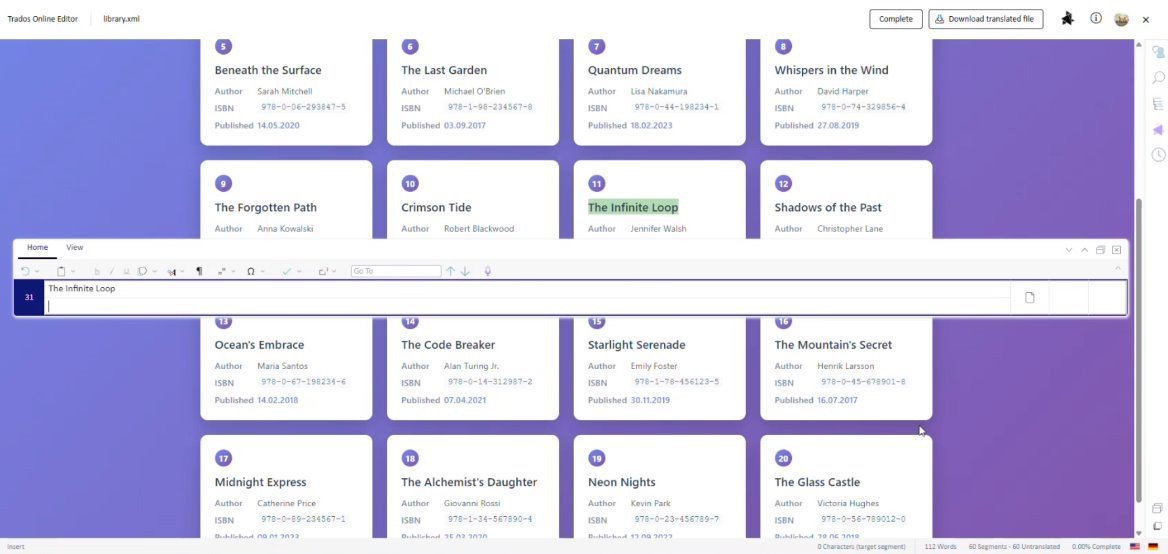
The In-Layout Editor has been extended to support HTML and XML file formats, allowing users to review and edit these files directly in a full-page, layout-based preview. This delivers a more intuitive, accurate, and in-context editing experience - particularly valuable for Subject Matter Experts.
The editor can now render HTML and XML using either native previews or project-specific custom previews, giving teams greater control over how content is displayed during translation and review.
Key details:
- HTML and XML files open in a full‑size, in‑context preview
- Support for custom HTML preview packages for improved fidelity
- XML support for single XSLT or XSLT package-based previews
- Automatically uses the top-ranked preview configuration from file type settings
- Preview updates automatically as segments are edited
- Available for Translation, Linguistic Review, Customer Review, and Implement Customer Review tasks
Edit and delete Translation Units directly in the Online Editor
(Applies to Trados Team, Accelerate and Enterprise)
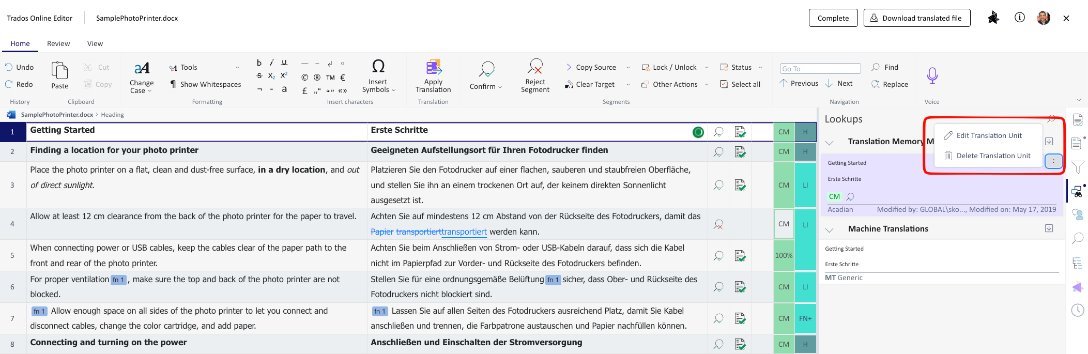
Users can now edit or delete translation units (TUs) directly from the Lookup panel in the Online Editor, enabling faster and more efficient TM maintenance without leaving the Online Editor.
Key details:
- Edit and delete options available from the TU context menu in the Lookup panel
- Supported in the Standard Online Editor layout (not available in the In-Layout Editor)
- Available across all task types
- Requires the Batch delete/edit TU permission
- Only available for updatable TMs with update rights enabled
Configure PerfectMatch before starting a project
(Applies to Trados Team, Accelerate and Enterprise)
PerfectMatch settings can now be configured for projects that have been created but not yet started - including projects created via Customer Portal or the Public API. This removes previous limitations where projects relied solely on template settings, providing greater flexibility and consistency across all project creation methods.
Benefits:
- Greater flexibility for offline projects and newly available content
- Consistent PerfectMatch behaviour across manual and API-driven projects
- Reduced friction in integrated and onboarding workflows
Extended reporting coverage for projects created at the Root and Customers level
(Applies to Trados Team, Accelerate and Enterprise)
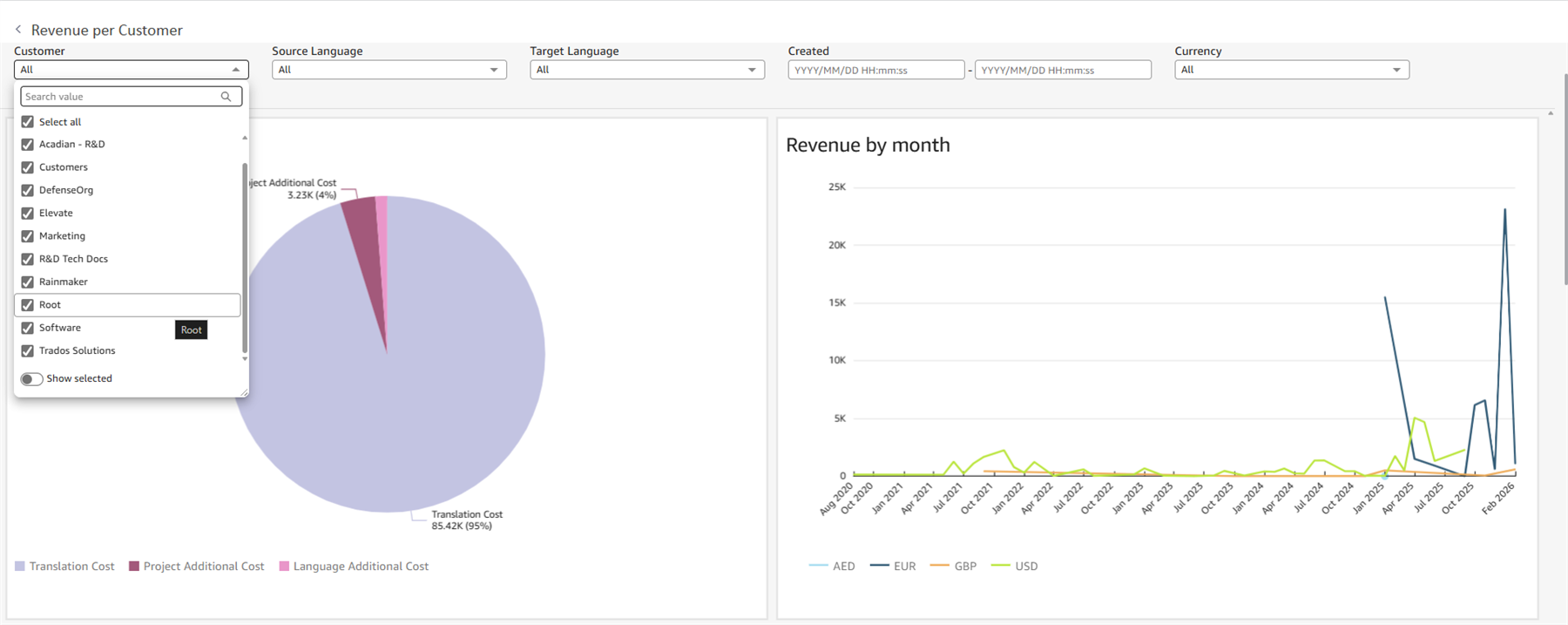
Reporting capabilities have been extended to include projects created at the “Root” and “Customers” levels. Both built‑in and custom reports now include these projects, improving visibility across your entire project hierarchy.
Translation Memory limit updates
(Applies to Trados Team, Accelerate and Enterprise)
We are now enforcing the Translation Memory (TM) limits detailed in our documentation: Platform limits across Trados offerings.
Immediately enforced limits:
- Maximum number of TMs per account
- Maximum number of language pairs per TM
- Maximum number of language pairs across all TMs
Advance Notice: 2 million Translation Unit limit per language pair
Effective June 1, 2026, a limit of 2 million Translation Units (TUs) per language pair will be enforced within a Translation Memory.
What this means:
- Language pairs exceeding 2 million TUs will no longer accept new imports
- TUs cannot be added to affected language pairs via TM Maintenance
- Project-related interactions (such as confirming TUs or updating TMs during project workflows) will continue to function normally
We strongly recommend reviewing and structuring your TMs proactively to ensure individual language pairs remain within this limit. Our Professional Services team is available to support you with TM optimisation and management best practices.
Trados API updates
This release introduces the following improvements to the Trados API:
- Extended group management capabilities. You can now Create, Update, and Delete groups. Roles and additionalRoles are now available in Get/List operations. To support this, we have introduced a new List Roles endpoint
- The available resource types returned by Get and List Custom Field Definition(s) have been extended to include vendor and vendor order template (VOT)
- Task-event payload enhancements, including apiInternalId and input. The error-task-event payload has been enhanced to include failedTask.input information
- Task events now include apiInternalId in the task details, allowing for easier identification of custom tasks
- Webhook input types expanded to include sourceFile, targetFile, languageDirection and project.
- For target files, the payload now includes a targetFile object which includes: targetFileId, fileVersionId, version, type (bcm/native), sourceFileId
- For source files, the payload now includes a targetFile object which includes: sourceFileId, fileVersionId, version, type (bcm/native)
- Various bug fixes
For full details, please visit the What’s New page.
Additional changes
- Files in completed projects can now be opened in the Online Editor
- Resolved incorrect “Sign-off Rejected” status on the first segment when opening files in the Online Editor from Customer Portal
- Fixed multiple accessibility mode issues in the Online Editor
- Resolved inconsistencies with penalty filters and Boolean custom fields in project settings
- Various bug fixes and UX enhancements to improve overall stability and user experience
We hope this post was informative, and we look forward to continuing to provide you with updates to the product.
Trados Product Management
Top Comments