 Translate



Can someone please explain how this works? I can see this in the Structure pane:
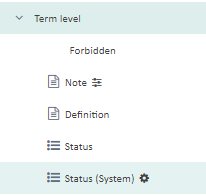
but what can I do with it?
Generated Image Alt-Text
[edited by: Trados AI at 7:29 AM (GMT 0) on 5 Mar 2024]


Can someone please explain how this works? I can see this in the Structure pane:
but what can I do with it?
Hi Mats,
Let's assume the following example: the German translation of the (good old) photo printer is "Fotodrucker". There is an older spelling of that term, which would be "Photodrucker" which is deprecated. If you want to have these two terms as synonyms but make sure that "Photodrucker" is not actively used in translations, then you can mark that synonym as forbidden. To achieve that, you can add the field "Status (System)" under the term "Photodrucker" and pick "Forbidden" as the picklist item. This will then mark the term as forbidden in the termbase.
First you pick the field at the term level:
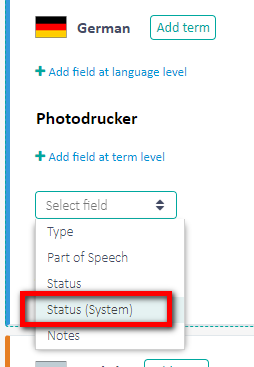
Then you confirm "Forbidden" as value:

When saving this value, you can see a "forbidden" icon next to the synonym:
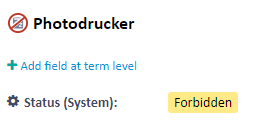
In Online Editor, this is also shown in the same way for found terms, and this forbidden synonym won't turn up in AutoSuggest, for instance, so it is filtered out.
We are working to get this logic also into Studio when working with cloud-based termbases, for instance for the forbidden term check; this is still some time off but it will of course be good to use this information both in the browser-based editor as well as in Studio down the line.
I hope this helps, best regards,
Daniel
Daniel Brockmann
Team Trados @ RWS


Hello Daniel!
It does indeed help! Very clear! And I see now that I read the Help text too hastily, getting stuck on the image. (I don't really know what I did...) Sorry for taking your time unnecessarily.
Mats

