 Translate



Hi, I've downloaded and installed Studio and MultiTerm 2019 and have access to the 30-day trial versions, but now 2019's activation code doesn't show on my Licenses list. Where can I find my activation code?
Thanks in advance.

Hi, I've downloaded and installed Studio and MultiTerm 2019 and have access to the 30-day trial versions, but now 2019's activation code doesn't show on my Licenses list. Where can I find my activation code?
Thanks in advance.
Paul Filkin | RWS
Design your own training!
You've done the courses and still need to go a little further, or still not clear?
Tell us what you need in our Community Solutions Hub


If the words 'available upgrade' appear on your account, that means there is an upgrade available. When you have processed it, the 2019 upgrade will appear.
Follow the steps given by Paul.
1. Go to your account
2. Click on Products & Plans -> Licences
3. Click on "Available Upgrades" on the left
4. Process the upgrade that is available for you in your account
All the best
Alison

Dear Gérard LAMBERT
Please do exactly the same thing. This is what you have in your account:
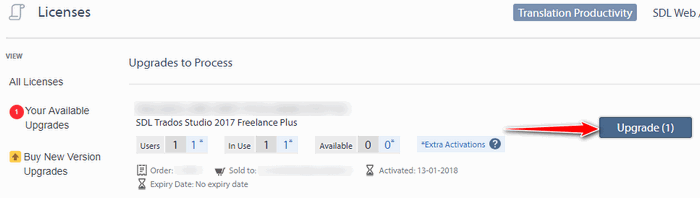
Click on upgrade.
Paul Filkin | RWS
Design your own training!
You've done the courses and still need to go a little further, or still not clear?
Tell us what you need in our Community Solutions Hub


Hello Gérard LAMBERT ,
To obtain your Studio 2019 license you must process the order correctly- When you log in to your SDL account you will see the following-
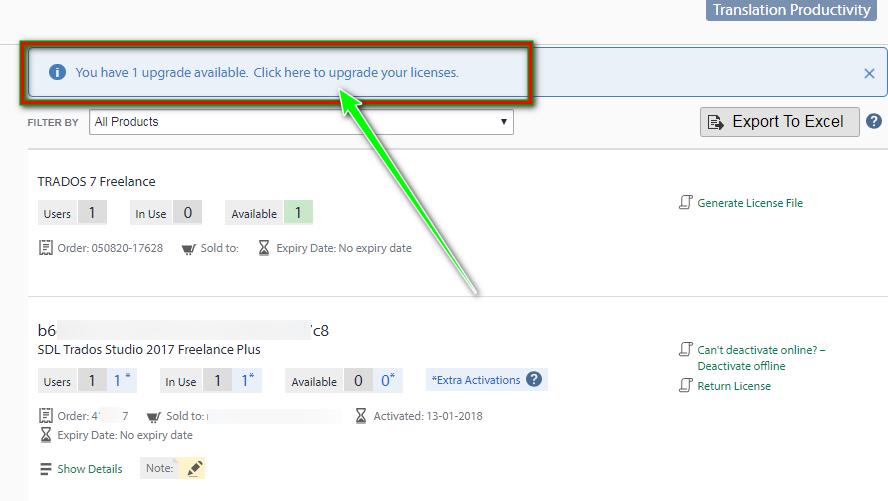
Once you click where requested you will be able to process the upgrade and then obtain the new Studio 2019 license.
Please be advised if you wish to KEEP your 2017 license as well- you must install CU12 as explained here-
https://gateway.rws.com/csm?id=kb_article_view&sysparm_article=KB0027380
Your Studio 2019 license will then run Studio 2017 as well on the same machine.
Oana Nagy | QA Engineer | RWS Group

Unknown said:Please be advised if you wish to KEEP your 2017 license as well- you must install CU12 as explained here-
I'd like to clarify this because it is misleading. When you process an upgrade you do not get to keep your 2017 licence under any circumstances. So it will always disappear from your account. CU12 for Studio 2017 provides a mechanism for Studio 2017 to read your installed 2019 licence. So you will be able to use 2017 and 2019 on the same computer just by installing and licensing Studio 2019.
Paul Filkin | RWS
Design your own training!
You've done the courses and still need to go a little further, or still not clear?
Tell us what you need in our Community Solutions Hub
Unknown said:Please be advised if you wish to KEEP your 2017 license as well- you must install CU12 as explained here-
I'd like to clarify this because it is misleading. When you process an upgrade you do not get to keep your 2017 licence under any circumstances. So it will always disappear from your account. CU12 for Studio 2017 provides a mechanism for Studio 2017 to read your installed 2019 licence. So you will be able to use 2017 and 2019 on the same computer just by installing and licensing Studio 2019.
Paul Filkin | RWS
Design your own training!
You've done the courses and still need to go a little further, or still not clear?
Tell us what you need in our Community Solutions Hub

Paul Filkin | RWS
Design your own training!
You've done the courses and still need to go a little further, or still not clear?
Tell us what you need in our Community Solutions Hub