2017 - Object reference problem with comments after update to 14.1.10018.54792

Hello,

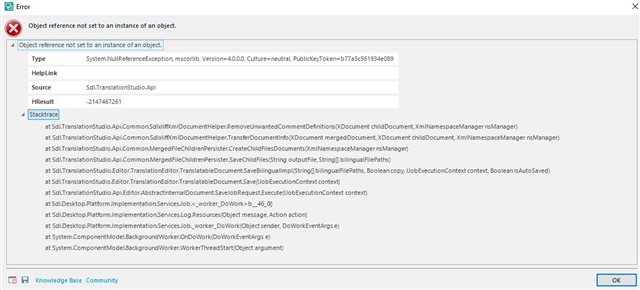
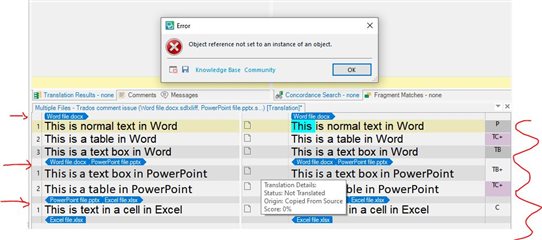
After updating my Studio 2017 to version 14.1.10018.54792 last weekend, I now get the good old "object reference not set" error message if I try to save a translation file with a comment added to the target text. So far I've only worked on DOCX files this week, some received in Studio packages and some included in local projects. The error occurs when I try to save in Studio, have not tried "Save Target" as I cannot even save the SDLXLIFF files. The error does not occur if I delete all comments from the translation.

I tried the KB for help, but could not resolve this problem nor did I see it in the Known Issues. How can I get comments to work again?

Attaching the latest stack trace below.
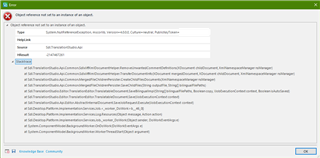
Error message in Trados Studio stating 'Object reference not set to an instance of an object' with a stack trace below.


Generated Image Alt-Text
[edited by: Trados AI at 1:31 PM (GMT 0) on 4 Mar 2024]

emoji
Parents
  • Hello,

    I have exactly the same issue. I did not notice exactly when the problem started, but I am using the same version/update as the original poster (Trados Studio 2017, version 14.1.10018.54792). I can insert a comment into a target segment, but as soon as I click save I get the "Object reference not set..." error message. If I delete the comments, I can save the file(s). The problem seems to occur irrespective of the source file format (have tried with PPT, Word and Excel - all of which I could previously add comments to with no problems at all). I also have the Comment View plug-in installed (but this was installed long before this issue started, and has never generated any problems that I am aware of).

     have you been able to resolve the issue?

    Thanks!

    Hayley

    PS. The error log details appear to be identical to those posted by TK:

    Error message in Trados Studio 2017 stating 'Object reference not set to an instance of an object.' with a stack trace listing various system and Trados Studio API calls.

    emoji


    Generated Image Alt-Text
    [edited by: Trados AI at 1:31 PM (GMT 0) on 4 Mar 2024]
Reply
  • Hello,

    I have exactly the same issue. I did not notice exactly when the problem started, but I am using the same version/update as the original poster (Trados Studio 2017, version 14.1.10018.54792). I can insert a comment into a target segment, but as soon as I click save I get the "Object reference not set..." error message. If I delete the comments, I can save the file(s). The problem seems to occur irrespective of the source file format (have tried with PPT, Word and Excel - all of which I could previously add comments to with no problems at all). I also have the Comment View plug-in installed (but this was installed long before this issue started, and has never generated any problems that I am aware of).

     have you been able to resolve the issue?

    Thanks!

    Hayley

    PS. The error log details appear to be identical to those posted by TK:

    Error message in Trados Studio 2017 stating 'Object reference not set to an instance of an object.' with a stack trace listing various system and Trados Studio API calls.

    emoji


    Generated Image Alt-Text
    [edited by: Trados AI at 1:31 PM (GMT 0) on 4 Mar 2024]
Children