


Deactivation failed

Hello there,

I just wanted to deactivate my Studio 2019 Freelancer Plus but received the following error message: "Deactivation failed. Revocation is either complete or revocation proof is already uploaded."

When restarting the application or checking status online, I can see that my license is still active. Although I am not sure whether both licences (of Plus version that I 've purchased) are available (I am also attaching a Print Screen to have a view on this one too.)
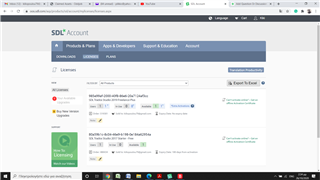
Screenshot of SDL Trados Studio account page showing active licenses with an error message 'Deactivation failed. Revocation is either complete or revocation proof is already uploaded.'

Thanks in advance and regards,


Generated Image Alt-Text
[edited by: Trados AI at 12:20 PM (GMT 0) on 4 Mar 2024]

emoji
Parents
  • Support Case Id : 00542687. Your account is showing that both activations are available to you. However if, when you start Studio, this starts without issue (is active), then there looks to be an issue. A ticket has now been logged for you so the licenses can be properly reset. Please check your SDL Community email address for updates.

    Oana Nagy | QA Engineer | RWS Group

  • Sorry for the delay in replying, but I had no time available to go through this till today. I need this to be resolved as soon as possible within the day, as I ll be using SDL a lot from now on...So, the issue at hand is: Both licences seem to be available from my Licenses account's link. When I started Studios, it started without an issue (it seems to be active)...I went to the Product Activation dialog and it gives me the option of Deactivation only....and it produces the same error message:  "Deactivation failed. Revocation is either complete or revocation proof is already uploaded."...So, I uninstalled both SDL 2019 and MultiTerm 2019, reinstalled them from scratch, but the issue persists...plus when I reinstalled SDL 2019 the SDL Trados Studio Wizard never run, so that I could configure my user settings....Could you please advise what I should do and in what order? Many thanks 

Reply
  • Sorry for the delay in replying, but I had no time available to go through this till today. I need this to be resolved as soon as possible within the day, as I ll be using SDL a lot from now on...So, the issue at hand is: Both licences seem to be available from my Licenses account's link. When I started Studios, it started without an issue (it seems to be active)...I went to the Product Activation dialog and it gives me the option of Deactivation only....and it produces the same error message:  "Deactivation failed. Revocation is either complete or revocation proof is already uploaded."...So, I uninstalled both SDL 2019 and MultiTerm 2019, reinstalled them from scratch, but the issue persists...plus when I reinstalled SDL 2019 the SDL Trados Studio Wizard never run, so that I could configure my user settings....Could you please advise what I should do and in what order? Many thanks 

Children