


Plugin Installaltion Problem

Hi. I'm a university student. I got SDL Trados Studio licence key from our university and registered an SDL account with the university email address. I wanted to download the Microsoft Azure MT Enhanced Plugin for Trados Studio on the SDL app store from this website https://appstore.sdl.com/language/app/mt-enhanced-plugin-for-trados-studio/604/ Although it says it's free to download, I couldn't successfully download it. The popup window said I don't have a license. What should I do?
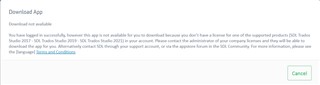
Error message on SDL App Store webpage stating 'Download not available. You have logged in successfully; however this app is not available for you to download because you don't have a license for one of the supported products: SDL Trados Studio 2017, SDL Trados Studio 2019, SDL Trados Studio 2021 or newer. Please contact the administrator of your company license and they will be able to download the app for you. Alternatively contact SDL through your support account, or visit the support forum in the SDL Community. For more information, please see the Developer's Terms and Conditions.' There is a green 'Cancel' button at the bottom.


Generated Image Alt-Text
[edited by: RWS Community AI at 11:41 PM (GMT 0) on 14 Nov 2024]

emoji