
 Translate



Hi.
Previously, I had an issue with my licence (for SDL Trados Studio 2019 Professional), so I logged a ticket to help resolve it. Someone in customer service helped me deactivate my licence, so it is now showing as "Available" on my Licences page.
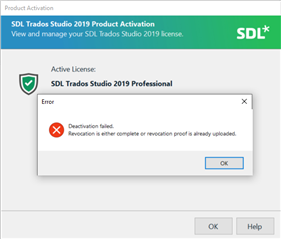
HOWEVER, when I go to Trados to try and activate it, I cannot. I get this weird error message: "Deactivation failed. Revocation is either complete or revocation proof is already uploaded."
However, I am able to use Trados WITHOUT activating my licence!!, which is very weird. My licence is showing as "Available" (and NOT "In Use" -- for "In Use" licences, I have "0"). That is, technically I am using Trados without a licence, and my licence is "suspended" in limbo.....
Please help resolve this. I need to go into my workplace tomorrow, and I will definitely have licence issues (as it's a different wifi network, I constantly have to activate/deactivate when moving from my home office to my work office, otherwise I can't work).
Also, I'm quite disappointed I can no longer log tickets for licencing issues. I run into these issues ALL the time, but at least I could get them resolved quickly with the ticketing system.... 
Thank you
Generated Image Alt-Text
[edited by: Trados AI at 2:09 PM (GMT 0) on 4 Mar 2024]



