 Translate



I just updated Trados 2021 and it stopped working!
It does not upload the files and doesn't allow to start working!
Can someone help me please?
See below. Thank you
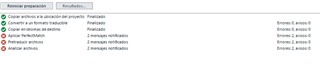
Generated Image Alt-Text
[edited by: Trados AI at 12:26 PM (GMT 0) on 4 Mar 2024]


I just updated Trados 2021 and it stopped working!
It does not upload the files and doesn't allow to start working!
Can someone help me please?
See below. Thank you


As we do not know anything more than this, start with the following steps:
BTW, you are not uploading any files anywhere–or are you really preparing a cloud project? If so, try to create local project instead.
_________________________________________________________
When asking for help here, please be as accurate as possible. Please always remember to give the exact version of product used and all possible error messages received. The better you describe your problem, the better help you will get.
Want to learn more about Trados Studio? Visit the Community Hub. Have a good idea to make Trados Studio better? Publish it here.
It seems a project template I had became corrupted. I started with a new project and did work. Tha Perfect Match feature works with my Studio version.
Thank you.

Hello! I decided to comment in here to avoid creating a duplicated topic. I've come across with the same issue. I downloaded the latest update to the Studio 2021 version 16.1.5.4270 on April 27th. I tried to create a new project but SDL Language Cloud could not apply Perfect Match. I tried different things and even reinstalled the program. However, nothing changed so I decided to open the project folder and right clicking on each one of the archives to select the option "pretranslate files". It worked so I could get the files automatically translated. Is this a consequence of an error in the latest update? Will RWS publish anything in here to let us know about any fix or will the fix appear in my notifications tab in Trados? Thanks!
Thank you Manuel. I'm sad to hear that. All of this started with the update. Pretranslating files one by one makes the process cumbersome, this is not the idea of an automated tool such as Trados Studio. Hopefully this will be fixed in the near future.
With every bigger update of Studio it is necessary to recreate the project templates. The best way is really to start with a completely fresh user profile and fresh templates, created from scratch.
_________________________________________________________
When asking for help here, please be as accurate as possible. Please always remember to give the exact version of product used and all possible error messages received. The better you describe your problem, the better help you will get.
Want to learn more about Trados Studio? Visit the Community Hub. Have a good idea to make Trados Studio better? Publish it here.
With every bigger update of Studio it is necessary to recreate the project templates. The best way is really to start with a completely fresh user profile and fresh templates, created from scratch.
_________________________________________________________
When asking for help here, please be as accurate as possible. Please always remember to give the exact version of product used and all possible error messages received. The better you describe your problem, the better help you will get.
Want to learn more about Trados Studio? Visit the Community Hub. Have a good idea to make Trados Studio better? Publish it here.