 Translate



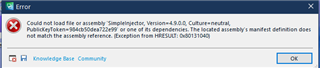
I had to reinstall an image of the previous setup.
Generated Image Alt-Text
[edited by: Trados AI at 12:40 PM (GMT 0) on 4 Mar 2024]


I had to reinstall an image of the previous setup.


Hello!
I'm having the same issue here after the latest update. Can't open Trados Studio 2021
Any tips?
This is a ridiculous situation and dreadful as one of the solution indicated when you get stuck restarting after the update is to deinstall something related to World Server, but you cannot as Trados does not restart after the suggested update???
So, if you do not have a restore point or an image of your hard drive, the solution might be to deinstall Studion and reinstall it from a saved version (if you have saved one). I am not sure about the one online available for download today)
Hi Paul,
Thanks for the prompt reply. For now, I haven't solved the problem yet, but I'll try to uninstall it and install again (with my antivirus deactivated).
Hope you manage to find a solution there.
Best regards
Marcus,
Good luck. This was not an official suggestion. I am a user that got caught as well and I saved my day by using a saved image of my hard drive (which I make a few times a week). So I lost an hour or so I should not have lost today, for what I considered a routine update, not any more.
I am surprised that no one at RWS (SDL) has jumped on yet offering some sort of help for such a critical issue that should never ever happen.
We all have client's commitment and cannot afford to lose time for that type of situation.
Hi Paul,
I totally agree with you. Updates shouldn't cost us any time more than what it takes to the software instal them.
Luckily, I haven't more jobs to deliver today, but I still can't open my Trados Studio 2021, even after reinstalling it.
If I don't find any solution until tomorrow, I'll probably have to use some free CAT tool until the problem is solved. I hope it won't be necessary.
Thanks for the answers and attention.
Have a nice day!
Hey Paul, just to inform, I managed to solve the issue following the "Knowledge Base" solution that was shown in the error window:
https://gateway.rws.com/csm?id=kb_article_view&sysparm_article=KB0037729
As it seems we had the same error, maybe it also works with you.
Kind regards!
Hey Paul, just to inform, I managed to solve the issue following the "Knowledge Base" solution that was shown in the error window:
https://gateway.rws.com/csm?id=kb_article_view&sysparm_article=KB0037729
As it seems we had the same error, maybe it also works with you.
Kind regards!
Great. I also found this link after trying to install the update on my backup computer, which failed as well after install.
I wonder why it was done that way and how many people got caught?
Oh, that's nice. Great that is also working with other people, I was afraid it was a 'specific solution'.
Yeah, no idea of why the update brought that. Hope that it doesn't delay/complicate other people workflow.