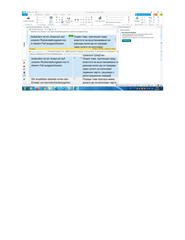
Fehlermeldung: Keine Internetverbindung

Screenshot of Trados Studio showing an error message 'No Internet connection' in a dialog box, preventing the use of Trados Live machine translation.DOCX

Hallo, Ich habe folgendes Problem bei meinem zweiten PC:

Es erschent die Fehlermeldung "Keine Inyternetverbindung" und ich kann die Maschine Translation (den Trados Live) nicht nutzen.

Koennten Sie mir bitte ein Hinweis geben, wie ich dieser Fehler beheben kann?

Vielen Dank im Voraus!

Ivo Rachev


Generated Image Alt-Text
[edited by: Trados AI at 2:05 PM (GMT 0) on 4 Mar 2024]

emoji
  • I answered you above "A HP database is a very normal online database my customer Hewlett Packard is giving us for working on their files.". It is a terminology database I connect to, when they send jobs. It is a terminology server I connect to. I don't know how else I can explain. That's a function in  Trados, and I also sent you a picture. Where do you see a TM there? TERMINOLOGY DATABASE. And yes, it is a groupshare server, see attachment. It doesn't let me connect. The connection is blocked. And I don't know why. Switching to Win 10 didn't help. And so far I was under the impression a TM is a TM, and a database is a database. That's at least what Trados is calling it. Translation memory. At least in German they call it this way. See attachment.

    No, the problem is not on customer side, because it works with Trados 2019. It doesn't work with Trados 2021 either. Like I said I switched to Win10 to avoid the TLS 1.2 problem, but it didn't help anything. It was still not connecting.

    emoji
  •  

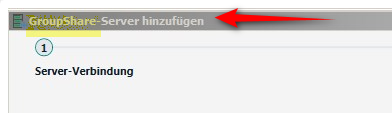
    ok - now you're providing a bit more helpful information.  Your last screenshot clearly shows you are connecting to GroupShare. So your "HP Database" is on a Groupshare server which means it's essentially a server based version of MultiTerm:

    Screenshot showing the option to add a GroupShare server in Trados Studio with a red arrow pointing to it.

    This KB is what you need to understand first of all:

    https://gateway.sdl.com/apex/communityknowledge?articleName=000001175

    If your client is using GroupShare 2015 or even 2014 then you would have been able to connect to it with Trados Studio 2019.  But neither Trados Studio 2021 or 2022 will work with that version of GroupShare.  So, the first thing you need to do is find out from your customer what version of GroupShare they are using.  When we know that we will know one of two things:

    1. if you have no option but keep working with 2019 for this customer, in which case we can discuss how we could support you in this endeavour or your client may be able to provide you with a licence for when you're working with them, or they may be able to provide you with an offline termbase for your projects with them; or
    2. there is a problem we need to resolve if they are working with GroupShare 2017 or 2020

    The latter could be a problem you have created by not upgrading your version of MultiTerm as well when you upgraded to 2022, but we will only know this when we know for sure what version of GroupShare your customer is working with.

    Paul Filkin | RWS

    Design your own training!
    You've done the courses and still need to go a little further, or still not clear? 
    Tell us what you need in our Community Solutions Hub

    emoji


    Generated Image Alt-Text
    [edited by: Trados AI at 2:05 PM (GMT 0) on 4 Mar 2024]
  •  

    And so far I was under the impression a TM is a TM, and a database is a database. That's at least what Trados is calling it.

    Then let's try and talk about the same things. A Translation Memory is a Translation Memory, but a database is nothing more than an organised collection of data stored and accessed electronically which could also be a Translation Memory.

    You are getting confused with "Termbase" which is a database that holds terminology.  In English we refer to this as a "Termbase" and in German we probably refer to this as a "Terminologiedatenbank".

    The interface you showed on your original screenshot showed the place where you can add a Terminology resource which could be a MultiTerm termbase, a GroupShare online termbase, a Cloud termbase or some custom plugin that you might have installed.  So when you keep referring to an "HP Database" you are clearly unknowingly providing no information to help at all.

    I'm absolutely sure it's all very clear to you, but that's because you are not aware of what is possible and so your answer didn't help at all.

    Paul Filkin | RWS

    Design your own training!
    You've done the courses and still need to go a little further, or still not clear? 
    Tell us what you need in our Community Solutions Hub

    emoji
  • Ok, I talked to the Customer and we solved the problem. They updated something on their site and it works now. So the "Message: No Internet connection" doesn't really matter, at least to me. Thank you very much for your efforts, Paul. And sorry again for being rude. Not my week.

    emoji