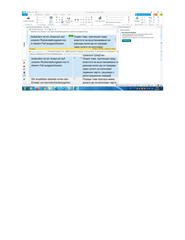
Fehlermeldung: Keine Internetverbindung

Screenshot of Trados Studio showing an error message 'No Internet connection' in a dialog box, preventing the use of Trados Live machine translation.DOCX

Hallo, Ich habe folgendes Problem bei meinem zweiten PC:

Es erschent die Fehlermeldung "Keine Inyternetverbindung" und ich kann die Maschine Translation (den Trados Live) nicht nutzen.

Koennten Sie mir bitte ein Hinweis geben, wie ich dieser Fehler beheben kann?

Vielen Dank im Voraus!

Ivo Rachev


Generated Image Alt-Text
[edited by: Trados AI at 2:05 PM (GMT 0) on 4 Mar 2024]

emoji
Parents
  • Hello ,

    This is most likely due to the AV and/or Ports configurations on the PC-

    The following articles should help you resolve this.

    https://gateway.rws.com/csm?id=kb_article_view&sysparm_article=KB0034866

    https://gateway.rws.com/csm?id=kb_article_view&sysparm_article=KB0040151

    Please let us know if this helps.

    Oana Nagy | QA Engineer | RWS Group

  • Sorry, that's BS. Name me one person where this worked. My Router is automatically opening ports. And all previous versions I had no problem. Support is not writing back. Do you only help people who have a support contract? I want my money back, folks.

    emoji
  • There are many threads about this subject and nothing helped. I found out now, that Trados needs TLS 1.2. I tried installing WIN 10. And the message was gong. But I still couldn't connect to my HP databases. But I need to. How can I get my money back and switch back to 2019? Or I will lose my customer.

    emoji
  • AND there are many other bugs in version 2022. Worst version so far for me.

    emoji
  •   

    I'm glad you found the reason for your problem.  It doesn't mean the solution Lydia provided for the customer originally posting their question was incorrect.  Although looking at the screenshot the operating system is old so it is likely to be the same issue as you had.

    I found out now, that Trados needs TLS 1.2.

    You make it sound as though you believe this is a fault of Trados!  TLS 1.2 is crucial for software applications due to its strong encryption and authentication mechanisms that secure data transmission, compliance with industry standards and regulations, seamless compatibility with various systems, and mitigation of vulnerabilities present in older versions of the protocol.  It ensures data security, protects sensitive information, meets compliance requirements, enables interoperability, and safeguards against potential attacks.

    If you needed this then the most likely reason is you were working with an out of date and probably unsupported operating system.  Older operating systems may not have built-in support for TLS 1.2 or may have outdated libraries or protocols that are incompatible with TLS 1.2.  As a result, the software relying on TLS 1.2 may encounter compatibility issues or fail to establish secure connections with servers, leading to operational failures.  In such cases, upgrading the operating system is probably necessary to ensure proper functionality.  Frankly continuing to work with business critical solutions on old unsupported operating systems isn't very sensible.

    I tried installing WIN 10. And the message was gong.

    Makes sense.

    But I still couldn't connect to my HP databases. But I need to.

    How about you explain something about this problem then?  Your questions are not helpful and just promote more questions that frustrates you... and me because I can't give you a better reply.

    What is an HP database?  Are you working with a plugin that connects Trados Studio to some database we don't know about?  If you are then that plugin will 100% need to be updated to work with a later version of Trados Studio.  I also know we do not have any plugins for translation memories on the appstore so if this is what it is then you will have to speak to whoever provided it.

    How can I get my money back and switch back to 2019? Or I will lose my customer.

    We might not be able to switch you back as 2019 isn't supported anymore.  But we may be able to do something to help buy you some time while you explain your problems properly so we can help.  I can't involve support unless you create a new thread as I already asked you.  So that one is on you.  In the meantime I'll see what we can do wrt 2019.

    Paul Filkin | RWS

    Design your own training!
    You've done the courses and still need to go a little further, or still not clear? 
    Tell us what you need in our Community Solutions Hub

    emoji
  • You are right. A HP database is a very normal online database my customer Hewlett Packard is giving us for working on their files. I can't connect to it anymore. And I was also not able to do it, under Win 10. My PC is too slow for Win 10 anyway and does not contain any hardware, which needs Win 10. Sorry, for my rude tone, I was stressed. I apologize. The weird thing is, I can use MT without problems and connect to the Cloud as well (under Win7).

    emoji
  •  

    From your screenshot this is a terminology database, not a translation memory.  Is this a MultiTerm online solution and not a custom plugin of some sort?  Did you also update MultiTerm when you installed Trados Studio 2022?

    Is your customer using Multiterm and if so what version?  Maybe they are using GroupShare?  There seems to still be a lot of information you are not telling us and we need to know this to be able to help you properly.

    In the meantime I've bought you a little time to take the pressure off... check your emails.  But when you can provide more information around your situation we should be better able to assist you.

    Paul Filkin | RWS

    Design your own training!
    You've done the courses and still need to go a little further, or still not clear? 
    Tell us what you need in our Community Solutions Hub

    emoji
  • Yes, that's what I said "HP Database" not TM. I am not the technical initiator of this database and have no clue how it is setup or whatever. Why should I? I updated Multiterm to 2022. But the problem ist the connection, I can't connect to it through port 443. But I can connect to MT Deepl and Google Translate and to the SDL account. I don't know if they use GroupShare. What difference would it make? The program is also crashing everytime I get into the last step of a  job creation. It has nothing to to with the Multiterm version, the connection to the internet is not there with Multiterm. It stil says no internet connection.

    emoji
  •   

     What does HP database mean? I’m not a mind reader! A TM is a database and so is a termbase. You should probably ask your customer for help.

    Why should I?

    Well… you’re using some resource that doesn’t seem to be ours. Seems reasonable that you’d at least have a passing interest in the technology you are connecting to. 

    I can't connect to it through port 443. But I can connect to MT Deepl and Google Translate and to the SDL account. I don't know if they use GroupShare. What difference would it make

    It would at least tell us what you are using. You have come in here asking for help. All we know so far is that you are connecting to some terminology solution you call an HP database, it doesn’t appear to be anything that belongs to Trados, you say you can connect to several things that do use our technology and we actually developed. How are we supposed to help you to connect to some unknown solution that won’t work?

    I suggest you speak to your client. I have no idea how to help you. Perhaps they can tell you what you have and what you’re connecting to.

    I have given you a 2019 version for a period of time so you can figure out what you’re working with and determine what’s needed to make it all work with 2022.

    Paul Filkin | RWS

    Design your own training!
    You've done the courses and still need to go a little further, or still not clear? 
    Tell us what you need in our Community Solutions Hub

    emoji
  • I answered you above "A HP database is a very normal online database my customer Hewlett Packard is giving us for working on their files.". It is a terminology database I connect to, when they send jobs. It is a terminology server I connect to. I don't know how else I can explain. That's a function in  Trados, and I also sent you a picture. Where do you see a TM there? TERMINOLOGY DATABASE. And yes, it is a groupshare server, see attachment. It doesn't let me connect. The connection is blocked. And I don't know why. Switching to Win 10 didn't help. And so far I was under the impression a TM is a TM, and a database is a database. That's at least what Trados is calling it. Translation memory. At least in German they call it this way. See attachment.

    No, the problem is not on customer side, because it works with Trados 2019. It doesn't work with Trados 2021 either. Like I said I switched to Win10 to avoid the TLS 1.2 problem, but it didn't help anything. It was still not connecting.

    emoji
  •  

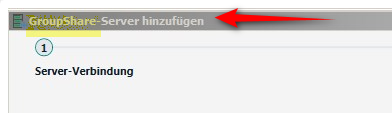
    ok - now you're providing a bit more helpful information.  Your last screenshot clearly shows you are connecting to GroupShare. So your "HP Database" is on a Groupshare server which means it's essentially a server based version of MultiTerm:

    Screenshot showing the option to add a GroupShare server in Trados Studio with a red arrow pointing to it.

    This KB is what you need to understand first of all:

    https://gateway.sdl.com/apex/communityknowledge?articleName=000001175

    If your client is using GroupShare 2015 or even 2014 then you would have been able to connect to it with Trados Studio 2019.  But neither Trados Studio 2021 or 2022 will work with that version of GroupShare.  So, the first thing you need to do is find out from your customer what version of GroupShare they are using.  When we know that we will know one of two things:

    1. if you have no option but keep working with 2019 for this customer, in which case we can discuss how we could support you in this endeavour or your client may be able to provide you with a licence for when you're working with them, or they may be able to provide you with an offline termbase for your projects with them; or
    2. there is a problem we need to resolve if they are working with GroupShare 2017 or 2020

    The latter could be a problem you have created by not upgrading your version of MultiTerm as well when you upgraded to 2022, but we will only know this when we know for sure what version of GroupShare your customer is working with.

    Paul Filkin | RWS

    Design your own training!
    You've done the courses and still need to go a little further, or still not clear? 
    Tell us what you need in our Community Solutions Hub

    emoji


    Generated Image Alt-Text
    [edited by: Trados AI at 2:05 PM (GMT 0) on 4 Mar 2024]
Reply Children
No Data