
 Translate



Hello,
I am having an issue with SDL Trados 2014 on an user’s computer.
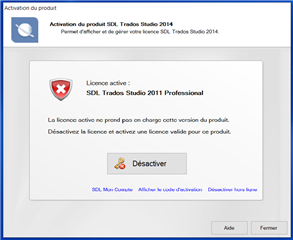
It reads that a license for Trados 2011 is still active on this computer, and needs to be returned, but I am positive that we never installed a license for Trados 2011 on this one; we do not even have a key for 2011, only 2014 (we use SDL Trados Studio 2014 Professional Network SN, for the record).
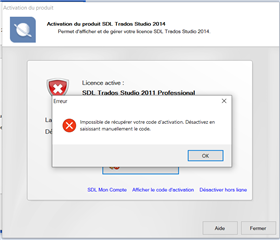
When I click on ‘deactivate’, I get the following error message (translated from French): ‘Unable to retrieve your activation code. Deactivate by manually entering the code.’
But as mentioned above, we do not have such a code…
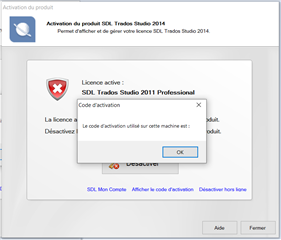
When I click on ‘View activation code’ below, a textbox opens and says ‘The activation code used on this machine is:...’ but without an actual number communicated.
Please kindly let me know how I can solve the issue, maybe by ‘force-deactivating’ the code or something similar?
I have tried to deinstall Trados 2014 and install it again on the user’s computer, but it does not fix the problem.
Let me know if you need further information.
Thank you very much in advance for your help.
Kind regards,
Clément
PS : screenshots below (in French) with the subsequent error messages
Generated Image Alt-Text
[edited by: Trados AI at 12:52 PM (GMT 0) on 4 Mar 2024]

