
 Translate



Kindly refer this matter to Lulia Dinca as a follow-up ticket.
This is related to moving our Passolo Server from a physical machine to an AWS instance. After making the move we have users who cannot connect to the server.
All of our users are on the same 10.20.0.0 subnet which has been allowed for inbound connection on our Passolo License Server. We previously had an issue whereby no users could connect to the license server, however we could manage to get a connection from a Passolo client following this guide https://can01.safelinks.protection.outlook.com/?url=https%3A%2F%2Fgateway.sdl.com%2Fapex%2Fcommunityknowledge%3FarticleName%3DCannot-connect-to-license-server-after-installing-Windows-updates-from-June-14-2016-KB3161949&data=05%7C01%7Cchittesh.sham%40corel.com%7Ccf009ff3a4e44237f5df08da65e28e33%7C33874721dd774b7e97b7863c2cbe7c73%7C1%7C0%7C637934320973346797%7CUnknown%7CTWFpbGZsb3d8eyJWIjoiMC4wLjAwMDAiLCJQIjoiV2luMzIiLCJBTiI6Ik1haWwiLCJXVCI6Mn0%3D%7C3000%7C%7C%7C&sdata=xUBirp8AlMDT3Iv0qPTVXg%2BbzSyRGhAvyZ%2F7F6Kmjt4%3D&reserved=0
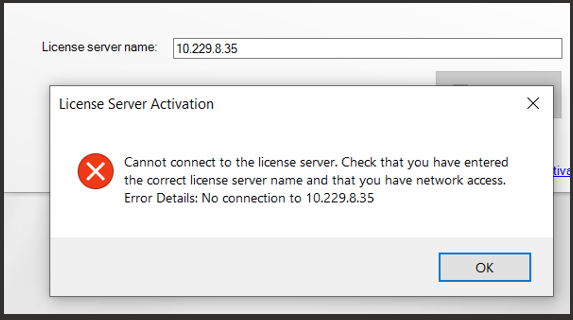
BUT there are still a couple of users experiencing “No Connection to ” error connection issues:
We tried to rule out it being network related issues by replicating the issue from one of our windows machines:
From our end we:
- RDP’d in 3 separate windows server on the same subnet (10.20.0.0) and installed Passolo client to try to connect to the Passolo server (10.229.8.35)
Results (OK:- is for could connect to Passolo license server):
ott-comsrv (10.20.6.70) OK
ott-rd-builder2 (10.20.7.208) NOK
ott-rd-builder7 (10.20.6.120) OK
Findings
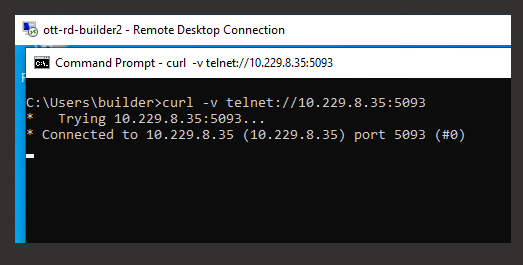
ott-rd-builder2 can connect to port 5093 of the passolo server (10.229.8.35)
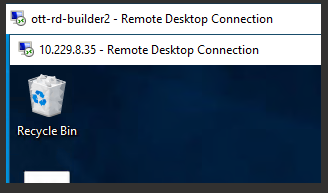
Ott-rd-builder2 could also rdp in the Passolo server
We even did a clean reinstall of SDL Passolo client, (remove appdata + clean registry) However we were still getting No connection error msg:
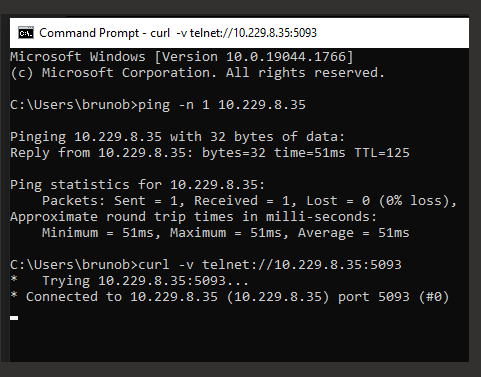
This screenshot is from 1 of our user who couldn’t connect
Generated Image Alt-Text
[edited by: Trados AI at 1:26 PM (GMT 0) on 4 Mar 2024]


