 Translate



Hello. Our translation memories are constantly hanging up.
They are stored on a separate server. 6 people have access to them.
Could you help us with this issue?


Hello. Our translation memories are constantly hanging up.
They are stored on a separate server. 6 people have access to them.
Could you help us with this issue?
Dear Yerkinoy Yerkinova
Can you please give us some more details.
Are you referring (1) to file-based TMs stored on a shared folder on a file server or (2) to TMs managed on a GroupShare server?
And what do you mean by 'hanging up'? Do you lose connection to them or do they react slowly or ....?
Walter


Hello Walter. Thanks for your reply. We refer to file-based TMs stored on a shared folder on a file server. We do not know exactly whether we lose connection or they react slowly. When the translation memory hangs, the segment is not confirmed for a long time, it is not entered and saved.


Hi Yerkinoy Yerkinova
How is your connection to the file server? Is it onsite in the same LAN as the workstations or is it connected via WAN?
Please be aware that working with several users simultaneously on file-based TMs is limited. Usually, about 5 users are the limit.
But the bad response time might also be due to the delay in the connection.
The connection from a PC to a file server uses the SMB protocol, which works fine inside a LAN, but not if your server is connected to your site via the Internet.
Please also give this KB article a look: Sharing Trados Studio Translation Memories and Termbases On A Network (sdl.com)

Hello Walter. Our Internet speed is 1000/1000 (Mbps). The file server is located on the local network. Workstations and the network uses the SMB protocol.
HI
OK, in this case we can exclude the protocol problem I mentioned.
There are many possible reasons for this: the size of the TMs, their state (are they regularly reorganized?), the load on the server and last but not least the number of Studio clients accessing it (refer to the KB article I mentioned).
You may also discuss this with your IT as it may also be related to heavy load on your file server.
Hello Walter. The size of our TMs is 493 MB. The server is not loaded. 5 people have access to it. Could you show us how to reorganize TMs? We don't know how to do it on new versions.
Once you opened a TM in the Translation Memories view, it looks like this:
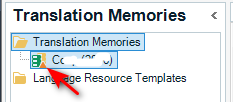
If you see a tiny orange triangle as shown in above screenshot, it means that your TM needs updating.
In that case, right-click on the TM name and select 'Upgrade Translation Memory':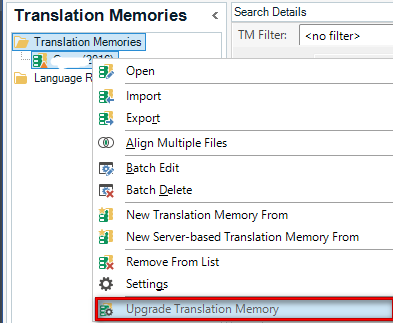
This will launch the upgrade process, which consists of several steps. This is mainly meant for TMs that have fragment matching enabled (which I assume is the case for you).
Alternatively, you may go into the TMs settings, under 'Performance and Tuning' and simply select one or both of the highlighted functions: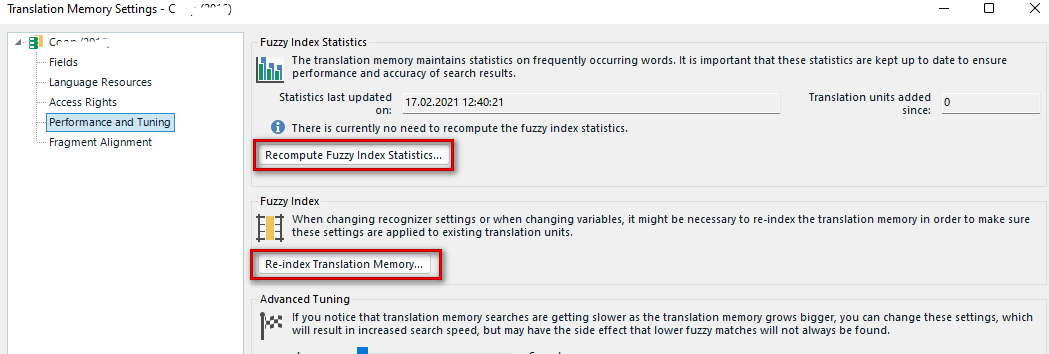

Once you opened a TM in the Translation Memories view, it looks like this:
If you see a tiny orange triangle as shown in above screenshot, it means that your TM needs updating.
In that case, right-click on the TM name and select 'Upgrade Translation Memory':
This will launch the upgrade process, which consists of several steps. This is mainly meant for TMs that have fragment matching enabled (which I assume is the case for you).
Alternatively, you may go into the TMs settings, under 'Performance and Tuning' and simply select one or both of the highlighted functions:
Hello Walter. We upgraded our translation memories. Our computers are very powerful, they are on modern hardware. Due to the settings of the translation memories, our work speed has dropped significantly. Could you help us with this issue?