 Translate



After upgrade TradosStudio2022_17.0.4.13209 opening takes minutes
and spellcheck either Yes or No stopped responding Windows


After upgrade TradosStudio2022_17.0.4.13209 opening takes minutes
and spellcheck either Yes or No stopped responding Windows
İlker GELİR
Are the issue of Studio taking ages to open as well as the spell check freezing, still an issue for you
Lyds
Oana Nagy | QA Engineer | RWS Group


Yes, Trados is opening very late. It should be quick and it may continue loading after interface is ready. Sometimes, spellcheck asks if you are insistent to use Word spellcheck, I say Yes.
Yes, Trados is opening very late. It should be quick and it may continue loading after interface is ready. Sometimes, spellcheck asks if you are insistent to use Word spellcheck, I say Yes.

Thank you for your feedback. 2 things worth exploring:
1. out of curiosity - are any of your projects in Studio connected to Language Cloud - or using Cloud based resources?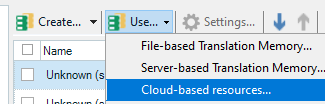
2. What apps do you have installed. Could you please send me a picture or screen print of your unpacked apps
You can get the list from: C:\Users\username\AppData\Roaming\Trados\Trados Studio\17\Plugins\Unpacked
Just assessing if either through Language Cloud or an app installed that is dependent on the IE - may be causing such slowness. In the meantime the following will cause no harm trying to resolve/isolate the issue: https://gateway.rws.com/csm?id=kb_article_view&sysparm_article=KB0033669
Looking forward to your response
Lyds
Oana Nagy | QA Engineer | RWS Group

Hi İlker GELİR
Lets break your post down into 2 sections:
1. Slowness when launchig
Thank you for sharing some files with me.
By looking at the files you shared, I was able to answer my first question above myself:
out of curiosity - are any of your projects in Studio connected to Language Cloud - or using Cloud based resources?
The answer is yes because I see
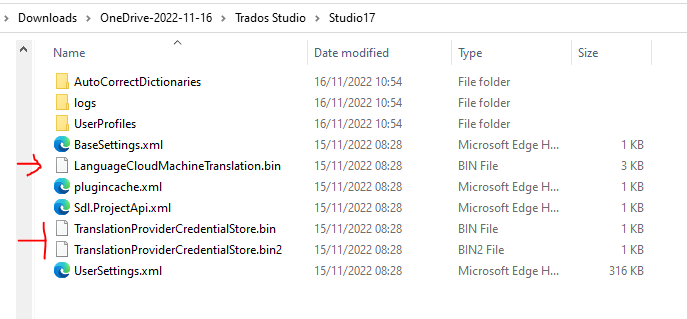
Please remove the *bin files and try open Studio again.
Let's see if it opens quicker.
I suspect once you have removed them, your Studio will not be connected to Language Cloud, this exercise will help establish if the IE connection is causing you slowness.
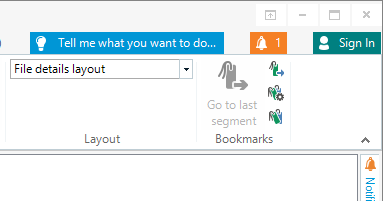
But you can always log back in by clicking on the top right where it says Signed In
2. Spell Checker
We see that you only have MT Enhanced as a plugin. But do you have any other external apps that could be controlling features such as spell check?
Perhaps to put your described issue into greater context, can you share a screen print of
Sometimes, spellcheck asks if you are insistent to use Word spellcheck,
Looking forward to your response
Lyds
Oana Nagy | QA Engineer | RWS Group

Deleting bin files did not change. If you send me your email address, I will send screen shots located in various parts of the computer.
Thanks for yor kind interest
Regards