
 Translate



症状はプログラムを立ち上げる時に件名のアラートが出て、OKを押すとプログラムが強制終了します。
使用バージョンです。
Trados Studio 2019 SR2
Windows11
以下のWEBSITEのアドバイスに基づいて修復を試みたところです。
https://www.trados.com/jp/blog/reset-trados-setting.html
しかしながら以下の問題により、修復ができません。
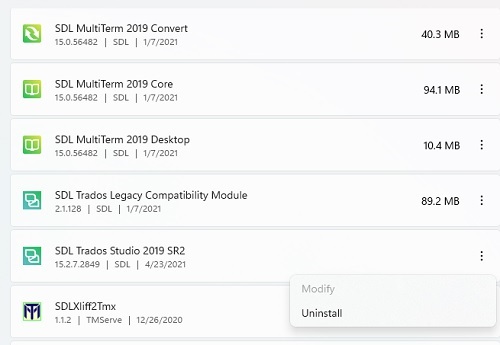
Setting>Apps>Apps&feautures>SDL Trados Studio 2019 SR2 の右側ボタンのところで修復ボタンが見つかりません。Uninstall / Modifyだけで、Modifyは半透明です。(添付画像)
修復の方法についてご教示ください。
Generated Image Alt-Text
[edited by: Trados AI at 1:39 PM (GMT 0) on 4 Mar 2024]


