
 Translate



I have once asked for help as I had problems opening Xliff-files after having installed a trial version of Studio 2021. I uninstalled the trial and returned to my 2019-version. Now I have discovered another problem with TMX-files. This also is caused by the installation of the trial version Studio 2021.
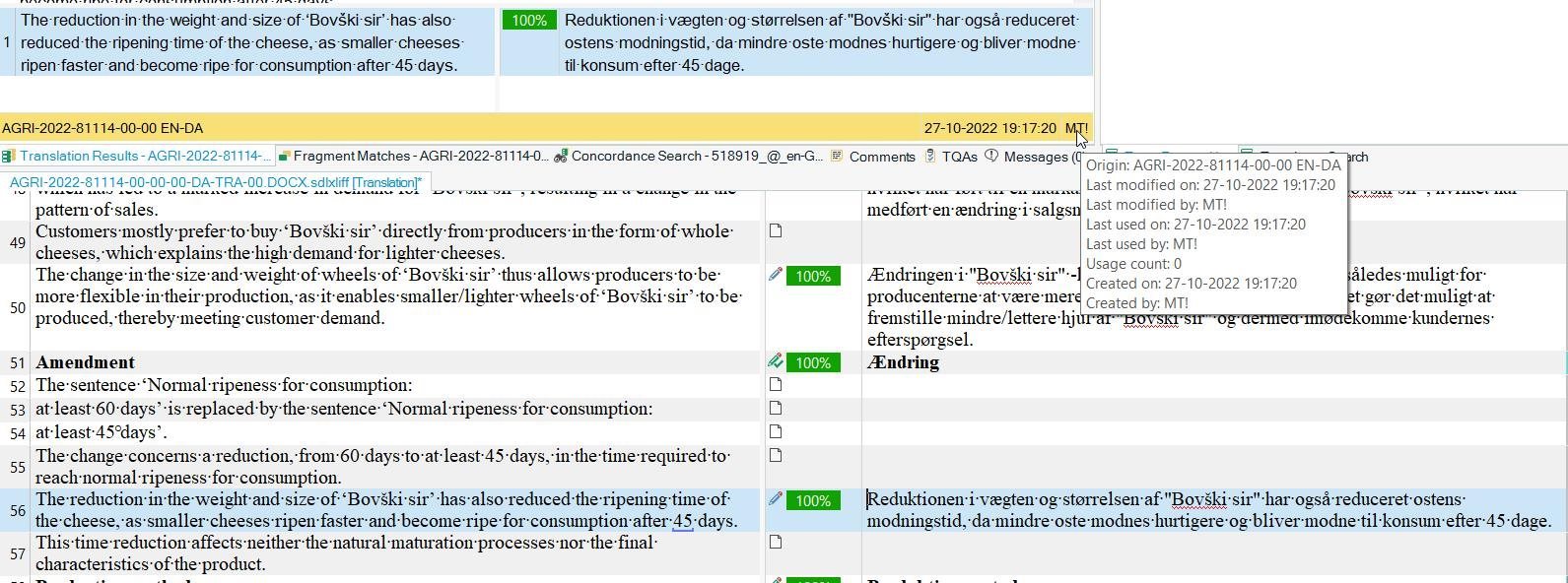
When working on my wife's laptop (seldom) I have now discovered that all TMX-files have another icon than on my stationary PC. Not only the icons are wrong, but also the behaviour of the files. F.ex. when importing a MT tmx, then all segments shows 100% match and there is no indication that a machine translation has been used.
There are apparently a lot of configuration from the trial version left in the laptop. Is there not a way of deleting all this?
I still have the 2019 version of Studio. Were too late to get 2021. I don't want to install the 2022 version as the European Commission, to which I deliver translations, has migrated to Studio 2021.
I hope that someone can help.

Generated Image Alt-Text
[edited by: Trados AI at 1:40 PM (GMT 0) on 4 Mar 2024]


