Reinstallation of SDL Trados Studio 2021 Freelance Plus

Hello. My hard disk (where programs are installed) in my main desktop computer got damaged and I needed to reinstall Windows 10. I lost my installation of SDL Trados Studio 2021 Freelance Plus in that computer. I do have an extra activation in a secondary computer. I need to reinstall Studio in my main computer, but I am not sure how to do it. Please help! I can provide invoice, purchase number, licence number, etc., whenever I receive you help. Should I install the SDLTradosStudio2021SR1_16.1.4.4184.exe and SDLMultiTermDesktop2021SR1_16.1.1.541.exe that I originally dowloaded when purchasing the software (20-Apr-2021)? I am asking this becasue there were several automatic updates after the original installation. I will greatly appreciate receiving help. Thank you!

emoji
Parents Reply
  • Hi Sorin,

    thanks a lot!

    That's right. I reactivated the licence. Also, I downloaded the latest versions.

    However, I do have a problem that I could not fix, despite trying different possible solutions (like reinstallations):

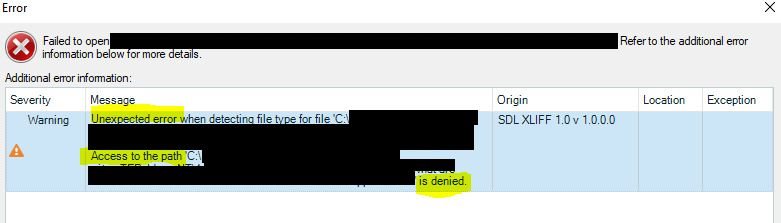
    When I try to open an existing, previous **project** (*.sdlproj) (of recently completed jobs), they do not open and I get the error message "Access to the path ..... is denied". This problem does not occur with the sample projects that Studio installation offers for practice, nor with the orinal packages I got from clients (*.sdlppx), it only occurs when trying to open a project. I guess this won't be much a problem, unless I need to reopen previous projects for some purpose.

    Thanks again!

    This is the error:

    Trados Studio error dialog box showing a warning message 'Unexpected error when detecting file type for file C:file path' with additional message 'Access to the path C:file path is denied.'

    emoji


    Generated Image Alt-Text
    [edited by: Trados AI at 1:39 PM (GMT 0) on 4 Mar 2024]
Children
No Data