 Translate



Generated Image Alt-Text
[edited by: Trados AI at 1:40 PM (GMT 0) on 4 Mar 2024]


Hello Sreekanth V
Please go to Studio > Help > About Trados Studio and tell me the exact version you have installed.
Also let me know the exact version of License manager you have installed on the server. This is most probably caused by an outdated version of License Manager installed on the server.
The solution from this article will most probably fix the issue: https://gateway.rws.com/csm?id=kb_article_view&sysparm_article=KB0039985
Thank you,
Sorin

Hello
Thanks for the reply
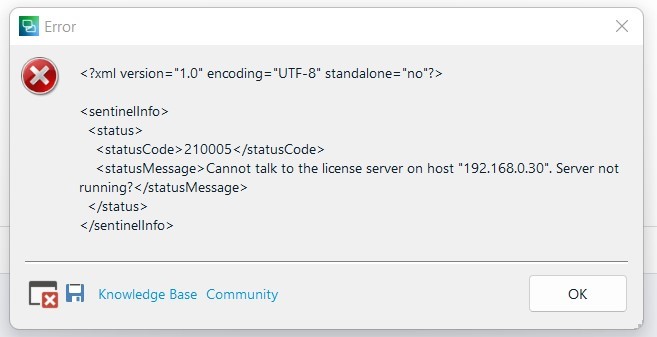
Actually the server OIP, which is showing there is wrong. we have another server IP.
And i am not able to use Trados Studio, it freeze after seeing "initializing Views"
Thank you
Sreekanth
Hello
Thanks for the reply
Actually the server OIP, which is showing there is wrong. we have another server IP.
And i am not able to use Trados Studio, it freeze after seeing "initializing Views"
Thank you
Sreekanth
Also I have reinstalled the Trados still it is not opening, free in "Initializing Views"
Please let me know how I can delete the license server

Hello Sreekanth V
1. Close Trados Studio.
2. Click the Windows Start menu and type regedit.
3. Double click on regedit.exe
4. Go to: HKEY_LOCAL_MACHINE\SOFTWARE\Wow6432Node\SDL\Studio16License
5. Double click on the ServerName registry and set to correct IP / Server Name.
Thank you,
Sorin

Thank you. It worked. The issue has been resolved now.