Adding-termbase Window Shows No .sdltb File

Hi,

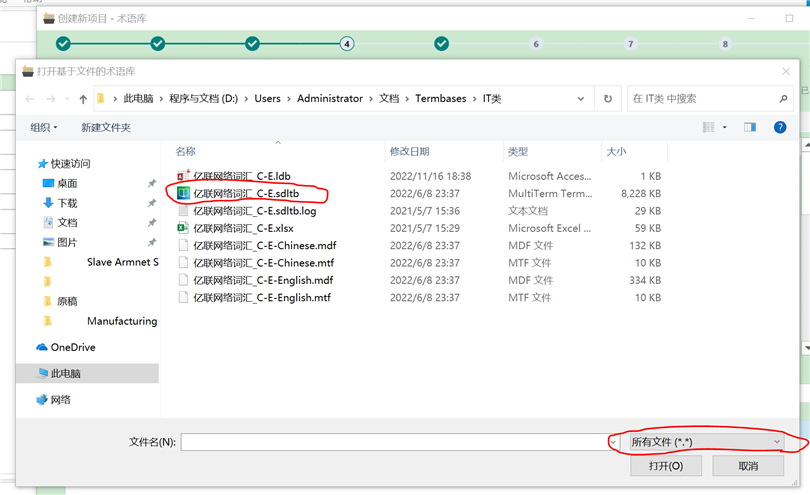
I have updated Studio 2021 to the latest version 9338. When I add a termbase file during creation of a new project, the window is blank showing nothing (please see Fig 1), but actually there is a .sdltb files in the folder. Now I change the extension to all files, this .sdltb file appears (please see Fig 2). This also happens to other file folds where there are many sdltb files. Therefore, I think there is a bug for the adding-termbase window showing .sdltb files. This is the first time I meet this issue since I started using Studio versions a few years ago.

Could anyone help?

Thanks.
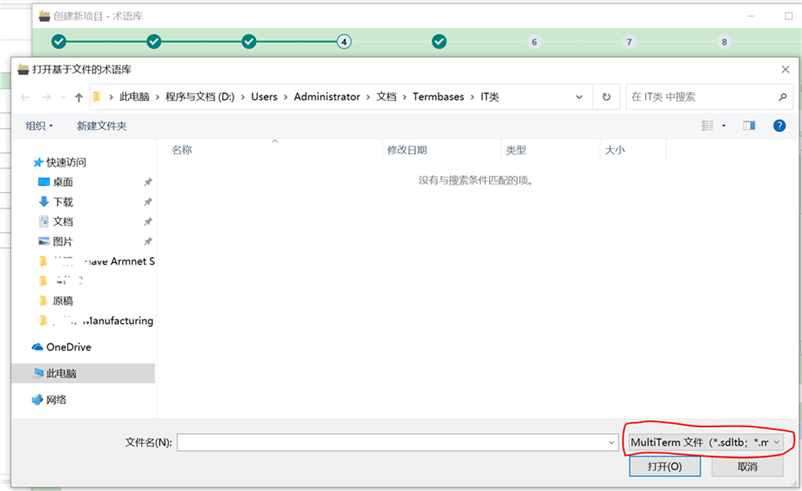
Trados Studio 2021 termbase file addition window is blank, despite .sdltb files being present in the folder.                         Trados Studio 2021 termbase file addition window displays .sdltb files after changing the file extension filter to all files.


Generated Image Alt-Text
[edited by: Trados AI at 1:44 PM (GMT 0) on 4 Mar 2024]

emoji
Parents Reply
  • Hi Paul,

    I’ve read through Bora’s post, and I believe I’m experiencing a very similar issue.

    I recently upgraded from Trados Studio 2021 to 2024. When I try to add a termbase while creating a new project, the window appears blank and doesn’t show any files, even though there are .sdltb files in the folder.

    If I change the file type filter to “All files,” the .sdltb file becomes visible. However, when I try to open it, I get an error message saying: “This termbase cannot be opened because it has been created with an unsupported version of MultiTerm.”

    The language pair is English–Chinese.

    Could you please advise on how to resolve this?

    Thanks very much,
    Chang


    emoji
Children
No Data