Saving settings on Options Menu in Studio

Hi friends!

Could you please let me know if there's any possibility to save all the settings we have in the option's menu on Studio.
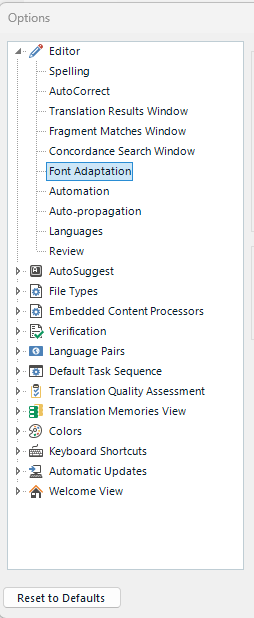
Trados Studio options menu with categories such as Editor, AutoSuggest, File Types, and Verification expanded showing sub-options like Spelling, AutoCorrect, and Font Adaptation.

I ask that because every time we have to repair the Studio, we need to set all the options all over again.

We have the option to save project templates, it would be nice if we could save options template.

Thanks in advance! 


Generated Image Alt-Text
[edited by: Trados AI at 1:41 PM (GMT 0) on 4 Mar 2024]

emoji
Parents
  •  

    What you can do is define your default settings.
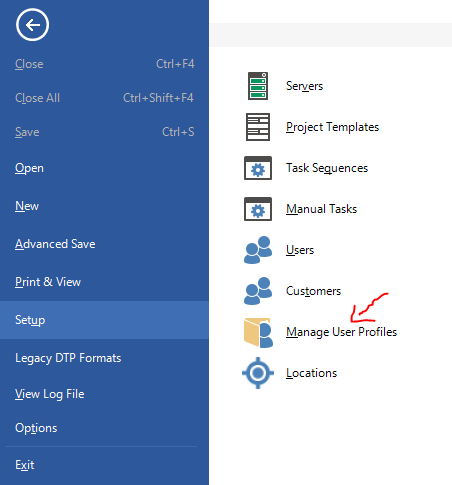
    Go to file - setup - manage profiles and export your settings and save them somewhere safe

    Trados Studio menu with 'Manage User Profiles' option highlighted and a red squiggle indicating an action or error.

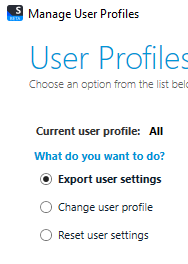
    Trados Studio 'User Profiles' window showing options to export user settings, change user profile, and reset user settings.

    This means that if you ever reset Studio: AppData\Roaming\Trados\Trados Studio\Studio17

    Yes it reverts back to the default configuration.
    But as you see in the screen print above, the second option is to change your user profile.
    At that point you browse for your saved profile that you kept safe and all your defined preferences are then restored

    I hope this is what you were looking for - have a good day

    Lyds

    Oana Nagy | QA Engineer | RWS Group

    emoji


    Generated Image Alt-Text
    [edited by: Trados AI at 1:41 PM (GMT 0) on 4 Mar 2024]
Reply
  •  

    What you can do is define your default settings.
    Go to file - setup - manage profiles and export your settings and save them somewhere safe

    Trados Studio menu with 'Manage User Profiles' option highlighted and a red squiggle indicating an action or error.

    Trados Studio 'User Profiles' window showing options to export user settings, change user profile, and reset user settings.

    This means that if you ever reset Studio: AppData\Roaming\Trados\Trados Studio\Studio17

    Yes it reverts back to the default configuration.
    But as you see in the screen print above, the second option is to change your user profile.
    At that point you browse for your saved profile that you kept safe and all your defined preferences are then restored

    I hope this is what you were looking for - have a good day

    Lyds

    Oana Nagy | QA Engineer | RWS Group

    emoji


    Generated Image Alt-Text
    [edited by: Trados AI at 1:41 PM (GMT 0) on 4 Mar 2024]
Children
No Data