
 Translate



Hello RWS crew,
I want to deactivate my 2019 license so I can upgrade from Windows 10 to Windows 11. But I receive the error message in SDL Trados Studio SR2 - 15.2.8.3007: "Deactivation failed. Revocation is either complete or revocation proof is already uploaded"
In my RWS account I see that I can only reset a 2009 license that I'm not using, and the 2019 license is supposedly not in use, so there's no reset/deactivate option - only an activate note. I tried to reset it, thinking that might free up the 2019 license, but I got this error:
"You can only reset your license 3 times within 12 months, it appears you have exceeded this limitation and the option to reset your license is no longer available. If you are having issues with your license and need further help please click here to log a request with the support team."
I appreciate your help on this!
Vince
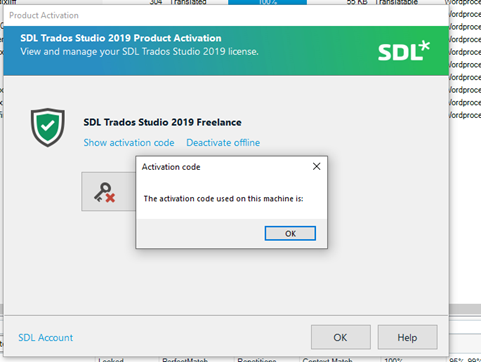
the software does not reveal my activation code either, which makes me wonder if I'll have problems reinstalling the software on Windows 11:
Generated Image Alt-Text
[edited by: Trados AI at 1:44 PM (GMT 0) on 4 Mar 2024]

