 Translate



Hi! I had a problem with my computer and didn't have time to deactivate my license. Now, I reinstalled Trados Studio 2015, but I can't reactivate my license. Please, how can I reactivate it? Thanks.


Hi! I had a problem with my computer and didn't have time to deactivate my license. Now, I reinstalled Trados Studio 2015, but I can't reactivate my license. Please, how can I reactivate it? Thanks.
Hello Angela Negrão Marim
You have an extra activation for your 2015 license, please try to activate that one and then you can try to reset the old one as described in this article: https://gateway.rws.com/csm?id=kb_article_view&sysparm_article=KB0038545
Thank you,
Sorin


Hello Sorin
When I open Trados Studio and click to activate my license, it appears the option to activate the trial version only and not my license. How can I activate my extra activation?
Hello Angela Negrão Marim
You need to click on Activate > Copy / Paste your activation code and click Activate again.
Here is an article which describes the activation process step by step: https://gateway.rws.com/csm?id=kb_article_view&sysparm_article=KB0039555
Thank you,
Sorin
Hello, Sorin
I have already done that, but it didn't work. I don't know the reason.
Thank you,
Angela
Hello Angela Negrão Marim
What happens when you do that? Can you provide more details? If you have any error message please send a screenshot.
Thank you,
Sorin
Hello Angela Negrão Marim
What happens when you do that? Can you provide more details? If you have any error message please send a screenshot.
Thank you,
Sorin
Hello, Sorin
When I try to activate the license, first the screen to activate the trial version displays and then the activation code is required. I put the activation code and the following screen displays:
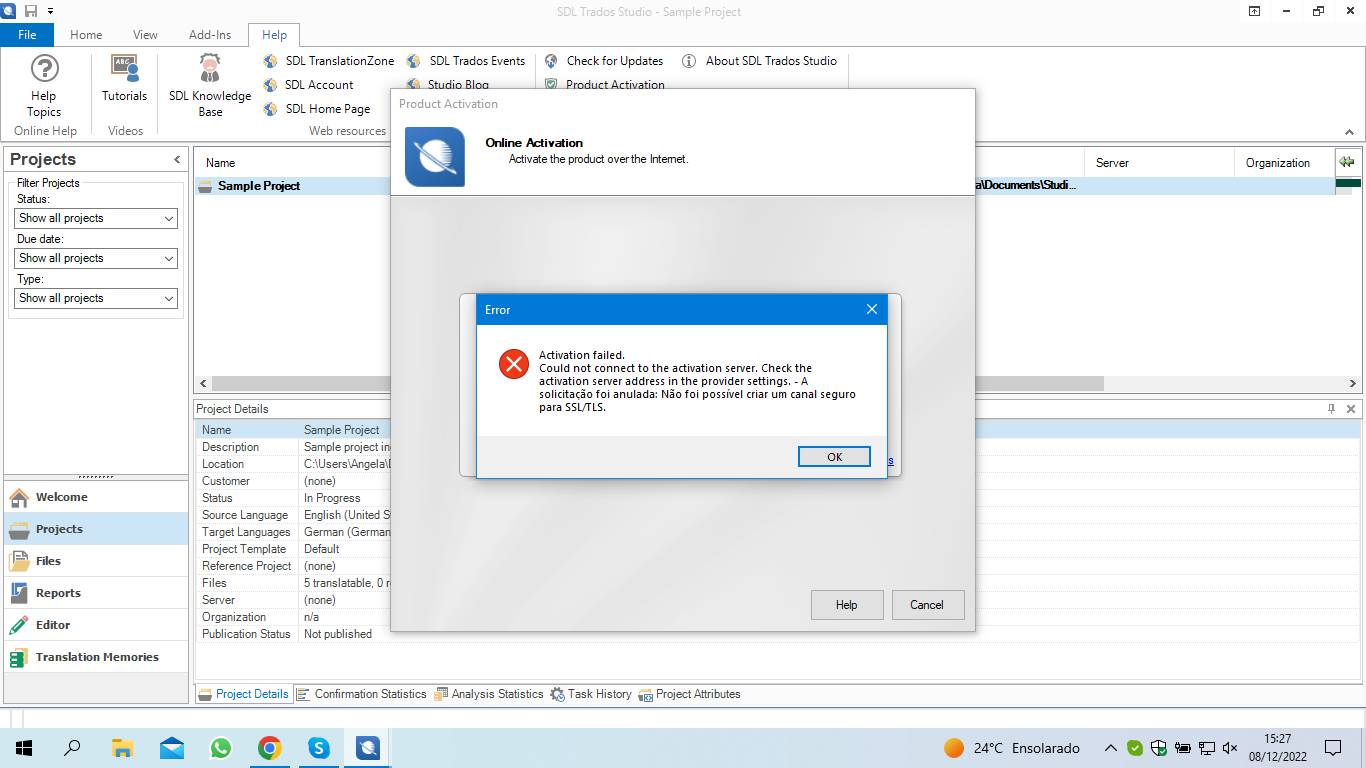
Do you know what can I do to solve this?
Thank you
Angela
Hello Angela Negrão Marim
Please try to activate your license offline as described in this article: https://gateway.rws.com/csm?id=kb_article_view&sysparm_article=KB0039784
Thank you,
Sorin