


Cannot upgrade my license to Studio 2022

Good morning,
I repeatedly tried to upgrade my license from Studio 2021 to Studio 2022.

The upgrade does not work.
I keep returning to the same page shown below and no upgrade is processed.
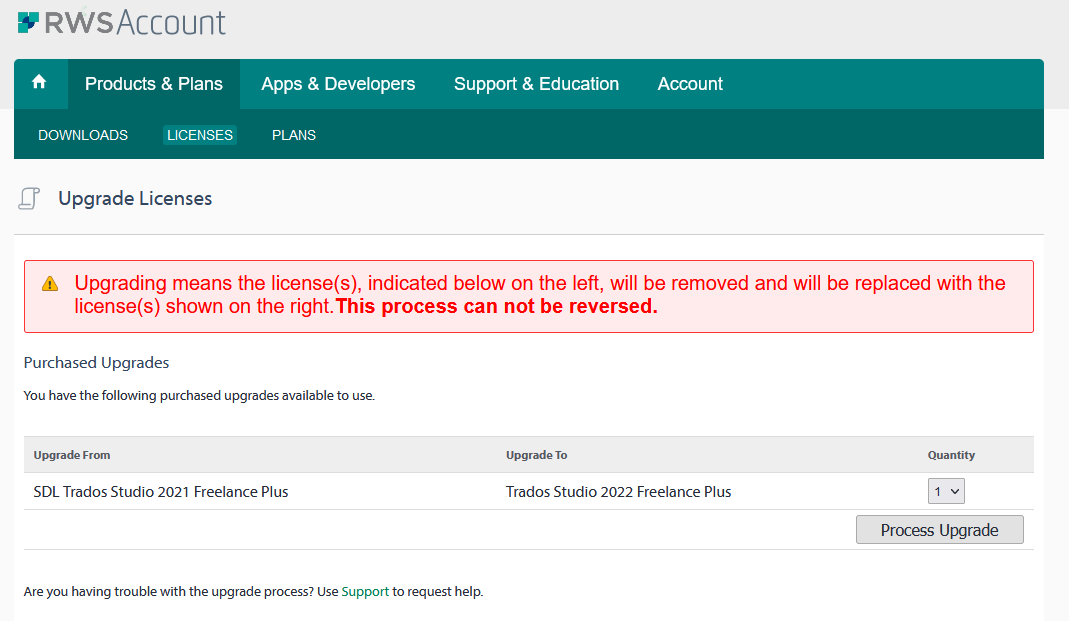
RWS Account Upgrade Licenses page with a warning message stating 'Upgrading means the license(s), indicated below on the left, will be removed and will be replaced with the license(s) shown on the right. This process cannot be reversed.' Options to upgrade from SDL Trados Studio 2021 Freelance Plus to Trados Studio 2022 Freelance Plus are shown with a 'Process Upgrade' button.
I already tried to change browser as this worked in the past.
But nothing happensa.

Thanks for your help.


Generated Image Alt-Text
[edited by: Trados AI at 1:56 PM (GMT 0) on 4 Mar 2024]

emoji
Parents Reply Children
  •   

    We do take your problem seriously and we do have a team focussing on making sure issues preventing our users from being able to use the product they've purchased are resolved as quickly as possible.  

    But we also have to be mindful of our obligations to customers who have paid for support contracts, and ensure that we are providing all of our customers with the appropriate level of service and support that they require.  Every company has limited resources and often have to make appropriate choices in prioritising work.  We cannot do everything at the same time.

    I have the same problem - what shall I do?

    Create a new thread please.  We convert the thread to a support case automatically, and we can't do this for you as you didn't create this thread.

    Paul Filkin | RWS

    Design your own training!
    You've done the courses and still need to go a little further, or still not clear? 
    Tell us what you need in our Community Solutions Hub

    emoji

