
 Translate



Guys, I've been trying since Tuesday to have the Studio 2017 installed in my new laptop, with no avail. I've tried everything - uninstalled my antivirus software, downgraded the OS to Windows 10, only to have my offline license activation failed and canceled at the final step.
Here is the freakin screenshot I get:
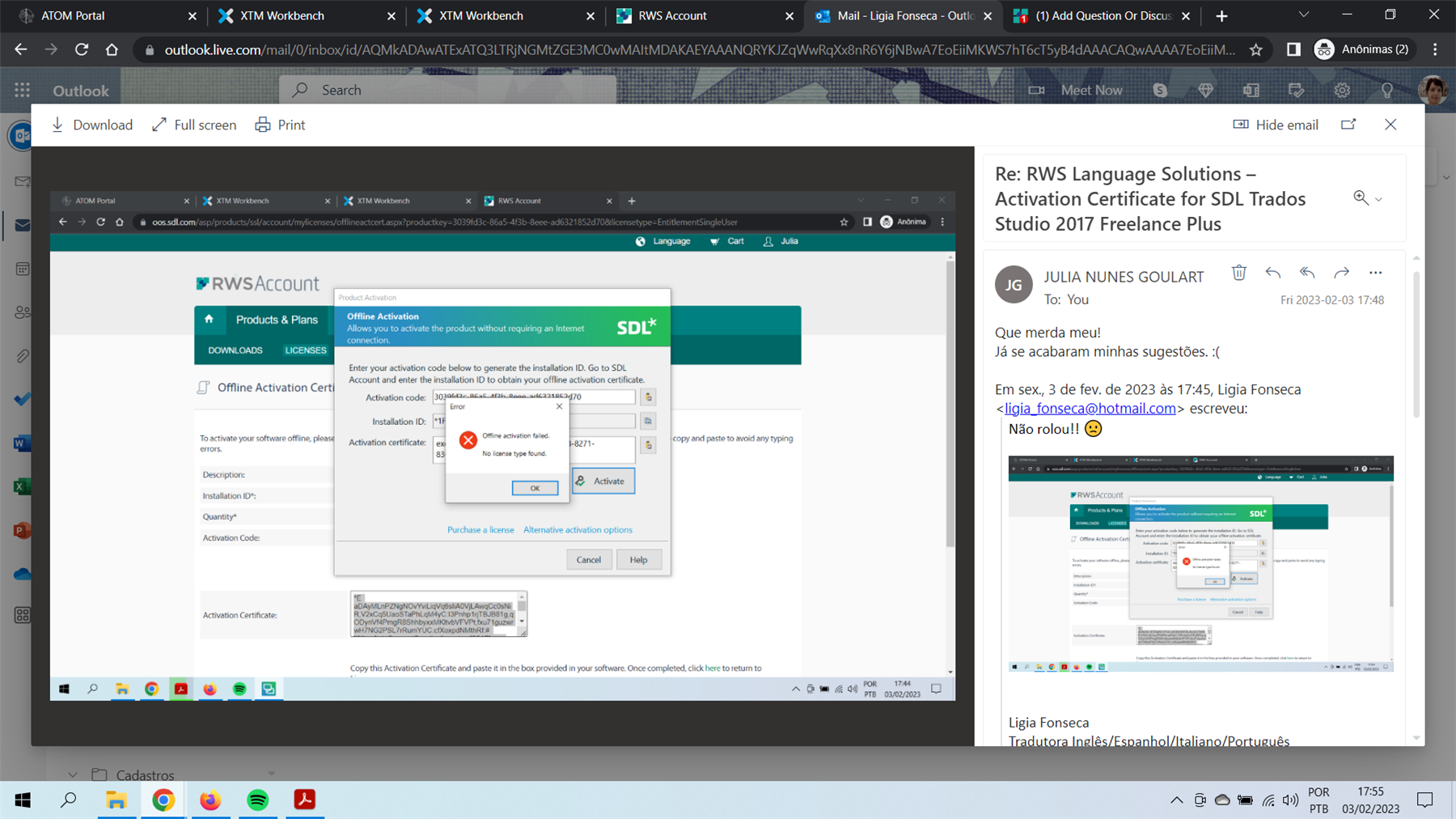
And when I click on Cancel, I get an error message (log pasted below):
<?xml version="1.0"?>

-<SDLErrorDetails time="03/02/2023 17:47:24">

<ErrorMessage>The requested service is not available: Sdl.Desktop.Platform.Services.ITelemetryService.</ErrorMessage>


-<Exception>

<Type>Sdl.Desktop.Platform.Services.ServiceNotAvailableException, Sdl.Desktop.Platform, Version=5.0.0.0, Culture=neutral, PublicKeyToken=c28cdb26c445c888</Type>

<HelpLink/>

<Source>Sdl.Desktop.Platform</Source>

<HResult>-2146233088</HResult>


-<StackTrace>

-<![CDATA[ em Sdl.Desktop.Platform.Implementation.Services.GlobalServiceContext.GetService[T]()
em Sdl.Desktop.Platform.Implementation.Studio.Application_ThreadException(Object sender, ThreadExceptionEventArgs e)
em System.Windows.Forms.Application.ThreadContext.OnThreadException(Exception t)
em System.Windows.Forms.Control.WndProcException(Exception e)
em System.Windows.Forms.Control.ControlNativeWindow.OnThreadException(Exception e)
em System.Windows.Forms.NativeWindow.Callback(IntPtr hWnd, Int32 msg, IntPtr wparam, IntPtr lparam)
em System.Windows.Forms.UnsafeNativeMethods.DispatchMessageW(MSG& msg)
em System.Windows.Forms.Application.ComponentManager.System.Windows.Forms.UnsafeNativeMethods.IMsoComponentManager.FPushMessageLoop(IntPtr dwComponentID, Int32 reason, Int32 pvLoopData)
em System.Windows.Forms.Application.ThreadContext.RunMessageLoopInner(Int32 reason, ApplicationContext context)
em System.Windows.Forms.Application.ThreadContext.RunMessageLoop(Int32 reason, ApplicationContext context)
em System.Windows.Forms.Application.RunDialog(Form form)
em System.Windows.Forms.Form.ShowDialog(IWin32Window owner)
em System.Windows.Forms.Form.ShowDialog()
em Sdl.Common.Licensing.Provider.Core.UI.MultiProviderLicensingForm.ShowDialog(IList`1 customStatusPages)
em Sdl.Common.Licensing.Manager.ApplicationLicenseManager.ShowLicensingDialog(LicensingFormConfiguration formConfiguration, IList`1 customPages)
em Sdl.TranslationStudio.Common.Licencing.LicensingService.ShowLicenseDialog(Boolean startupCheck)
em Sdl.TranslationStudio.Common.Licencing.LicensingService.StartupLicenseCheck()
em Sdl.Desktop.Platform.Implementation.Studio.Run()
em Sdl.TranslationStudio.Application.Launcher.RunApplication()]]>
</StackTrace>

</Exception>


-<Environment>

<ProductName>SDL Trados Studio</ProductName>

<ProductVersion>14.0.0.0</ProductVersion>

<EntryAssemblyFileVersion>14.1.10018.54792</EntryAssemblyFileVersion>

<OperatingSystem>Microsoft Windows 10 Home Single Language</OperatingSystem>

<ServicePack>NULL</ServicePack>

<OperatingSystemLanguage>1046</OperatingSystemLanguage>

<CodePage>1252</CodePage>

<LoggedOnUser>DESKTOP-17AC0T2\ligia</LoggedOnUser>

<DotNetFrameWork>4.0.30319.42000</DotNetFrameWork>

<ComputerName>DESKTOP-17AC0T2</ComputerName>

<ConnectedToNetwork>True</ConnectedToNetwork>

<PhysicalMemory>16555320 MB</PhysicalMemory>

</Environment>

</SDLErrorDetails>
I'm losing my mind (and revenue. And work) over here.
I reeeeeeally need you guys to give me a definite solution for this. Or else, you're losing a valuable customer...
Generated Image Alt-Text
[edited by: Trados AI at 1:53 PM (GMT 0) on 4 Mar 2024]


