Studios Trados 2022 crashes with mention "Une exception a été levée par la cible d'un appel"

Hello guys,

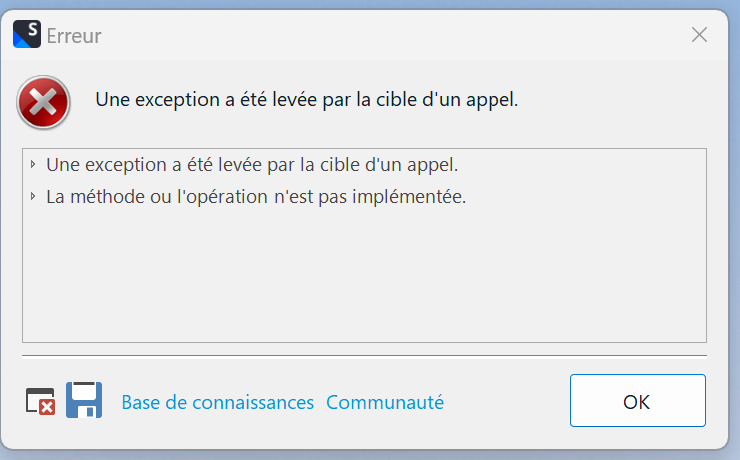
I have a technical problem trying to open Trados Studio 2022 this morning on my laptop. It says ""Une exception a été levée par la cible d'un appel" . I tried the chat and to rename my files according to this protocol without success.

I did the workaround 2 specific to trados 2022 : gateway.sdl.com/.../communityknowledge

Would you have other recommendations?

Thanks you so much,

emoji
  •  

    Would you have other recommendations?

    If you share the full error message and not just the title we might have.  The title is just telling us that there is some asynchronous code running somewhere that causes the error.  The full error message might be more helpful as it could point to where this is occurring and help us with the solution.

    But if you have repaired AND reset then you may need assistance from support.  So I'll log the case anyway.

    Paul Filkin | RWS

    Design your own training!
    You've done the courses and still need to go a little further, or still not clear? 
    Tell us what you need in our Community Solutions Hub

    emoji
  • We will be pleased to help you with this problem so have logged a support case on your behalf. We do prioritise customers who have a support contract so please keep in mind it could take up to 48 hours, especially over a weekend, but rest assured we will contact you as soon as we can. You will be contacted at the email address used for this Community. Support Case Id : 00777019 .

    Paul Filkin | RWS

    Design your own training!
    You've done the courses and still need to go a little further, or still not clear? 
    Tell us what you need in our Community Solutions Hub

    emoji
  • Thank you Paul for your first follow-up.

    I have also tried the "repair" option in the program files without success. Here is a screen capture of the full error message you were requesting : 

    Error dialog box in Trados Studio displaying a message in French that translates to 'An exception was thrown by the target of a call. The method or operation is not implemented.' with options for Knowledge Base and Community.

    <SDLErrorDetails time="2023-02-20 13:13:24">
      <ErrorMessage>Une exception a été levée par la cible d'un appel.</ErrorMessage>
      <Exception>
        <Type>System.Reflection.TargetInvocationException, mscorlib, Version=4.0.0.0, Culture=neutral, PublicKeyToken=b77a5c561934e089</Type>
        <HelpLink />
        <Source>mscorlib</Source>
        <HResult>-2146232828</HResult>
        <StackTrace><![CDATA[   à System.RuntimeMethodHandle.InvokeMethod(Object target, Object[] arguments, Signature sig, Boolean constructor)
       à System.Reflection.RuntimeMethodInfo.UnsafeInvokeInternal(Object obj, Object[] parameters, Object[] arguments)
       à System.Reflection.RuntimeMethodInfo.Invoke(Object obj, BindingFlags invokeAttr, Binder binder, Object[] parameters, CultureInfo culture)
       à System.Reflection.RuntimePropertyInfo.GetValue(Object obj, BindingFlags invokeAttr, Binder binder, Object[] index, CultureInfo culture)
       à System.Reflection.RuntimePropertyInfo.GetValue(Object obj, Object[] index)
       à Sdl.Platform.UI.DataListControl.DataListRow.Data.get_Item(String dataMember)
       à Sdl.Platform.UI.DataListControl.DataList.<>c__DisplayClass386_0.<QuickSortUsingLinq>b__5(DataListRow x)
       à System.Linq.EnumerableSorter`2.ComputeKeys(TElement[] elements, Int32 count)
       à System.Linq.EnumerableSorter`1.Sort(TElement[] elements, Int32 count)
       à System.Linq.OrderedEnumerable`1.<GetEnumerator>d__1.MoveNext()
       à System.Linq.Buffer`1..ctor(IEnumerable`1 source)
       à System.Linq.Enumerable.ToArray[TSource](IEnumerable`1 source)
       à Sdl.Platform.UI.DataListControl.DataList.QuickSort(DataListRowCollection rows, DataListColumn groupColumn, DataListColumn sortColumn, SortOrder sortOrder)
       à Sdl.Platform.UI.DataListControl.DataList.SortHierarchical()
       à Sdl.Platform.UI.DataListControl.DataList.Sort()
       à Sdl.Platform.UI.DataListControl.DataList.DataBind()
       à Sdl.Platform.UI.DataListControl.DataList.DataBindBindingList()
       à Sdl.Platform.UI.DataListControl.DataList.set_DataSource(Object value)
       à Sdl.TranslationStudio.Common.Files.FileListControl.SetProjectFiles(IProjectFile[] projectFiles)
       à Sdl.TranslationStudio.Common.Files.FileListControl.set_ProjectFiles(IProjectFile[] value)
       à Sdl.TranslationStudio.Common.Files.FileDataController.SetFileListContents(Folder selectedFolder)
       à Sdl.TranslationStudio.ProjectManagement.FilesView.MyFileDataController.SetFileListContents(Folder selectedFolder)
       à Sdl.TranslationStudio.Common.Files.FileDataController.RefreshFileList()
       à Sdl.TranslationStudio.Common.Files.FileDataController.TryLoadData()
       à Sdl.TranslationStudio.Common.Files.FileDataController.set_FileData(IFileData value)
       à Sdl.TranslationStudio.Common.Files.ProjectFileDataController.set_FileData(ProjectFileData value)
       à Sdl.TranslationStudio.ProjectManagement.FilesView.FilesViewService.UpdateDetails()
       à Sdl.TranslationStudio.ProjectManagement.FilesView.FilesViewService.ProjectLanguagesComboBox_SelectedIndexChanged(Object sender, EventArgs e)
       à System.EventHandler.Invoke(Object sender, EventArgs e)
       à System.Windows.Forms.ComboBox.OnSelectedIndexChanged(EventArgs e)
       à System.Windows.Forms.ComboBox.set_SelectedIndex(Int32 value)
       à Sdl.Platform.UI.FlagsComboBox.SetLanguages(Object dataSource)
       à Sdl.TranslationStudio.Common.ProjectLanguagesComboBox.RefreshData()
       à Sdl.TranslationStudio.Common.ProjectLanguagesComboBox.set_Project(IProject value)
       à Sdl.TranslationStudio.ProjectManagement.FilesView.FilesViewService.ProjectManagementService_CurrentProjectChanged(Object sender, EventArgs e)
       à System.EventHandler.Invoke(Object sender, EventArgs e)
       à Sdl.Desktop.Platform.Extensions.EventsExtensions.Raise(EventHandler e, Object sender)
       à Sdl.TranslationStudio.ProjectManagement.ProjectManagementService.RefreshProjects(Boolean raiseEvent)
       à Sdl.TranslationStudio.ProjectManagement.ProjectManagementService.RefreshProjects()
       à Sdl.TranslationStudio.ProjectManagement.ProjectsView.ProjectsListViewPart.Refresh()
       à Sdl.Desktop.Platform.AbstractViewWithParts.RefreshViewPart(IViewPartReference viewPartReference)
       à Sdl.Desktop.Platform.AbstractViewWithParts.Control_ViewPartShown(IViewWithParts view, IViewPartReference viewPartReference)
       à Sdl.Platform.UI.DockingViewContentControl.OnViewPartShown(IViewPartReference viewPartReference)
       à Sdl.Platform.UI.DockingViewContentControl.AddSingleCenterViewPart(IViewPartReference viewPartReference)
       à Sdl.Platform.UI.DockingViewContentControl.AddViewPart(IViewPartReference viewPartReference)
       à Sdl.Platform.UI.DockingViewContentControl.PopulateViewParts(Boolean reload)
       à Sdl.Platform.UI.DockingViewContentControl.Init(IViewWithParts view)
       à Sdl.Desktop.Platform.AbstractDockingView.OnInitControl()
       à Sdl.Desktop.Platform.AbstractViewWithParts.GetContentControl()
       à Sdl.Platform.UI.ViewPane.set_ViewReference(IViewReference value)
       à Sdl.Platform.UI.StudioWindowForm.UpdateActiveView()
       à Sdl.Platform.UI.StudioWindowForm.LoadViews()
       à Sdl.Desktop.Platform.Implementation.StudioWindow.Init(IEventAggregator eventAggregator)
       à Sdl.Desktop.Platform.Implementation.Studio.CreateWindowInternal(Boolean setActive, IEventAggregator eventAggregator)
       à Sdl.Desktop.Platform.Implementation.Studio.Run(ISplashScreen splashScreen, IPluginLoaderService pluginLoaderService, ICommandLineParsingService commandLineParsingService, IUserSettingsService userSettingsService, IEnumerable`1 startUpActions)
       à Sdl.TranslationStudio.Application.Launcher.RunApplication()]]></StackTrace>
        <InnerException>
          <Type>System.NotImplementedException, mscorlib, Version=4.0.0.0, Culture=neutral, PublicKeyToken=b77a5c561934e089</Type>
          <HelpLink />
          <Source>Sdl.ProjectApi.Implementation</Source>
          <HResult>-2147467263</HResult>
          <StackTrace><![CDATA[   à Sdl.ProjectApi.Implementation.OnlineProjectRepository.GetAnalysisBands()
       à Sdl.ProjectApi.Implementation.AbstractProjectConfiguration.get_AnalysisBands()
       à Sdl.ProjectApi.Implementation.Statistics.AnalysisStatistics.EnsureCountDataObjects(IProject project, AnalysisStatistics xmlAnalysisStatistics)
       à Sdl.ProjectApi.Implementation.Statistics.AnalysisStatistics..ctor(IProject project, ILanguageDirection languageDirection, TranslatableFile translatableFile, AnalysisStatistics xmlAnalysisStatistics, Boolean canUpdate)
       à Sdl.ProjectApi.Implementation.TranslatableFile.get_AnalysisStatistics()
       à Sdl.TranslationStudio.Common.Files.FileListItem.get_WordCount()]]></StackTrace>
        </InnerException>
      </Exception>
      <Environment>
        <ProductName>Trados Studio</ProductName>
        <ProductVersion>Studio17</ProductVersion>
        <EntryAssemblyFileVersion>17.0.5.14757</EntryAssemblyFileVersion>
        <OperatingSystem>Microsoft Windows 11 Famille</OperatingSystem>
        <ServicePack>NULL</ServicePack>
        <OperatingSystemLanguage>3084</OperatingSystemLanguage>
        <CodePage>1252</CodePage>
        <LoggedOnUser>DESKTOP-BOKNUJK\symph</LoggedOnUser>
        <DotNetFrameWork>4.0.30319.42000</DotNetFrameWork>
        <ComputerName>DESKTOP-BOKNUJK</ComputerName>
        <ConnectedToNetwork>True</ConnectedToNetwork>
        <PhysicalMemory>6265928 MB</PhysicalMemory>
      </Environment>
    </SDLErrorDetails>


    Generated Image Alt-Text
    [edited by: Trados AI at 1:56 PM (GMT 0) on 4 Mar 2024]
  • Thanks  .  That is helpful although there isn't anything obvious in the stack.  It could just as easily be a problem related to W11 as it could a problem in the code and we'd probably need to see your log files to help correlate what happened.

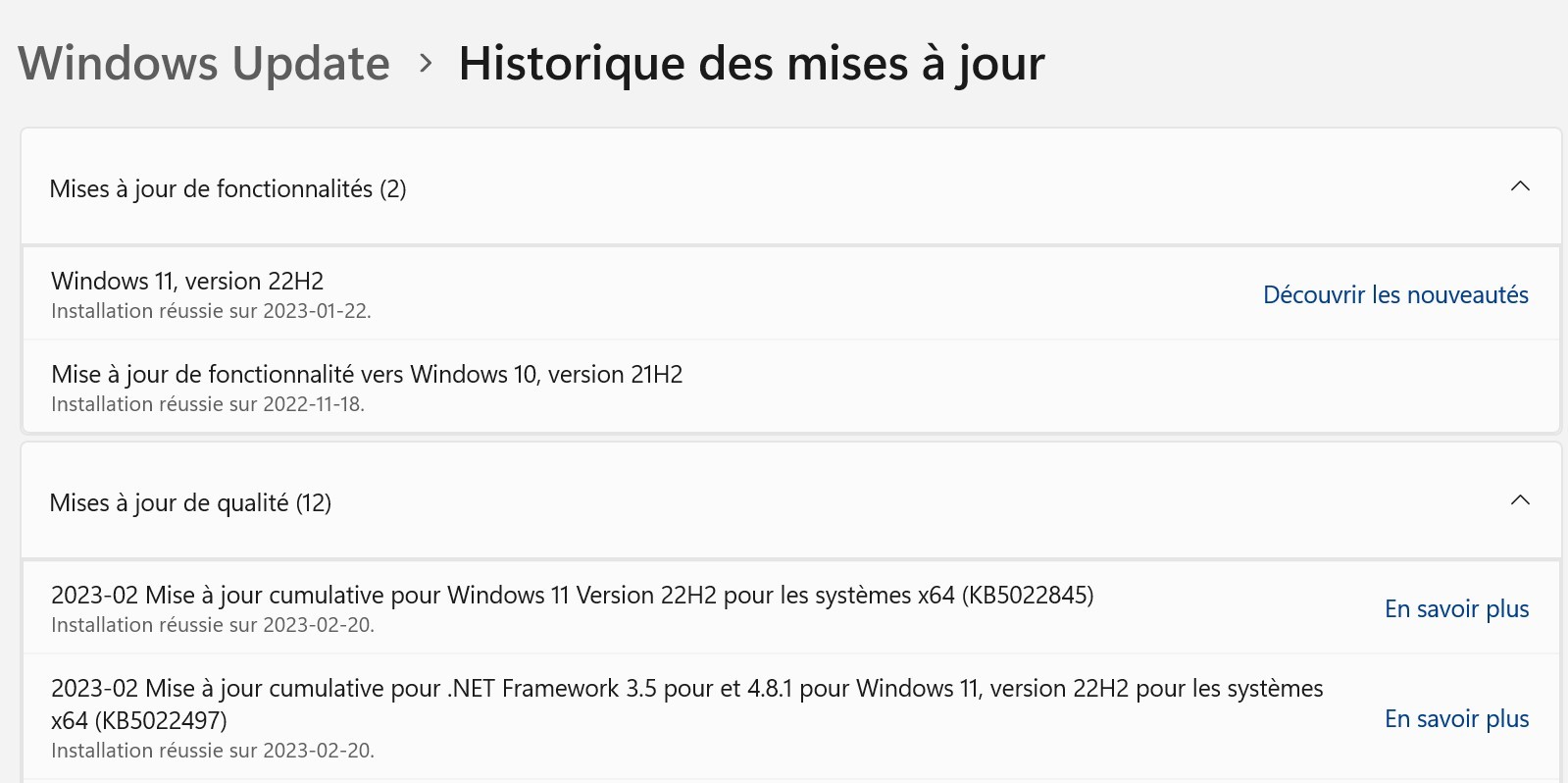
    Can you tell me if you upgraded to Win 11 over an existing installation on W10 perhaps?

    Paul Filkin | RWS

    Design your own training!
    You've done the courses and still need to go a little further, or still not clear? 
    Tell us what you need in our Community Solutions Hub

    emoji
  • Good morning Paul,

    Yes you are right, my computer updated to Windows 11 on Feb. 20, here is the screen capture I was able to find:

    Screenshot of Windows Update history showing successful installation of Windows 11, version 22H2 on 2023-01-22 and a feature update to Windows 10, version 21H2 on 2022-11-18.

    Hopefully it is useful enough to find a recovery plan?

    Most kindly, 

    emoji


    Generated Image Alt-Text
    [edited by: Trados AI at 1:56 PM (GMT 0) on 4 Mar 2024]
  •  

    I believe this is a known issue wit W11 and the solution is to uninstall Trados Studio, and then reinstall.  A repair might work, but I'd just remove and put it back.

    Paul Filkin | RWS

    Design your own training!
    You've done the courses and still need to go a little further, or still not clear? 
    Tell us what you need in our Community Solutions Hub

    emoji
  • Thank you Paul. At first, the chat operators told me it would be of no use to uninstall/reinstall. But I did try the repair by renaming some program files and it worked! If I experience further problems, I will let you know. Your help is much appreciated. Best regards,

    emoji