How do I change the path from 2019 to 2021

I have been using SDL Trados 2019 for years and now would like to swith to 2021. I have the licence and everything in place but when I receive my client's package and click on "open", it always opens in 2019 and not in 2021.

So I figure I have to change the path somewhere from 2019 to 2021 -   but I don't know where.

Thanks

emoji
  •  

    Perhaps work a different, and safer way. Start Trados Studio and then open the package using "Open Package" from the ribbon in the Projects View.  You do that once and then never open that same package again that way.  You always use the Project that was created in Studio after that.

    But... if you've switched to 2021 then maybe remove 2019?

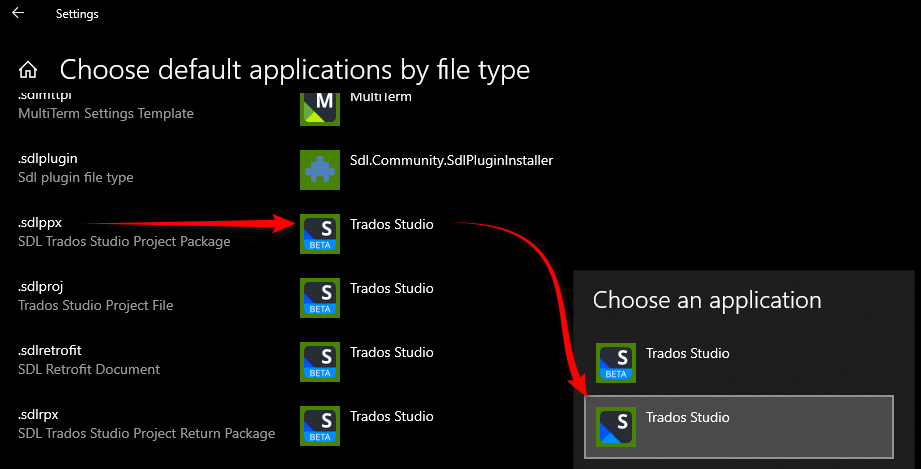
    Or... if you really want to keep it try setting the file association in windows:

    Windows settings showing 'Choose default applications by file type' with a list of file types. An arrow points from '.sdlppx' file type to Trados Studio option in the 'Choose an application' sidebar.

    If 2021 isn't there you can probably manually associate it with the file type using the following steps:

    1. Right-click on the file you want to associate with the program, and select "Open With" from the context menu.

    2. In the "Open With" dialog box, click on "Choose another app".

    3. In the "How do you want to open this file?" dialog box, select the program you want to use to open the file, and check the box next to "Always use this app to open [file type] files".

    4. If the program you want to use is not listed, click on "More apps" and select "Look for another app on this PC".

    5. Browse to the location where the program is installed, select the program's executable file (usually ending in .exe), and click "Open".

    6. The program should now be associated with the file type, and you should be able to open the file by double-clicking on it.

    Paul Filkin | RWS

    Design your own training!
    You've done the courses and still need to go a little further, or still not clear? 
    Tell us what you need in our Community Solutions Hub

    emoji


    Generated Image Alt-Text
    [edited by: Trados AI at 1:57 PM (GMT 0) on 4 Mar 2024]