Upgrade from 2017 to 2022

Until recently, I worked with the TRADOS version 2017, without any problems. Then my notebook (let’s call it Notebook 1) failed (power supply defective) and could no longer be reactivated. Fortunately, I have an IT expert here who was able to rescue the hard drive, which he installed in another notebook which he put at my disposal (Notebook 2). So I was able to continue working 1:1 with the familiar interface and all the saved programmes and data - except for TRADOS. The licence could no longer be reactivated, so I bought a new licence for TRADOS 2022.
We installed TRADOS 2022, but there is a permanent error message, at least on one of my old TMs that I am currently working with. It reads: An error occurred while using the translation source XXX: At least one error occurred." This comes up with every translated segment, over and over agaion and a thousand times when I translate a long text. I do get old translation orders displayed from the TM I am working with, but I have the impression that more recent texts from the last few months are not found there, only quite old entries. The concordance search also often finds nothing, even for terms that I know should be in the TM a hundred times over, even not in the document I am working with. Spellchecker also finds nothing. I wonder where the corrected terms are stored. Autopropagation does not work. It is also noticeable that TRADOS takes much longer than normal to save the individual segments. As a test, I created a new TM with TRADOS 2022 and translated and saved a small text. Unfortunately, none of the text segments were written into this new TM.
Meanwhile I have bought an new computer (Notebook 3), the one I am working with now. In order not to encounter the same problesm as with TRADOS on Notebook2, I am working with the test version of TRADOS here. The problems are the same – I translated a text a week ago and had to translate a second, slightly altered version of this document, and TRADOS found nothing from the original text in the TM.

emoji
Parents
  •  

    I am going to list your items to help facilitate your issues 

    1. TM:  At least one error occurred
    2. TM: Date of TM entries
    3. Concordance
    4. Spellchecker & corrected entries
    5. Autopropagation
    6. Time to save segments

    Responses.

    1. TM:  At least one error occurred

    Because your TM was 2017 and you are now working with 2022, have you upgraded your TM?
    If not please follow this article

    I
     feel strongly a lot of your issues will be resolved as a result

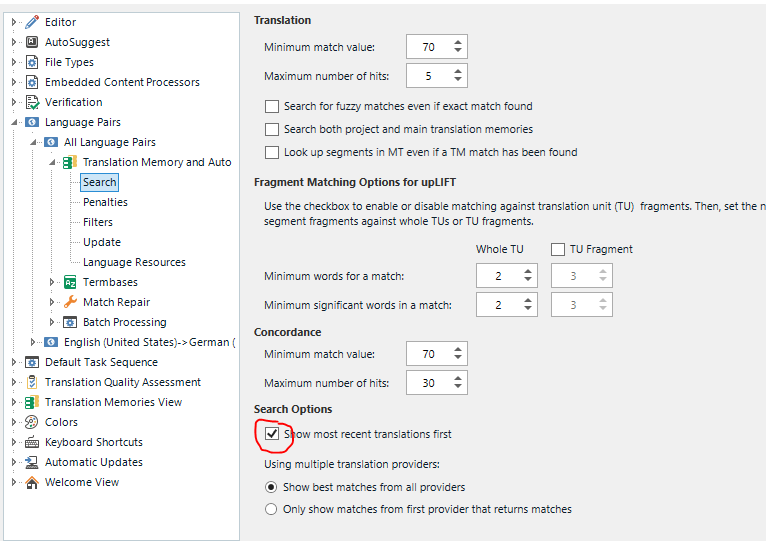
    2. TM: Date of TM entries

    There is a setting which is worth checking: 

    Trados Studio settings showing Translation Memory and AutoSearch options with 'Show most recent translations first' checked.

    3. Concordance

    If you followed the article for question 1 where you are asked to upgrade your TM, you may find that concordance is behaving better.
    If not, please keep this second article in mind

    4. Spellchecker & corrected entries

    I suspect now that you are on a new machine, you have lost your legacy profiles both for Trados Studio including MS spell checker.
    If you update spell corrections you are reliant on MS Word. Not Trados Studio. Unless you are using Hunspell, as that is different. 

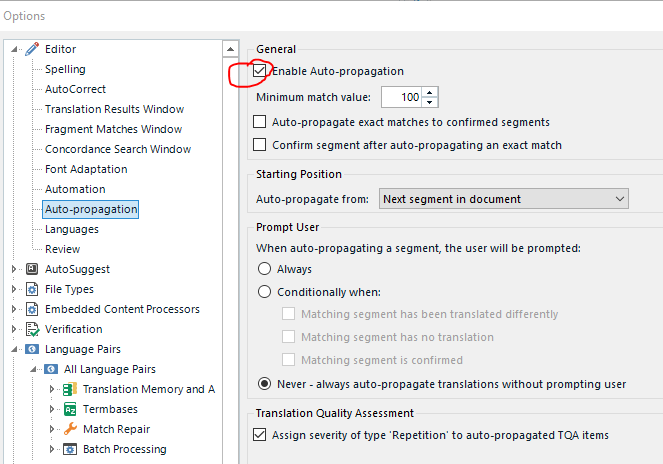
    5. Auto propagation

    Please review your default settings under File - Options - Auto-propagation

    Trados Studio options with 'Enable Auto-propagation' checked and minimum match value set to 100.

    6. Time to save segments

    Where are your TM's and project files saved to?
    Local to your machine or are you  using 3rd party tools like DropBox / OneDrive?

    You may find that by following the suggestions I made for 1 and 3, the issue has been resolved.

    *If your TM's are still give you issues, in particular errors like At least one error occurred I would strongly recommend you consider evaluating if you TM's got corrupt during your migration and following some assessments to help restore what you can. Please see here for our recommendations on this topic, which is basically an export / re import. 

    If you require further support, please consider creating a new post so others skilled / in the knowing can contribute in the areas relevant. If anything you may get responses quicker.
    In the meantime, I hope this helps a bit.

    Lyds

    Oana Nagy | QA Engineer | RWS Group

    emoji


    Generated Image Alt-Text
    [edited by: Trados AI at 1:59 PM (GMT 0) on 4 Mar 2024]
Reply
  •  

    I am going to list your items to help facilitate your issues 

    1. TM:  At least one error occurred
    2. TM: Date of TM entries
    3. Concordance
    4. Spellchecker & corrected entries
    5. Autopropagation
    6. Time to save segments

    Responses.

    1. TM:  At least one error occurred

    Because your TM was 2017 and you are now working with 2022, have you upgraded your TM?
    If not please follow this article

    I
     feel strongly a lot of your issues will be resolved as a result

    2. TM: Date of TM entries

    There is a setting which is worth checking: 

    Trados Studio settings showing Translation Memory and AutoSearch options with 'Show most recent translations first' checked.

    3. Concordance

    If you followed the article for question 1 where you are asked to upgrade your TM, you may find that concordance is behaving better.
    If not, please keep this second article in mind

    4. Spellchecker & corrected entries

    I suspect now that you are on a new machine, you have lost your legacy profiles both for Trados Studio including MS spell checker.
    If you update spell corrections you are reliant on MS Word. Not Trados Studio. Unless you are using Hunspell, as that is different. 

    5. Auto propagation

    Please review your default settings under File - Options - Auto-propagation

    Trados Studio options with 'Enable Auto-propagation' checked and minimum match value set to 100.

    6. Time to save segments

    Where are your TM's and project files saved to?
    Local to your machine or are you  using 3rd party tools like DropBox / OneDrive?

    You may find that by following the suggestions I made for 1 and 3, the issue has been resolved.

    *If your TM's are still give you issues, in particular errors like At least one error occurred I would strongly recommend you consider evaluating if you TM's got corrupt during your migration and following some assessments to help restore what you can. Please see here for our recommendations on this topic, which is basically an export / re import. 

    If you require further support, please consider creating a new post so others skilled / in the knowing can contribute in the areas relevant. If anything you may get responses quicker.
    In the meantime, I hope this helps a bit.

    Lyds

    Oana Nagy | QA Engineer | RWS Group

    emoji


    Generated Image Alt-Text
    [edited by: Trados AI at 1:59 PM (GMT 0) on 4 Mar 2024]
Children
No Data