 Translate



I have this problem Sdl.TranslationStudio.AlignmentEditor.IAlignmentEditorService' could not be started
Other message is:Unsigned Trados Studio Plug-in Found
VERY URGENT, THANKY


I have this problem Sdl.TranslationStudio.AlignmentEditor.IAlignmentEditorService' could not be started
Other message is:Unsigned Trados Studio Plug-in Found
VERY URGENT, THANKY
Did you try this:
https://gateway.sdl.com/apex/communityknowledge?articleName=000002212
Other message is:Unsigned Trados Studio Plug-in Found
Could be a valid message. Where do you get the plugin from?
It would also be helpful if you told us what version of Trados Studio you are using.
Paul Filkin | RWS
Design your own training!
You've done the courses and still need to go a little further, or still not clear?
Tell us what you need in our Community Solutions Hub


Hello Paul
I use SDL Trados 2022


ok - on this:
Other message is:Unsigned Trados Studio Plug-in Found
It would be better if you explained where the plugin came from as it might be a valid message. The solution when it should not be showing as unsigned is to reset your plugins as explained below, but this will not help if the plugin simply isn't sighned because your customer gave this to you, or a developer at your company for example.
But if it's supposed to be signed then please delete the following folders and then reinstall your plugins after making sure you have the latest ones for your product, either from the appstore at https://appstore.rws.com/ or by using the integrated appstore in Trados Studio:
%APPDATA%\Trados\Trados Studio\17\Plugins
%LOCALAPPDATA%\Trados\Trados Studio\17\Plugins
c:\ProgramData\Trados\Trados Studio\17\Plugins
If you have manually downloaded your plugins from the AppStore then double click them to install them again, or preferably download the ones you want and install them via the integrated AppStore in Trados Studio.
Paul Filkin | RWS
Design your own training!
You've done the courses and still need to go a little further, or still not clear?
Tell us what you need in our Community Solutions Hub

Did you try this:
https://gateway.sdl.com/apex/communityknowledge?articleName=000002212
I've tried everything, I've also tried this. The problem still persists.
We will be pleased to help you with this problem so have logged a support case on your behalf. We do prioritise customers who have a support contract so please keep in mind it could take up to 48 hours, especially over a weekend, but rest assured we will contact you as soon as we can. You will be contacted at the email address used for this Community. Support Case Id : 00785913 .
Paul Filkin | RWS
Design your own training!
You've done the courses and still need to go a little further, or still not clear?
Tell us what you need in our Community Solutions Hub
The error has existed since Friday. The "plugin error" message appeared for the first time after an update, the Sdl.TranslationStudio.AlignmentEditor.IAlignmentEditorService' could not be started error message appeared tonight.
This message appeared after updating Trados: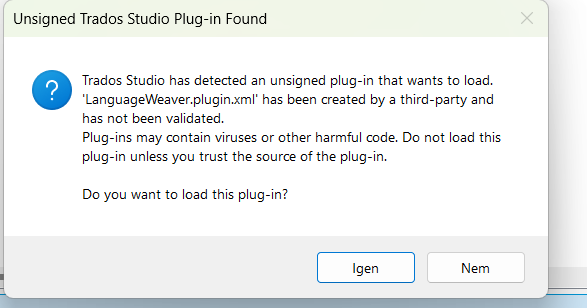
HI Paul
problem solved with this step:
thank you for your help!