
 Translate



Hi,
A month ago I was able to activate my license using the offline activation method, but now Studio is asking me to activate again.
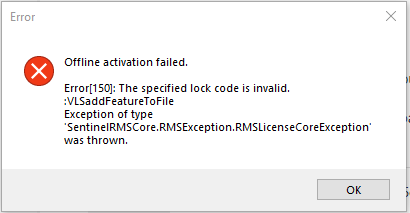
I tried both the online and offline methods to no avail. Below, the error message that is displayed when I try the offline activation.
On my RWS account, it says that I have one license in use:

How can I activate my license again and make sure the information on my RWS account is accurate?
Also, how can I make sure Studio won't ask for activation again, let's say, next month?
Generated Image Alt-Text
[edited by: Trados AI at 2:03 PM (GMT 0) on 4 Mar 2024]


