
 Translate



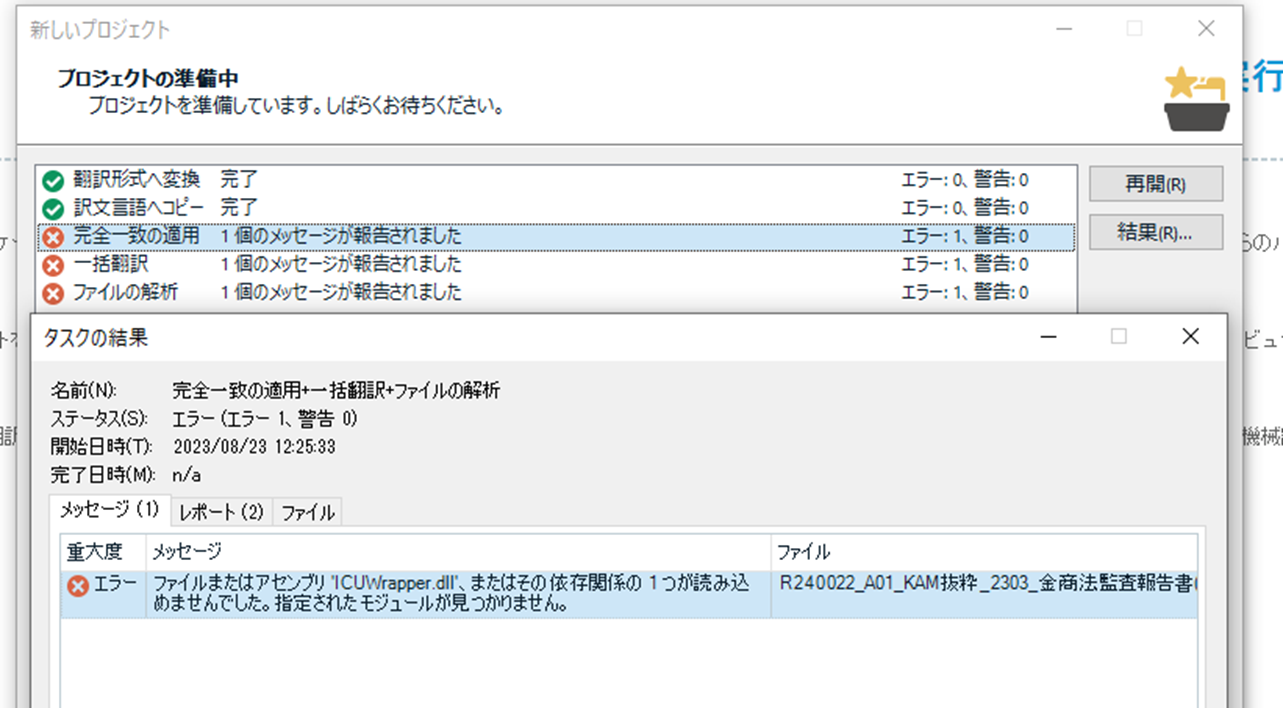
チームメンバーがTrados Studio 2017でレポート作成操作をすると、下記スクリーンショットのエラー画面が表示されます。
解消方法をお伺いできますでしょうか。
FreshsStart(RWS AppStore)は実施済です。
また、Communityの以下の記事によると、「Microsoft Visual C++ 」が関係している様ですが、今回のエラーもそこが関係しているでしょうか。
(なお、問題なく操作できる私のPCにある「Microsoft Visual C++」のバージョンと、エラーの発生しているメンバーのPCにあるバージョンは相違しています。)
お手数ですが、どうぞ宜しくお願い致します。
Generated Image Alt-Text
[edited by: Trados AI at 2:15 PM (GMT 0) on 4 Mar 2024]


