 Translate



My hard drive has crashed and I can not return the license for my SDL Trados Studio 2019 Freelance Plus. Is there anyone who can help me with this?


My hard drive has crashed and I can not return the license for my SDL Trados Studio 2019 Freelance Plus. Is there anyone who can help me with this?
You have the second activation fulfilment free so you can use that second fulfilment to activate it, and then reset the old one.

I suggest to use offline activation for Trados 2019
https://www.youtube.com/watch?v=xVQZyX3tbsg&list=PLeCTib6EEYZHfZBaRI2ZsRm3r8bKGq-Qz&index=4
And this is how to reset the old fulfilment after you use the free one:
https://gateway.rws.com/csm?id=kb_article_view&sysparm_article=KB0038545
And in case you forgot, you also have available and unprocessed the Upgrade from Trados Studio 2019 Freelance Plus to Trados Studio 2021 Freelance Plus.
Kind regards,
Anca
Anca Stoian | RWS Group


The second one is for my laptop - I have returned that license "just in case", but I need it for the laptop. The one that I can not return is from my crashed hard drive. Would you please help me navigate thru this. This is what I see when I lon into my account:
and not this (from https://gateway.rws.com/csm?id=kb_article_view&sysparm_article=KB0038545) :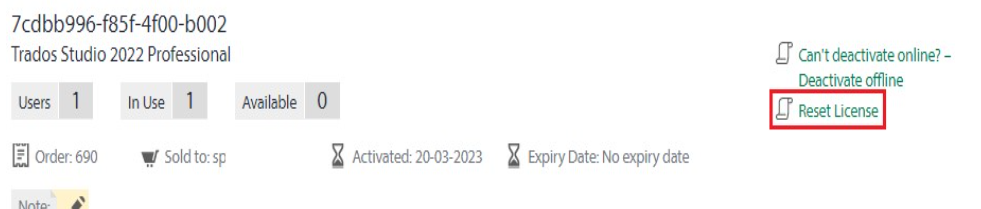
Is there any tech support who can reset my license on your side?
Thank you!
You can reset the license after you use the free one as I explained above, you'll get the reset button available once both activations are in use.
And then, when you click on reset you choose which one to reset and it is going to be the one that has the oldest activation date.
Anca Stoian | RWS Group

Bare with me here, im 61yrs old :)
So, you suggest that I reactivate the license on my laptop, and after that try to return the license that was active on my crashed disk so that I can activate it on a new disk? Thank you for your patience :)

No problem, I am happy to explain as this may help you in the future as well :)
I suggest to activate it on any device you wish, if you are left now just with the laptop until you solve the crashed disk, then on the laptop.
After that you can reset the other one - you are going to see that both activations are In Use and you get the Reset license button.
When you are going to click on it - you are going to see both fulfilments and need to select the one to reset, and should be the one with the oldest activation date.
You confirm the reset for that one and wait a bit for the system to confirm the reset. After that, you'll get back to one available and you'll see the last activation date as today for the activation done on the laptop.
Anca Stoian | RWS Group
Ok, I'll try this and I'll get back to you in case I get into a trouble. Thank you very much :)
Sure thing, please do let me know how this goes!
Anca Stoian | RWS Group
All went well, I followed your instructions. Thank you and have a lovely day!
I am really happy to hear that, you are welcome!
Have a great day too!
Anca Stoian | RWS Group