 Translate



The operating system I use is Windows and I get the following message:
This application cannot run on your PC
In order to find a version for your PC, please ask the software publisher.


I dowloaded both thanks, but I still cannot open the files


Marion Piroux - what files are you referring to?
Can you please specify if you have problems installing Trados?
We manage Trados related queries and issues here, not third party ones.
Thank you.
Anca
Anca Stoian | RWS Group

I installed Trados for free trial for now and I am trying to open a zip file in order to work on the files. I downloaded winrar and winzip but I still have the issue.
I wanted to buy Trados but I will not if I can't use it.
Thanks in advance for your help

Trados does not open directly zip files, please contact the person who send you the file to resend it unzipped.
Trados is a CAT tool, not a software to zip or unzip files.
You can check the file formats for Trados here:docs.rws.com/.../supported-file-types-334056
Anca Stoian | RWS Group

Are you sure these files are *.zip? Do you see the file name extension? If not, change this: https://learn.microsoft.com/en-us/answers/questions/4349805/how-can-i-get-the-extension-to-display-along-with
The issue has nothing to do with Trados Studio. This software does not open any zip files.
_________________________________________________________
When asking for help here, please be as accurate as possible. Please always remember to give the exact version of product used and all possible error messages received. The better you describe your problem, the better help you will get.
Want to learn more about Trados Studio? Visit the Community Hub. Have a good idea to make Trados Studio better? Publish it here.
How do you try to open these files? The most simple way would be right click and chose either "Open" or "Extract all". Should this not work, maybe the archive is simply damaged. If you have installed WinRar, you should see this when right clicking a zip file:
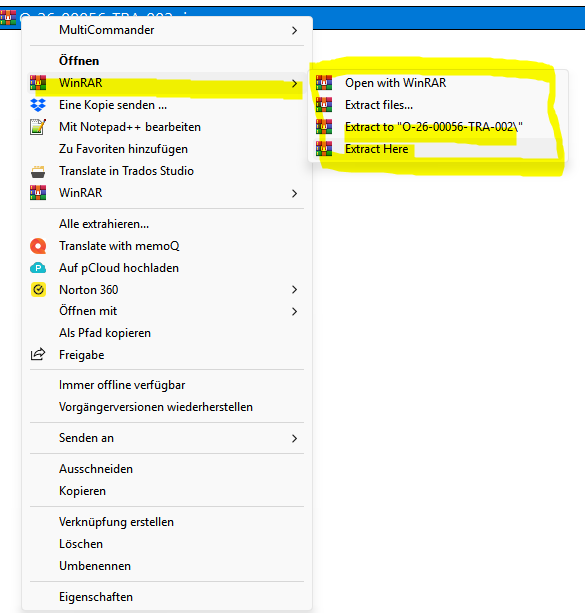
Chose one of the highlighted options to extract your files.
_________________________________________________________
When asking for help here, please be as accurate as possible. Please always remember to give the exact version of product used and all possible error messages received. The better you describe your problem, the better help you will get.
Want to learn more about Trados Studio? Visit the Community Hub. Have a good idea to make Trados Studio better? Publish it here.
How do you try to open these files? The most simple way would be right click and chose either "Open" or "Extract all". Should this not work, maybe the archive is simply damaged. If you have installed WinRar, you should see this when right clicking a zip file:
Chose one of the highlighted options to extract your files.
_________________________________________________________
When asking for help here, please be as accurate as possible. Please always remember to give the exact version of product used and all possible error messages received. The better you describe your problem, the better help you will get.
Want to learn more about Trados Studio? Visit the Community Hub. Have a good idea to make Trados Studio better? Publish it here.
