
 Translate



Description : Hello,
I had to buy a new device. I followed the deactivation procedure when uninstalling it on the old device. However, I was unable to activate the product on the new one either online or offline.
During the online activation, it said there was a connection issue and did not complete the activation, but on the RWS licensing page it showed that the license is activated and in use.
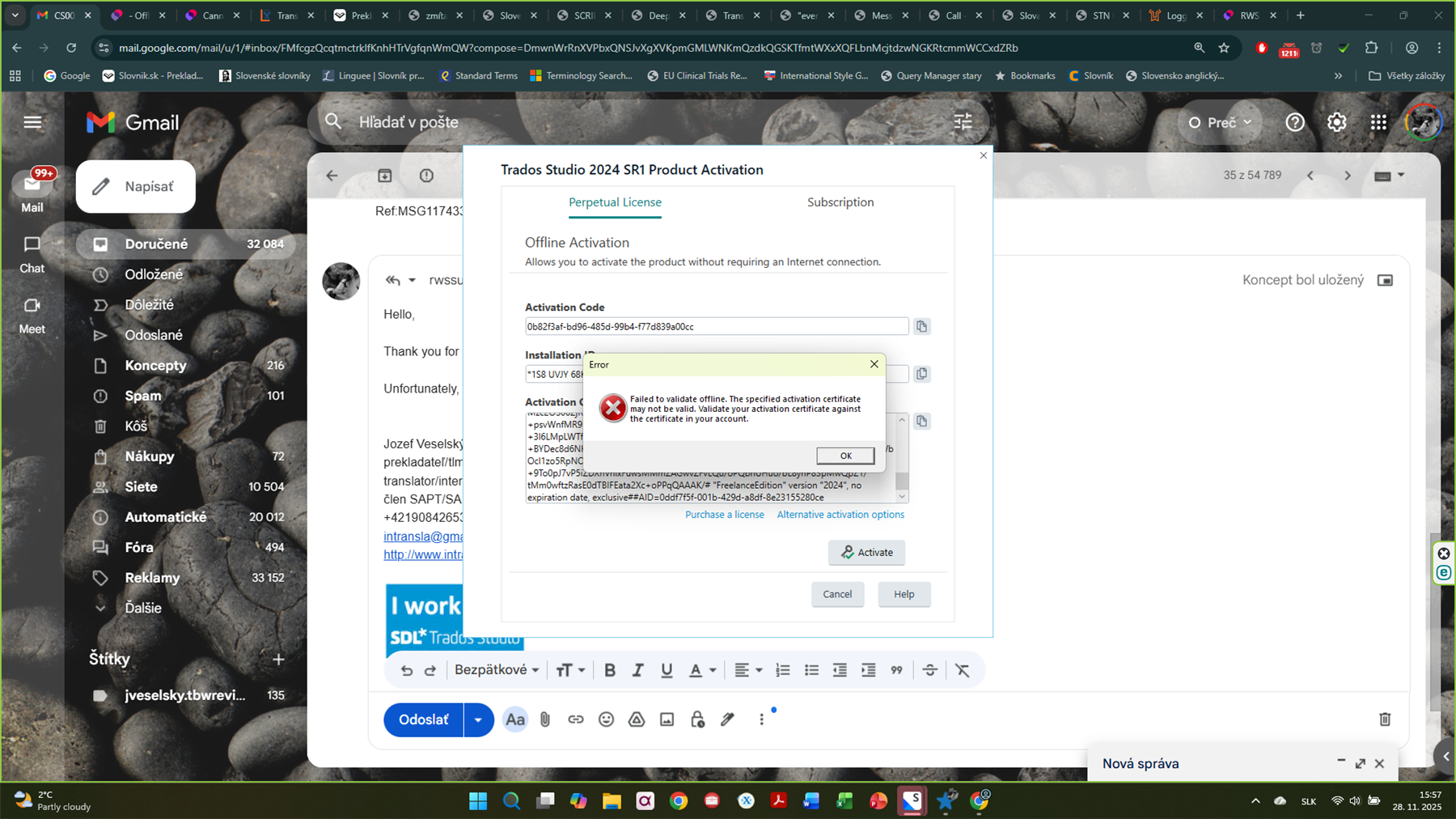
During the offline activation, it said that the activation certificate was not valid—even though it was—and again did not complete the activation successfully. However, on the RWS licensing page it once again showed that the license is activated and in use.
I have already tried resetting the license thrice. I attempted both online and offline activation after each license reset. Each time, the activation in Trados failed with the error messages I mentioned, but in the RWS account the license switched to “In use,” as you can see now. However, the product is not activated on the device. I also can no longer reset the license.
/resized-image/__size/1800x1200/__key/communityserver-discussions-components-files/93/pastedimage1764240930653v3.png
This is my second attempt to resolve this issue. The previous effort (case No CS0032836) was unsuccessful. The situation has not changed even though I had followed the instructions provided. This is the offline activation certificate pasted in the relevant field.
*N LFEAvrNeDllPttJb7/IDakBTHxxaivZ6vvygCXgo7jD/lAaB+HAFk7WyZevvDUKaK4UC+xhpTTetAlvbNDnmmOb8IYSUCAO0UVs0hg2ip8tG/6me2d9Zpz4N6X+mNOMYwgsigg444tKLzR7ttHisB+1pnXPFOQAsglXcuX7RgqpIon1BqIBF9q/DEvxHKekWR44YfWSIRMz4j9RHSxfGI3lhorPAwI2ahd4fX8VvXAx8HD6IL0AydGMC19mvbajpS9Q5jMkCTR33OFnw+vBmatXv9GGavQS96+BIV7cYTyud6sammH7yS8m3avfEJYaz5lM7V57C+ewMTGVZy6hfYV3zkctyhuKpUSEtmbyLRaMQ/92fYwA5FEAyTw3zcVHNkTP3DXsFRH2kmilEZxfmFkYtf76Et+vzQDj6MJRH57lxiuNNPLtBAdlH6tf4bmEzEDdEsULVcval5xfBsnm8orRWGpooD1NIVGRXFH67fosF+5C7pYKKkFy/Mhj3MdiRfVJSH5nR2vYWn9LALIBV0gUEUkNCMguDCQUEUkNCMgYBAQcBAQQlOGIxYjZmMWQtMzc2OS00ZjRlLWIzODctMzRlMzJlZTk2M2JkAAgBAQlAUf//b4grCbaHFyq81ErCZw1217AH3HbzrSH0gBm6LRqQzDo4rragnOCH0mjU5MnL19EuMAg2YZuJYeeXn6S11QqCDjCCAQoCggEBAKxJdTGLrwylhj+xyupG4L/YCeGFjYolg06s4WTom5wKjZEmy0MF8AuzAKPHraF3nDNIzwsogQaFxL2ImVU3y0GFwukeozgXkHVH7PeSUVrDdMEK3L8tquCkDWOgTgbjX0ExWly82Pwv665CbOeiBTGsw+A1oUANxL4Qk1KILcqn8+BQ/qmrSpm7G2ZUMytbxcbm3H9MXOnFJHwjjNbiY/47ZyFbhlFueE3GJTihLbmZZ+j+sw87FGdiW/VUjEO74dFrODqsBICmWsEmI+xngQLHu1zTeCPgiI2d+E3brI77zgBLLpT8tn4tv6brnqDQeX4ihqOapRPEMaMTx6SrdSsCAwEAAQQlOGIxYjZmMWQtMzc2OS00ZjRlLWIzODctMzRlMzJlZTk2M2JkAAcBAQyCAHskwkHvwE2PjQ0qhM+psvWnfMR9bdEIPLtjDLNgcql57imSnoxa6lFgPa+3l6LMpLWTfeQTUTpAnOx581KSLXeUBIWuUMh0iAw0/tsKwmiTEQ+kLmJ+cnVPplFIg9wH+BYDec8d6NKFhXuDB7R8zF4tKbkmfQrPf50mGDWkbH1uCq8jlP0BQ4o6o6KrvP9RWuNeWbOcl1zo5RpNOMqCtWj1c3xPy3SsDyykUFrWg1taQw0sDfObEOf+9To0pJ7vP5iZDXnVnlxFuwsMMmZAGwvZFvLQu/oPQbhUHuo/bL8ynP83pMwQpZ1/tMm0wftzRasE0dTBIFEata2Xc+oPPqQAAAK/# "FreelanceEdition" version "2024", no expiration date, exclusive##AID=0ddf7f5f-001b-429d-a8df-8e23155280ce
Generated Image Alt-Text
[edited by: RWS Community AI at 7:23 PM (GMT 0) on 17 Feb 2026]

