
 Translate



Hi,
My Trados 2024 Freelance install on a 12-month subscription plan stopped working this morning.
Symptoms:
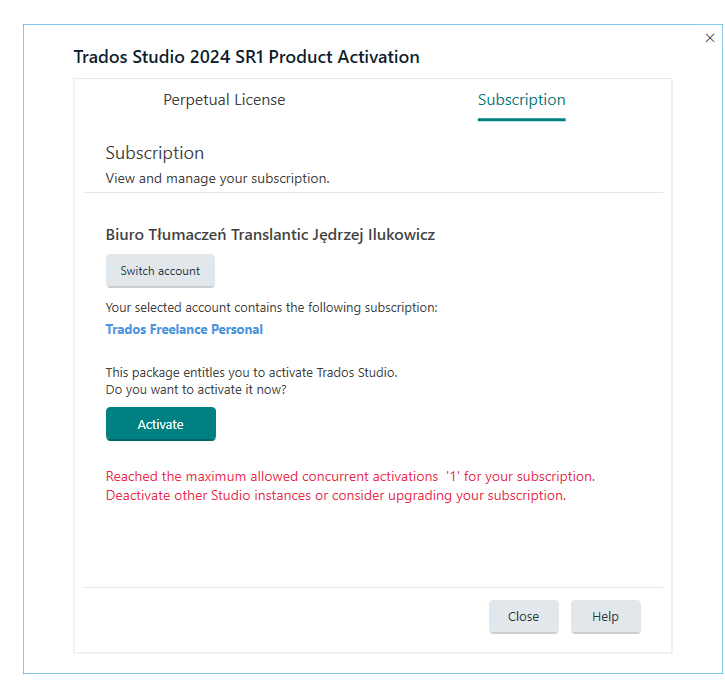
T2024 forces a License/Subscription activation window when launched and cannot be bypassed. I have had an active 12mo sub for Studio 2024 Freelance since Feb '25.
Clicking the Activate button in the Subscription tab of that window returns this:
Solutions tested so far:
1. The KB links posted in similar-issue threads on the RWS Community are either dead (linking to the old SDL portal) or useless. Ditto the solutions in the Community.
2. I have the latest SR1/CU1 installed, it's been running for weeks without a hitch, until today.
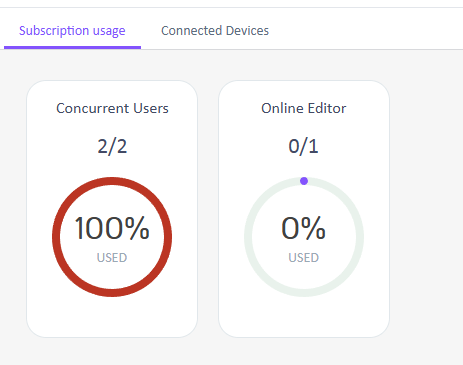
3. Logged into the Language Cloud and found this:
I removed all connected devices:
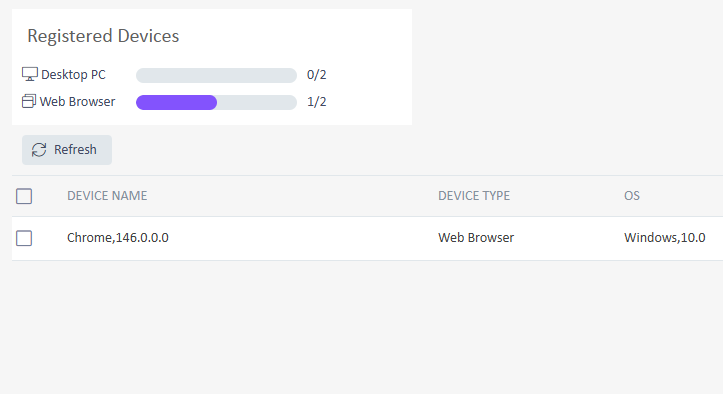
The subscription usage count shown in the screenshot is bogus. It must be a ghost session glitch.
There is no physical way for me to reset this.
There is no other instance running anywhere.
4. Tried deleting the license file for my subscription plan, followed by a full power cycle of my rig hosting the Studio 2024 install, along with my router/modem reset to refresh the IP: NO EFFECT.
5. No hardware modifications, no software/firewall/VPN changes or modifications, no operating system modifications have been made to trigger this issue.
As it is now, my subscription license is basically believed by the LC licensing to have maxxed out the concurrent user count, which is incredulous.
The product is now basically useless, I can't make it work/reset instance/user count in any way, and I'm already past a job deadline, with the LSP/customer blowing up my phone.
The issue is the more critical since further delay will result in contractual damages for failed on-time delivery.
I need urgent help with this. This seems to be a random bug on the RWS end, preventing me from using a product I'm paying for and fulfilling my contractual obligations as a vendor dependent on your CAT product.
Generated Image Alt-Text
[edited by: RWS Community AI at 7:32 AM (GMT 0) on 25 Mar 2026]


