


IS MY OLD DEEPL TRANSLATION PROVIDER OK TO REGISTER WITH DEEPL AGAIN?

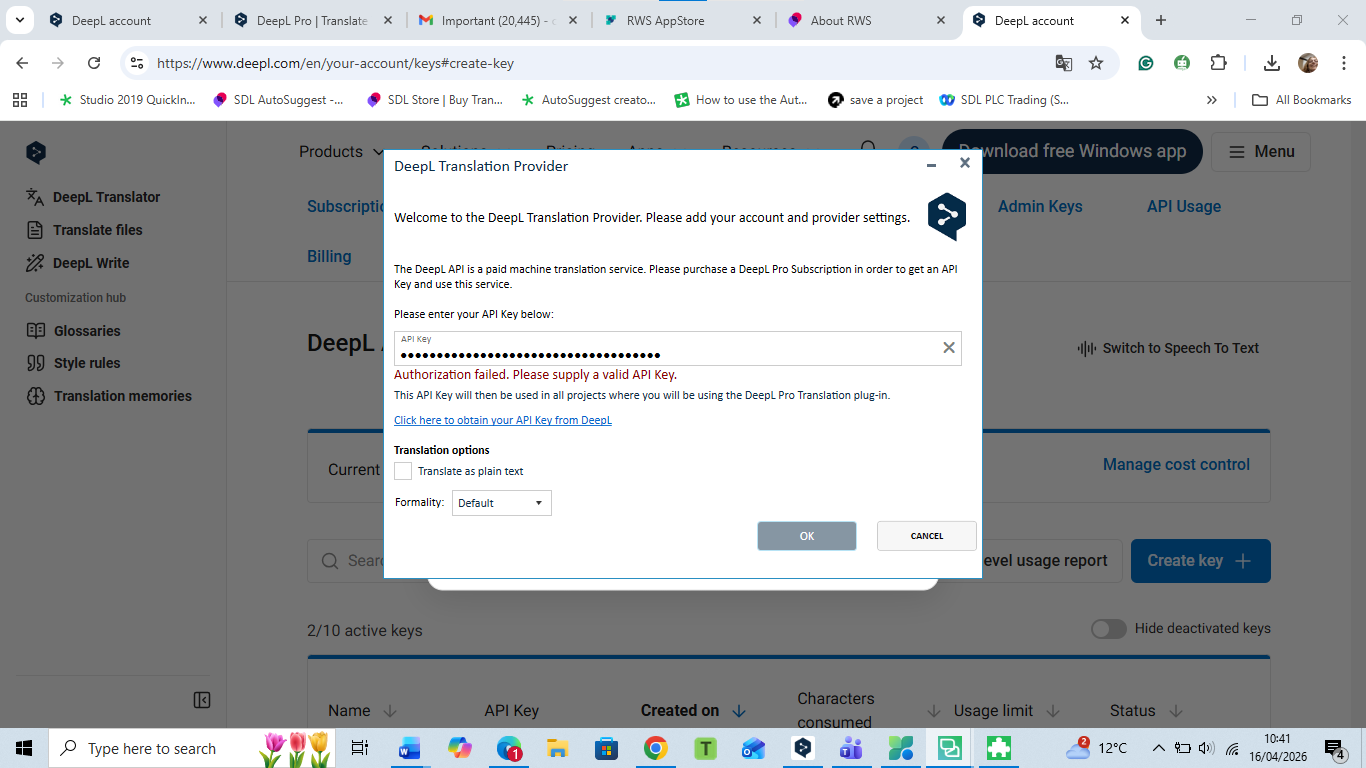
I HAD DELETED EVERYTHING A MONTH AGO.I registered with DeepL, and everything changed. I have the API plan and the API key, but it doesn't work. Do you think I should change the DeepL translation provider?Screenshot of the DeepL Translation Provider settings window showing an error message: 'Authorization failed. Please supply a valid API Key.' The API Key field is filled with a masked key. Options for translation and formality are visible, along with buttons for 'OK' and 'Cancel.'


Generated Image Alt-Text
[edited by: RWS Community AI at 10:44 AM (GMT 1) on 16 Apr 2026]

emoji
Parents
  • Probability score: 0.6  

    Question improvement suggestion: Provide specific details about the error message you are encountering with the API key and clarify whether you have checked the validity of your DeepL API key.  

    In the meantime, based on the information you have provided, here is a suggested answer to your question:  

    Hello! Thank you for your question regarding your DeepL Translation Provider and the issues you're experiencing. Let's go through some steps to help you resolve this.

    **Step 1:** Ensure that you have the latest version of the DeepL Translation Provider installed. You can do this by navigating to **Add-Ins** → **RWS AppStore** → **Installed plug-ins** and uninstalling the current version. Then, reinstall the latest version from the RWS AppStore.

    **Step 2:** Check that your Trados Studio is up-to-date. Go to **Help** → **Check for updates** to ensure you have the latest build installed.

    **Step 3:** Verify that you have a valid DeepL API key. Log into your DeepL account and check your API key under the account settings. If the key is invalid or expired, you will need to generate a new one.

    **Step 4:** Confirm that your DeepL subscription is active and that you have the appropriate plan (Pro Advanced or Ultimate) that supports API access.

    **Step 5:** If you continue to experience issues, check the health status of your DeepL Machine Translation Provider in the RWS AppStore. If it shows "Not Configured," follow the steps to validate the configuration.

    If you have followed these steps and are still facing issues, it may be worth considering switching to another translation provider, especially if the DeepL service does not meet your needs or if the problems persist.

    I hope this answer addressed your question. If not, please reject the answer, add the question improvement suggestion information, and click the RWS Community AI checkbox on the right to try again.  

    RWS Community AI

    emoji
Reply
  • Probability score: 0.6  

    Question improvement suggestion: Provide specific details about the error message you are encountering with the API key and clarify whether you have checked the validity of your DeepL API key.  

    In the meantime, based on the information you have provided, here is a suggested answer to your question:  

    Hello! Thank you for your question regarding your DeepL Translation Provider and the issues you're experiencing. Let's go through some steps to help you resolve this.

    **Step 1:** Ensure that you have the latest version of the DeepL Translation Provider installed. You can do this by navigating to **Add-Ins** → **RWS AppStore** → **Installed plug-ins** and uninstalling the current version. Then, reinstall the latest version from the RWS AppStore.

    **Step 2:** Check that your Trados Studio is up-to-date. Go to **Help** → **Check for updates** to ensure you have the latest build installed.

    **Step 3:** Verify that you have a valid DeepL API key. Log into your DeepL account and check your API key under the account settings. If the key is invalid or expired, you will need to generate a new one.

    **Step 4:** Confirm that your DeepL subscription is active and that you have the appropriate plan (Pro Advanced or Ultimate) that supports API access.

    **Step 5:** If you continue to experience issues, check the health status of your DeepL Machine Translation Provider in the RWS AppStore. If it shows "Not Configured," follow the steps to validate the configuration.

    If you have followed these steps and are still facing issues, it may be worth considering switching to another translation provider, especially if the DeepL service does not meet your needs or if the problems persist.

    I hope this answer addressed your question. If not, please reject the answer, add the question improvement suggestion information, and click the RWS Community AI checkbox on the right to try again.  

    RWS Community AI

    emoji
Children
No Data
