
 Translate



Hello,
I saw this error on a few machines, including mine. The user goes to Use -> SDLX Translation Memory -> Choose the last option "SDL Translation Management System" and then the error is shown directly when clicking OK.
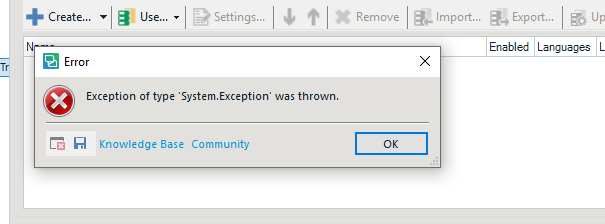
This is on Studio 2017. Troubleshooting included:
Make sure Studio 2017 is on latest build
Repair Studio 2017
Uninstall the plug-in and install again. Even re-download from the user's TMS -> My Downloads section (this plug-in gets delivered with SDL TMS)
Nothing worked.
What worked was: In TMS under MyDownloads there is a stand-alone SDL TMS TM Maintenance Tool (file name SDLTMSTMMaintenance.2011.0.9090.msi). I downloaded that and installed it. Connected from that tool to the user's TMS server, then tried again from Studio's SDLX plug-in and it worked.
So I think the plug-in has a bug, it is missing some component or something like that. I would like to suggest to have this looked into as it can cause users to not be able to use their TMS TMs which is a big deal.
Thank you
Adrian


