 Translate



Hi,
I am trying to use the Trados Studio Web Browser plugin by localix, with a similar layout as the picture enclosed i.e next to the editor. Anybody knows how to achieve this?

Regards
Ollie
Language Weaver Maintenance Activity - Saturday June 6th, 2026 between 06:00 AM UTC and 10:00 AM UTC

Hi,
I am trying to use the Trados Studio Web Browser plugin by localix, with a similar layout as the picture enclosed i.e next to the editor. Anybody knows how to achieve this?
Regards
Ollie
Hi Olivier den Hartigh (Olivierden Hartigh) ,
Please follow these steps to achieve the plugin Web browser in Editor -or any other view on the navigation pane:
1. Once you downloaded the plugin, go to Editor view on the left navigation pane. Go to View tab -up in the ribbon- the 2 instances installed. You want to choose the one on the far right from the View menu (no. 2 )
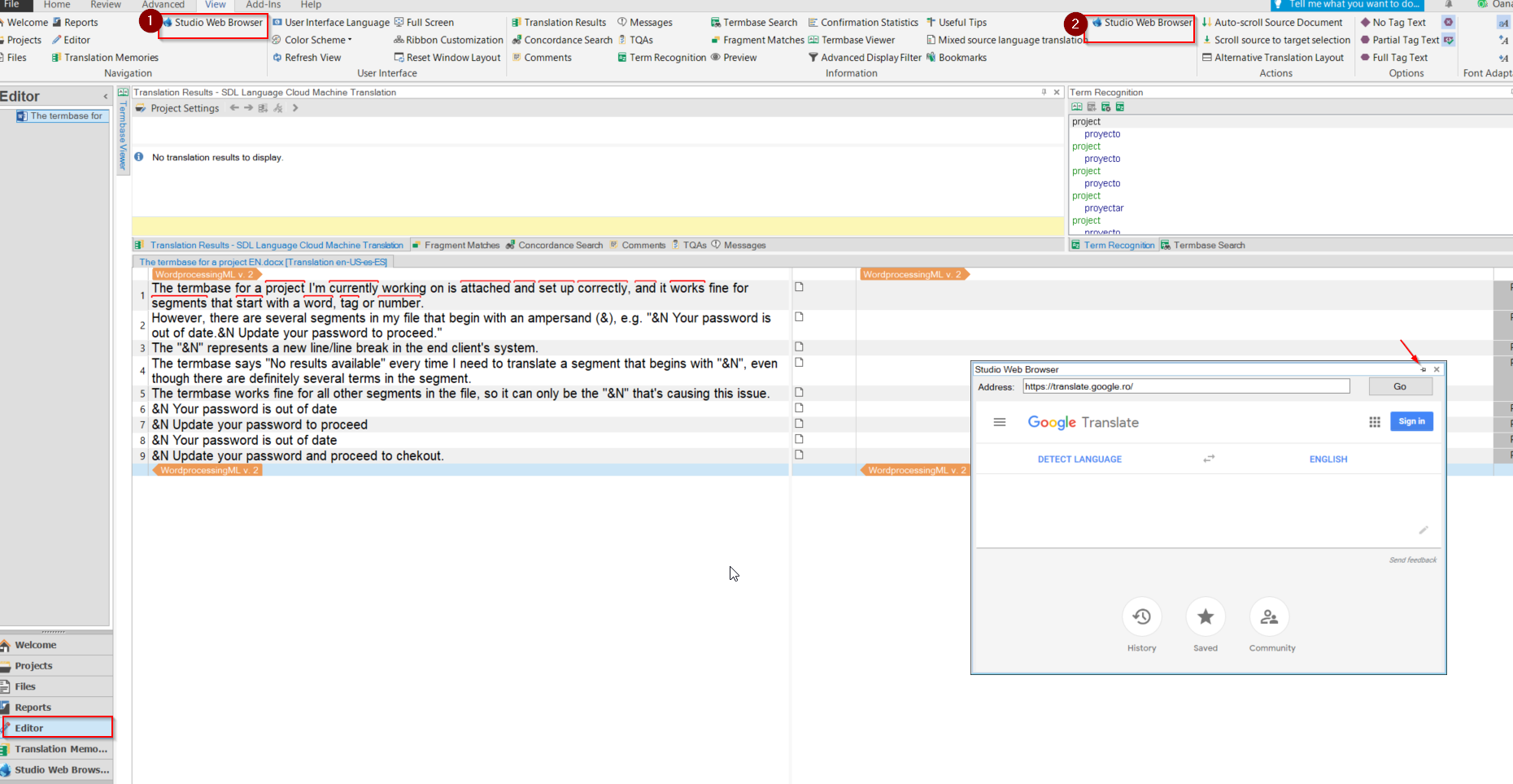
2. The plugin with the page selected will open on the bottom part of the Editor. Just need to click to unpin it from there and you can play with it and choose the size and where you want to place it on the screen.
Hope it helps!
Oana Nagy | QA Engineer | RWS Group
