Post Edit Compare/SDLXliff Compare

Hi,

I have a little bit of challenge when using the Post Edit Compare and the SDLXliff Compare.

I want to compare two SDLXliffs, one is an SDLXLiff from an MS Word, one is an SDLXliff that is created from an alignment file, which created from the Word doc (SRC and RGT) using the Reg Labs PM option. The content is the same.

Now, we know that the structure is different between the SDXLiff from alignment, and the standard Xliff - but there is any way we can get it to read both of them.

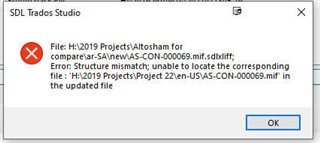
I get an error message about structure mismatches when trying to run both apps.

James

  • Hello

    Apologies for not getting back to you sooner on this (did see your email).  We looked at the updated file your provided and realized that it is missing all of the target segments.

    Steps in attempting to resolve and compare these files:

    1. Ensure the target file contains the target segments and valid structure for comparison. Copy source to target in this case.
    2. The file SDL:OriginalFilePath are different. This is considered a level 1 error taking into consideration -> if the original file is different, then you are comparing different files. To override this, you will need to manually change the file path of either the source or target file that you are comparing so that they match.

    In these type of cases, you should uncheck the options for TERp analysis and Google API graphs to understand if the files can be automatically compared; avoiding any NRE’s

    The developer tested that procedure, which worked, but the results were not useful as there really are too many structural changes.

    Paul Filkin | RWS

    Design your own training!
    You've done the courses and still need to go a little further, or still not clear? 
    Tell us what you need in our Community Solutions Hub

  • The Post Edit compare tool is brilliant, but it does not always work properly! In Many times you get a structure mismatch error, despite the fact that it is the same xliff file with the same structure, but only the changes done by the proofreader!!! I wonder if opening the XLIFF files on a previous version of SDL studio is the reason, as I use SDL Studio 2021 and my proofreader uses an old version!!! However, I tested today to make sure that is not the case, and I created the files from scratch using a TM for the old target and another TM for the proofread files, and I still get the mismatch error!! Very frustrating indeed.