 Translate



Hallo,
mein zweisprachises Excelblatt wird nur zu einer Sprache hin ausgelesen. Die Einstellunge waren richtig. Wo ist der Fehler?

Hallo,
mein zweisprachises Excelblatt wird nur zu einer Sprache hin ausgelesen. Die Einstellunge waren richtig. Wo ist der Fehler?
The most likely problem is you are not using the filetype you think you are. Let me try and explain... your fietypes for Excel probably look something like this (only yours will probably use the DE interface):
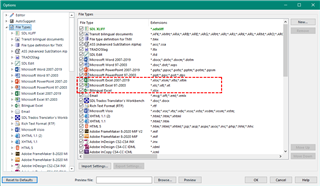
The Bilingual Excel filetype is at the bottom of this list. Because Trados Studio doesn't know what a Bilingual Excel file is, it only knows what an Excel file is, it's up to you to make sure you are using the correct one of these three.
Trados Studio will start with the first one it comes to, which is a monolingual Excel filetype. So to use the Bilingual version you need to either disable the first two, OR, move the Bilingual Excel to the top, like this:
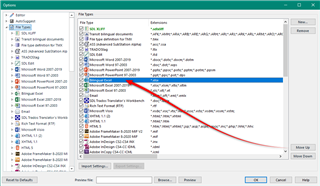
Then, when you create your project the correct filetype will be used.
You can also create a project template just for this if you like and then when you create a project that requires this type of filetype to be used you just select the appropriate template.
Does this help? If it doesn't please share a screenshot of the following:
- your project settings for the Bilingual Excel filetype
- the files view so we can see the filetype identifier for your project:
Paul Filkin | RWS Group
________________________
Design your own training!
You've done the courses and still need to go a little further, or still not clear?
Tell us what you need in our Community Solutions Hub

Entschuldigung ich habe falsch formuliert. Hier geht es um Converter Clossary. Meine Excel-Datei wird falsch ausgelesen, d.h. anstelle von zwei Sprachen wird nur eine ausgegeben.
Entschuldigung ich habe falsch formuliert. Hier geht es um Converter Clossary. Meine Excel-Datei wird falsch ausgelesen, d.h. anstelle von zwei Sprachen wird nur eine ausgegeben.

Entschuldigung ich habe falsch formuliert. Hier geht es um Converter Clossary. Meine Excel-Datei wird falsch ausgelesen, d.h. anstelle von zwei Sprachen wird nur eine ausgegeben.
And you are still posting into the wrong forum. I'll move it.
Paul Filkin | RWS Group
________________________
Design your own training!
You've done the courses and still need to go a little further, or still not clear?
Tell us what you need in our Community Solutions Hub
Meine Excel-Datei wird falsch ausgelesen, d.h. anstelle von zwei Sprachen wird nur eine ausgegeben.
Please provide a screenshot showing at least the top two rows of your spreadsheet, AND, the settings you are using in the Glossary Converter?
Paul Filkin | RWS Group
________________________
Design your own training!
You've done the courses and still need to go a little further, or still not clear?
Tell us what you need in our Community Solutions Hub