Is it possible to automatically insert terms from a termbase into the TM results?

Hello,

I translated a book from English into Spanish that includes 300+ names of books. In the target segments, I currently have the titles in English, but I made a list of book titles in English and Spanish with the hope of using Terminjector to replace the titles once I finished translating the book.

I installed the plugin and found out that I needed to create a regex rules file for the plugin. There's a video by Paul Filkin showing how to do that, but it refers to date formats. For the regex file I used a simple text file created from the Excel file where I have the bilingual list, but of course it doesn't work (I don't know anything about regex rules or even if I need them in this case). 

So, my question is whether I can use Terminjector to replace the titles, and if so, how should I create the regex rules file.

I can't find the "extensive" documentation promised by the plugin's developer (links in the plugin description are dead).

Thanks for your help,

emoji
Parents
  •  

    I wonder if using Terminjector would be overkill?  When you say this:

    In the target segments, I currently have the titles in English

    Is this a segment that contains only the title?  Or is the title mixed into a sentence with other text?

    If the former it would probably be easier to just create a TM with the English title and its translation, and then pre-translate the file.

    A couple of examples of your problem would be helpful.

    Paul Filkin | RWS Group

    ________________________
    Design your own training!

    You've done the courses and still need to go a little further, or still not clear? 
    Tell us what you need in our Community Solutions Hub

    emoji
  • Hi Paul, and thanks for your attention into this.

    It is the second case: the title is mixed in the sentence with other text. I have for example this target segment: 

    "Sin embargo, en Second Foundation, el Primer Orador de la Segunda Fundación logra adelantársele al Mulo."

    But the title, "Second Foundation", should be "Segunda Fundación", as in my list. So the result I'm aiming at is:

    "Sin embargo, en Segunda Fundación, el Primer Orador de la Segunda Fundación logra adelantársele al Mulo."

    I have a termbase and an Excel list with the titles in both languages, but I understand that Terminjector doesn't use either of those files.

    emoji
  •  

    I had a quick play with Terminjector just to test this for myself and it does the job quite nicely when working interactively.  But I cannot make this work running a batch task... so there is something not quite right... could be me not using this correctly, could be a bug in the plugin, could be a Studio bug.  I asked the AppStore team to take a look and they'll probably come back to you later on.

    If you want to try it here's the examples I used to test it... first my replacement file:

    Inception	El origen	Inception
    The Matrix	La Red Invisible	The Matrix
    Interstellar	Interestelar	Interstellar
    The Godfather	El padrino	The Godfather
    Schindler's List	La lista de Schindler	Schindler's List
    Pulp Fiction	Relatos de la Pulp	Pulp Fiction
    Blade Runner	Corredor de Filo	Blade Runner
    The Shawshank Redemption	Sueños de libertad	The Shawshank Redemption
    Star Wars	La guerra de las galaxias	Star Wars
    Jurassic Park	Parque Jurásico	Jurassic Park

    This is just a text file with tab separated terms.  The first column is the source term, the second column is the translation you want, the third column is the translation that is currently in the TM.  So the idea is the Terminjector will replace the incorrect terms that are in your TM with the ones in the list.

    I used this simple source file:

    And this TM:

    en-es_terminjector.zip

    And a short video to explain:

    Paul Filkin | RWS Group

    ________________________
    Design your own training!

    You've done the courses and still need to go a little further, or still not clear? 
    Tell us what you need in our Community Solutions Hub

    emoji
Reply
  •  

    I had a quick play with Terminjector just to test this for myself and it does the job quite nicely when working interactively.  But I cannot make this work running a batch task... so there is something not quite right... could be me not using this correctly, could be a bug in the plugin, could be a Studio bug.  I asked the AppStore team to take a look and they'll probably come back to you later on.

    If you want to try it here's the examples I used to test it... first my replacement file:

    Inception	El origen	Inception
    The Matrix	La Red Invisible	The Matrix
    Interstellar	Interestelar	Interstellar
    The Godfather	El padrino	The Godfather
    Schindler's List	La lista de Schindler	Schindler's List
    Pulp Fiction	Relatos de la Pulp	Pulp Fiction
    Blade Runner	Corredor de Filo	Blade Runner
    The Shawshank Redemption	Sueños de libertad	The Shawshank Redemption
    Star Wars	La guerra de las galaxias	Star Wars
    Jurassic Park	Parque Jurásico	Jurassic Park

    This is just a text file with tab separated terms.  The first column is the source term, the second column is the translation you want, the third column is the translation that is currently in the TM.  So the idea is the Terminjector will replace the incorrect terms that are in your TM with the ones in the list.

    I used this simple source file:

    And this TM:

    en-es_terminjector.zip

    And a short video to explain:

    Paul Filkin | RWS Group

    ________________________
    Design your own training!

    You've done the courses and still need to go a little further, or still not clear? 
    Tell us what you need in our Community Solutions Hub

    emoji
Children
  • Hello Paul,

    Well, that's a bingo!

    Thanks for taking the time to make the test and providing the answer.

    I made a replacement file with the three columns like yours, added it in Terminjector's configuration and the titles were replaced in most cases from inside the editor. I'm still trying to figure out why it doesn't work where it doesn't. Same as in your test, it didn't work with the pre-translate batch task.

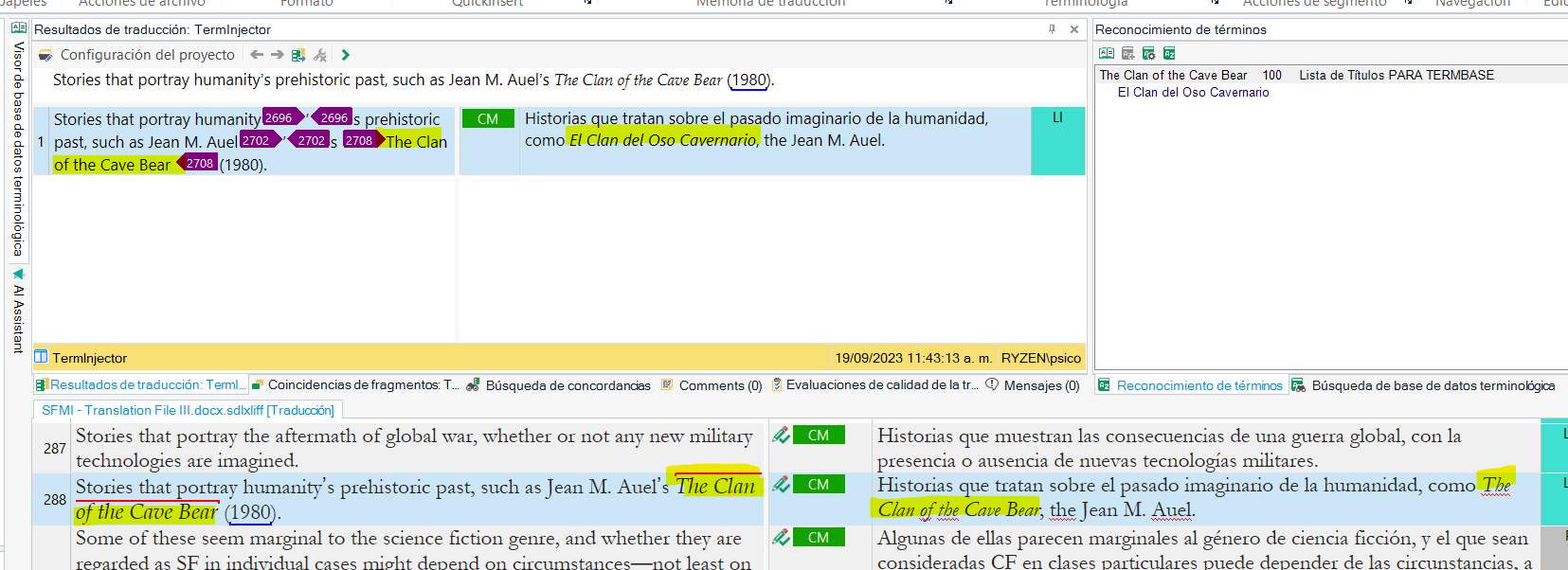
    Here's a screenshot where you can see the file I ran through the batch task, with the title not changed in the target segment, but changed in the translation results window, ready for Ctrl+T:

    Screenshot of RWS AppStore Applications interface showing translation results. The source segment mentions 'The Clan of the Cave Bear' which is correctly translated in the results window but not in the target segment.

    It helps me a lot as is, since I still have to do the final review and just pulling the segment with the replaced title will save me days of tedious work, but it would be neat if we could find out how to make this work with the batch task for the benefit of other users.

    So, thanks again, this is awesome. 

    emoji


    Generated Image Alt-Text
    [edited by: RWS Community AI at 3:49 PM (GMT 0) on 29 Oct 2024]
  •  

    Excellent.  The dev team has reviewed it as well and logged this for investigation and resolution as our reference SDLCOM-6272 so we can follow up on this in the future.

    Paul Filkin | RWS Group

    ________________________
    Design your own training!

    You've done the courses and still need to go a little further, or still not clear? 
    Tell us what you need in our Community Solutions Hub

    emoji